People often use these terms interchangeably, but they actually do very different jobs. Backups protect copies of the data you’re using right now. Archives keep information safe for the long haul. Disaster recovery is the plan that gets your systems running again after everything goes wrong. You really need all three to be fully protected.
A company might have great backups but no plan for what to do if the office floods. Or they might have years of archives but can’t find the file they lost yesterday. Sometimes, they have a recovery site ready but realize they forgot to protect the data on their team’s laptops.
For businesses in the GCC, getting this right is more important than ever. Data is everywhere on laptops, servers, the cloud and apps like Microsoft 365. At the same time, we’re dealing with more data than ever and the constant threat of ransomware.
The goal is not simply to store more copies. It is to ensure that the right information is available for the right purpose, at the right time and at an appropriate cost.
Businesses designing their protection policies should begin with a documented enterprise backup strategy based on recovery priorities.
What Is Backup?
A backup is a separate copy of data created so that the original information can be restored after deletion, corruption, hardware failure, cyberattack or another data-loss event. Backup is all about quick recovery.
Imagine an employee accidentally overwrites a presentation one hour before a customer meeting. The organization does not need to activate a disaster recovery site. It needs an earlier version of that file.
If a laptop gets hit with ransomware, you might have to wipe the device, but you can get the documents back from your backup once the machine is clean.
Whether it’s a laptop, a database, or a cloud app, backups are your “safety net” for returning to a version of your work that actually works.
A solid backup plan should clear up a few things:
- Which data is protected
- How frequently copies are created
- How many versions are retained
- Where backups are stored
- Who can access or delete them
- How quickly information can be restored
- How recovery will be tested
How often you back up is vital because it determines how much work you could lose. Experts call this the Recovery Point Objective (RPO) basically, the “point in time” you can go back to. If you need to lose almost no work, you need to back up very often.
Backup is not limited to data center systems. Endpoint backup protects information stored on devices such as laptops and desktop computers. CrashPlan describes endpoint backup as securely storing a copy of device data locally or in the cloud so that it remains available when the original device or information is lost.
A modern backup strategy usually covers:
- Employee endpoints
- Physical and virtual servers
- Microsoft 365
- Google Workspace
- Databases
- File repositories
- Cloud workloads
- Branch-office systems
However, a backup is valuable only when the organization can restore it. A successful job notification is not proof that a complete recovery will work under pressure. You have to test your backups regularly.
For organizations retaining large volumes of unstructured information, long-term data storage may combine disk, object storage and tape according to access requirements.
What Is Archive?
An archive is like a digital library. It’s where you keep data for a long time, maybe for legal reasons, history or just in case you need it one day.
While backup is about recovery, archive is about preservation. You aren’t trying to fix a broken system; you’re keeping a record.
For instance, a construction company needs project files long after the building is done. A bank needs to keep transaction records for years. A media house might keep old video footage that still has value but doesn’t need to be on their main server.
This info doesn’t need to take up space on your most expensive systems, but it still needs to be safe and easy to find when you need it.
When setting up an archive, ask yourself:
- Why is the information being retained?
- How long must it be kept?
- How will authorized users locate it?
- Can its integrity be verified?
- What happens when its retention period expires?
- Is the storage cost appropriate for its access frequency?
- Does it need to remain online, nearline or offline?
Since you won’t look at archived data every day, it makes sense to store it on cheaper, high capacity systems rather than your fastest servers.
Quantum’s enterprise backup and archive portfolio illustrates this tiered approach. Its Active Scale object storage is positioned for scalable, durable storage of immutable backup copies and long-term data, while Scalar tape systems provide an offline option for extended retention and cyber protection. Archiving also helps organizations control the growth of primary storage.
Storing every old document on your primary hardware is expensive and makes daily tasks harder. Moving them to an archive keeps them available without getting in the way.
Archive is not a place where data should simply disappear. You need to organize it and know who owns it. Otherwise, you’ll end up with a mountain of data that you’re paying for but can’t actually use.
What Is Disaster Recovery?
Disaster recovery is the actual plan for how you get back to work after a major disaster.
The disruption may involve ransomware, fire, flooding, power failure, infrastructure damage, cloud outages, hardware failure or another event that prevents normal operations.
NIST describes a disaster recovery plan as written procedures for processing or restoring critical applications after major hardware failure, software failure or destruction of facilities.
Disaster recovery is about the big picture, not just finding one lost file.
It may involve:
- Rebuilding servers
- Recovering databases
- Restoring network services
- Reconnecting applications
- Activating secondary infrastructure
- Recovering user access
- Validating system integrity
- Coordinating technical teams
- Communicating with employees and customers
- Returning operations to the primary environment
A backup supplies the recoverable data, but disaster recovery determines how that data becomes a functioning business system again.
You have to prioritize what needs to come back first.
Your customer facing website might need to be back in an hour, while an internal report can wait. This is your Recovery Time Objective (RTO), the clock you’re racing against to get things running.
A meaningful disaster recovery plan should identify application dependencies as well.
There’s no point restoring a database if the network it needs isn’t working yet. You have to follow the right order.
Backup vs Archive: Main Differences
Backup and archive may both create additional copies of information, but they serve different business purposes.
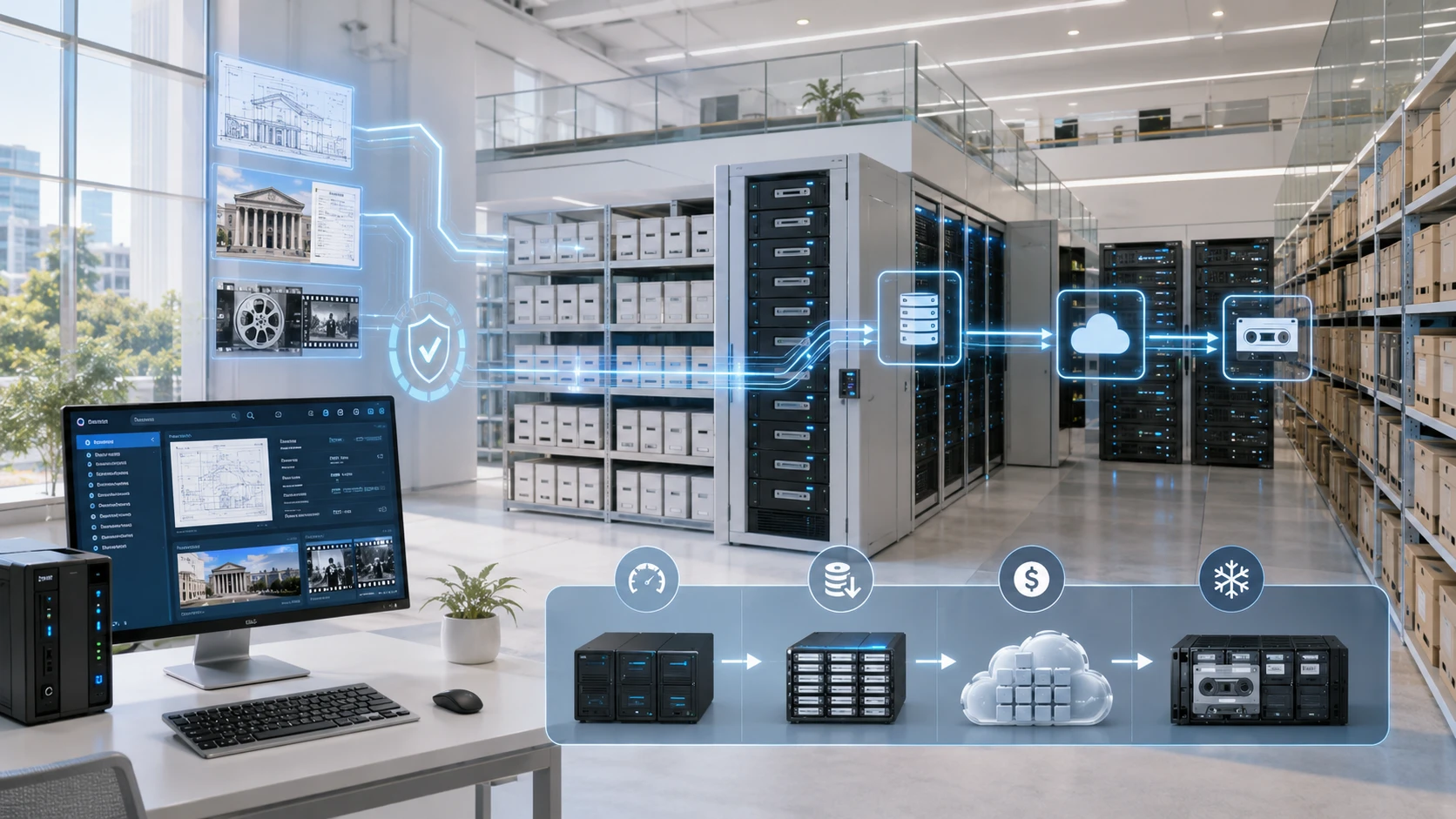
Backup is for fixing things. Archive is for keeping things.
Backups cover the data you’re changing every day so you can recover from a recent mistake or attack.
Archive generally holds data that is no longer used every day but must remain available over a longer period. Its design priorities durability, searchability and storage economics.
Here’s a quick way to think about it:
If an employee deletes a folder they made yesterday, they need a backup.
If your legal team needs a contract from six years ago, they need the archive.
Using backup as an archive gets expensive and messy. Using an archive as a backup makes recovery way too slow.
Using backup as a permanent archive can become expensive and difficult to manage. Using an archive as the only backup can make recent recovery slower or less flexible than the business needs.
You need them to work together, but don’t mix them up!
Backup vs Disaster Recovery: Main Differences
Backup provides the data. Disaster recovery is the plan and the tools that get you back to business.
A company could have copies of every file but still be down for days because they don’t know what to restore first or where to put it.
That’s having a backup without a recovery plan.
The opposite problem can also occur. A business may document a sophisticated recovery procedure but discover that some endpoint, SaaS or server data was never protected properly.
Backup asks:
What data can we get back?
Disaster recovery asks:
How do we get everyone back to work?
You really need both to be safe.
Disaster recovery should also support the wider business continuity strategy. NIST defines a business continuity plan as documented procedures explaining how business processes will be sustained during and after a significant disruption.
Technology recovery is a major part of that plan, but people, communications, facilities and operational workarounds matter too.
Archive vs Disaster Recovery: Main Differences
Archive keeps data for the long term. Disaster recovery gets you back on your feet after a crash.
Archived data may contribute to recovery, but an archive is not normally designed to restart the organization’s most important applications within a short period.
A manufacturer might archive ten years of designs. That’s valuable, but it’s not the same as having a backup of the system they use for today’s production.
Similarly, a hospital group may retain historical records for long-term access while maintaining separate backups and recovery procedures for active systems.
Archive asks:
What must we keep for the future?
Disaster recovery asks:
What needs to come back first so we can keep working?
They might use some of the same tech, but their goals are very different.
Why Businesses Need All Three Strategies
Backup, archive and disaster recovery protect different stages of the data lifecycle.
Backup supports day-to-day recovery. Archive preserves long-term business value. Disaster recovery prepares the organization for major disruption.
Think of it as a complete shield for your business data.
Data Protection
Protecting your data starts with knowing where it is.
It’s not just on servers, it’s on laptops, remote devices and in the cloud. If you only protect your main office but forget about everyone’s laptops or your Microsoft 365 files, you’re leaving yourself open to risk.
CrashPlan’s current platform supports backup and recovery across endpoints, servers, Microsoft 365 and Google Workspace, with options to use CrashPlan’s cloud, a customer’s Azure environment, local destinations or supported third-party storage.
The key is to set a policy that matches how important the data is, rather than just treating everything the same way.
Long-Term Retention
Some data remains valuable long after it leaves active use.
Moving it to an archive saves money and keeps your main systems fast while ensuring you can still find what you need for legal or research reasons.
Quantum’s Active Scale is great for this, offering a “cold storage” option that’s perfect for keeping massive amounts of data for a long time without a huge bill.
The right platform depends on how often you’ll need the data and how quickly you need to find it.
Business Continuity
Business continuity is about more than just having copies of your data.
The organization must know who declares a disaster, which systems return first, what infrastructure will be used and how restored services will be tested.
Don’t just leave your plan in a document that no one reads, practice it! Testing helps you find problems before a real emergency happens.
Ransomware Recovery
Ransomware may affect active files, shared storage, endpoints and connected backup repositories.
Effective ransomware recovery therefore depends on protected version history, restricted deletion rights, immutable copies and recovery points that predate the attack.
CrashPlan makes this easier by letting you restore data from earlier versions across all your devices and cloud apps.
For larger enterprise environments, Quantum’s DXi appliances provide purpose-built backup storage, while ACTIVE Scale supports immutable copies through Object Lock. Scalar tape can add an offline layer that is physically separated from network-based attacks.
A good ransomware plan needs many layers—prevention, detection, and tested recovery all working together.
Common Mistakes in Data Protection Planning
One big mistake is thinking that any kind of data storage is a “backup.”
Synced files or archives are useful, but they don’t always work the same way if you need to recover from a mistake or an attack.
Another error is ignoring employee laptops while only protecting your main servers. Valuable business data might be sitting on someone’s laptop before it ever gets to your shared systems.
And don’t just keep everything forever without a reason! It drives up your costs and can lead to legal headaches.
Other things to watch out for:
- Keeping every recovery copy within the same security boundary
- Failing to separate production and backup credentials
- Assuming cloud data is automatically backed up
- Choosing retention periods without consulting the business
- Testing file recovery but not complete applications
- Ignoring recovery bandwidth and infrastructure
- Setting unrealistic RTO and RPO targets
- Failing to assign recovery responsibilities
- Treating disaster recovery as an IT-only concern
- Buying technology before classifying the data
Most of these problems come from the same place: making assumptions instead of focusing on what actually matters to your business.
Best Solutions for Business Backup and Recovery
The best tool isn’t just the one with the most features. It’s the one that matches where your data lives and what you expect from your recovery.
CrashPlan Backup
CrashPlan is perfect for businesses that need automated protection for laptops, servers and SaaS apps.
It’s great for remote teams where files might not be in a central office. It works automatically so your team doesn’t have to remember to back up their own work, and it makes restoring files after a mistake or a crash very simple.
For businesses evaluating endpoint backup, practical questions should include whether backups continue over intermittent connections, whether administrators have central visibility and whether large-scale recovery can be managed efficiently.
Quantum Backup
Quantum provides the backbone for big businesses that need high-performance backup and long-term archiving.
DXi appliances support high-performance backup and data reduction. ACTIVE Scale provides scalable object storage for active, immutable and cold data. Scalar tape adds a secure offline option for long-term retention and cyber protection.
It’s a great way to manage huge amounts of data across multiple sites while keeping everything safe from cyber threats.
CrashPlan and Quantum can work together:
CrashPlan protects your team’s day-to-day work, while Quantum provides the heavy-duty infrastructure for your archives and cyber resilience. Together, they cover your data at every stage of its life.
Final Checklist for Choosing the Right Data Protection Strategy
Before signing off on your data plan, make sure you can answer “yes” to these questions:
- Have all endpoints, servers, cloud platforms and SaaS applications been identified?
- Is active data protected through automatic and frequent backup?
- Are RPO and RTO targets based on business impact?
- Can earlier versions be recovered after accidental deletion or ransomware?
- Is long-term data separated from active production storage where appropriate?
- Does every archived dataset have a defined owner and retention period?
- Are immutable, isolated or offline copies included?
- Are backup credentials separated from normal production access?
- Can the organization restore complete applications, not only individual files?
- Are dependencies and recovery priorities documented?
- Is there enough bandwidth and infrastructure to meet recovery targets?
- Are backup and disaster recovery procedures tested regularly?
- Can the strategy scale as data volumes, offices and cloud services grow?
- Is responsibility shared between IT, security and business leadership?
- Does the organization have a regional partner capable of supporting design, sizing and implementation?
D3 helps partners and organizations across the GCC translate these questions into a practical data resilience architecture.
By combining CrashPlan’s automated protection with Quantum’s industrial-scale archiving, we can help you keep your business safe, from a single lost file to a major disaster.
The objective is not to buy three disconnected systems. It is to create one coordinated strategy in which active data is recoverable, historical information remains available and critical operations can return when the unexpected happens.