A successful backup job is useful, but it does not automatically mean the business can recover. The backup may be accessible through compromised credentials, connected to the infected environment or contaminated by data that was already encrypted before anyone detected the attack.
The real question is not simply, “Do we have backups?”
The more important question is: Do we have a clean copy of our data that attackers cannot reach or modify?
For enterprises across the GCC, this question is becoming increasingly important. Organizations are managing larger volumes of data across offices, endpoints, data centers, Microsoft 365 environments, cloud platforms and remote workforces. At the same time, many businesses operate under strict availability expectations. A prolonged outage can affect customers, supply chains, government services, financial operations and public trust.
Recovery storage should therefore be treated as the organization’s last line of defense, not simply another IT purchase.
You need an architecture that remains available even when primary systems are compromised. That means maintaining data that cannot easily be changed, keeping recovery copies separated from production systems and regularly testing the recovery process to confirm that it works when needed.
Quantum and CrashPlan address complementary parts of this challenge. Quantum provides data-center backup, immutable storage and offline tape capabilities, while CrashPlan focuses on protecting endpoint and cloud-based business data.
Combining these approaches can create a broader recovery strategy that protects data from the data center to individual employees working remotely.
Why Backup Alone Is Not a Recovery Strategy
A complete enterprise backup strategy should therefore define not only how copies are created, but how clean systems and data will actually be restored.
Backup and recovery are closely related, but they are not the same thing.
Backup is the process of creating a separate copy of data. Recovery is the process of using that copy to restore systems, files and business operations after an incident.
A company can have several backups and still struggle to recover.
For example, the backup may exist, but the recovery team may not know which version is clean. The data may restore successfully while the application remains unusable because its configuration, identity services or dependencies were not protected. The backup platform may also be too slow to restore the amount of data required within the business’s expected timeframe.
This is why a green “Backup Complete” message should never be treated as proof of resilience.
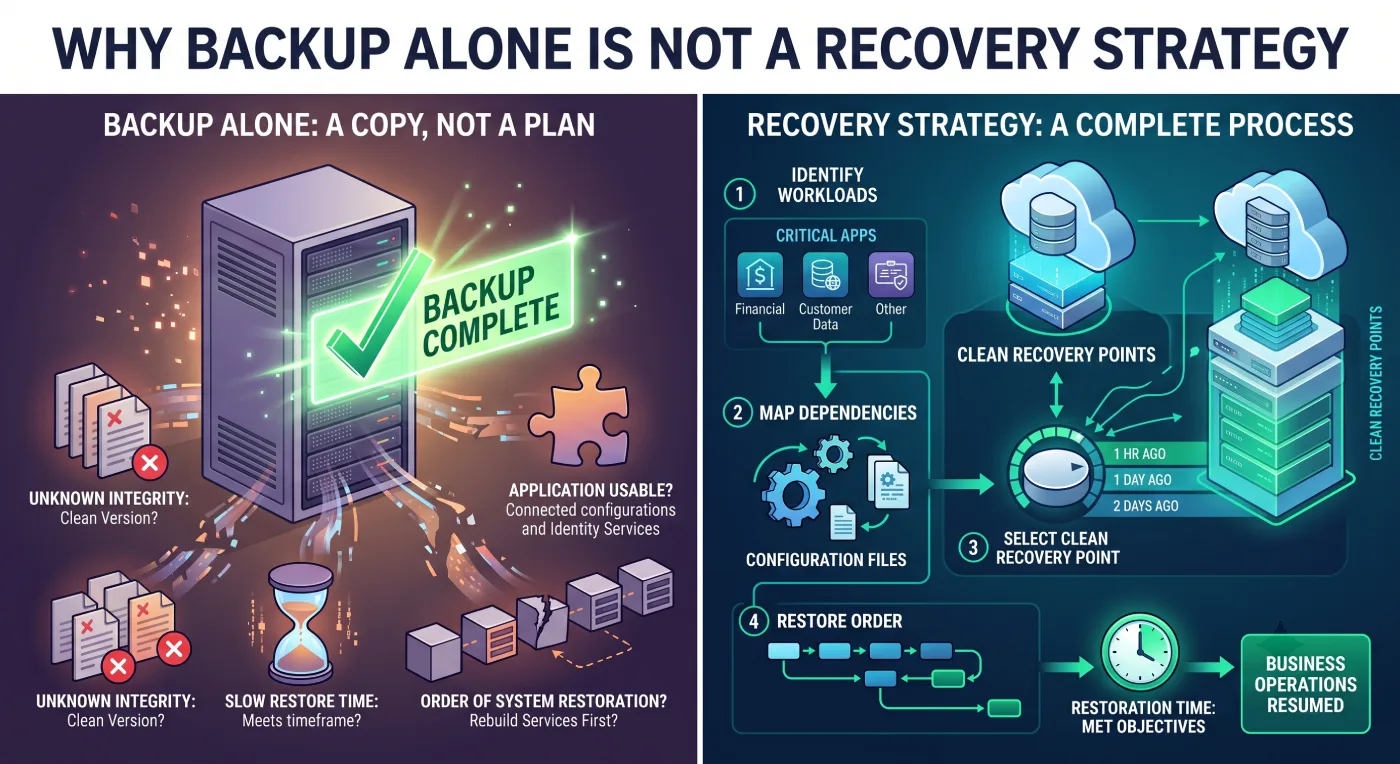
That confirmation only shows that a backup copy was created. It does not prove that the data is clean, protected from attackers or capable of being restored within the required timeframe.
During a ransomware attack, an IT team may discover that the most recent backups contain encrypted files because the attack began several days before detection. Older versions may be clean, but identifying the correct recovery point can take time.
If the organization has not documented the order in which systems should be restored, teams may also begin recovering data before rebuilding the services those systems depend on.
A practical recovery strategy should answer these questions before an incident occurs:
- Which services must return first?
- Which datasets are essential to those services?
- Where will the data be restored if primary infrastructure is unavailable?
- How long can each department operate without its critical applications?
- Which recovery points are most likely to contain clean data?
CrashPlan’s approach emphasizes maintaining independent, point-in-time copies that are separated from the primary production environment. If a user accidentally deletes a file or ransomware encrypts an endpoint, the organization has another recovery path.
For endpoints, this separation is particularly important. Employees may store business-critical documents, project files, local databases and working data outside approved shared folders.
Sync-and-share platforms generally protect only the information users place inside selected locations. Enterprise endpoint backup is designed to protect data automatically without depending on each employee to save files in the correct location.
The strongest recovery strategies therefore begin by identifying the workloads that genuinely matter to the business. They then match each workload with the appropriate protection method, retention policy and recovery objective.
What Attackers Target in Backup Environments
Modern ransomware attacks increasingly target backup infrastructure because attackers understand that reliable recovery reduces an organization’s incentive to pay a ransom.
Once attackers gain access to an environment, they may search for backup servers, administrative credentials and privileged accounts. If they gain sufficient control, they can attempt to delete recovery history, disable backup jobs, encrypt storage repositories or compromise the identity services used to administer them.
If backup administration relies on the same directory, credentials and privileged accounts as the production environment, one compromised identity may provide access to both.
This is particularly dangerous when backup consoles are permanently online and reachable from the main corporate network.
Immutability becomes most valuable as part of a broader ransomware recovery strategy that also considers isolation, clean recovery points and restore testing.
Some of the most common weaknesses include:
- Shared administrative credentials: Using the same privileged accounts across email, production systems and backup infrastructure can allow one compromised credential to expose multiple environments.
- Always-connected backup storage: Backup repositories that are continuously reachable from production networks may also be accessible to ransomware.
- Insufficient role separation: If a single account can delete all recovery copies, compromising that account can put the entire recovery strategy at risk.
- Unprotected endpoints: Business-critical information stored on employee laptops may fall outside traditional data-center backup policies.
- Overreliance on native cloud recovery: Built-in cloud recovery features are useful, but an independent backup path can provide additional protection if the primary cloud account or tenant is compromised. This issue becomes particularly important with Microsoft 365 backup, where retention features and independent recovery copies serve different purposes.
- Unmonitored policy changes: Attackers may modify retention settings, permissions or backup policies before launching the final stage of an attack.
The risk is not limited to malicious attacks. Human error, accidental deletion and incorrect configuration can also affect recovery data.
A resilient backup architecture should therefore assume that credentials may eventually be compromised and limit how much damage a single account can cause.
Organizations should consider dedicated backup accounts, multi-factor authentication (MFA), role separation and additional approval controls for destructive actions. Alerts for configuration changes, policy modifications and large-scale deletions can also help security teams detect suspicious activity earlier.
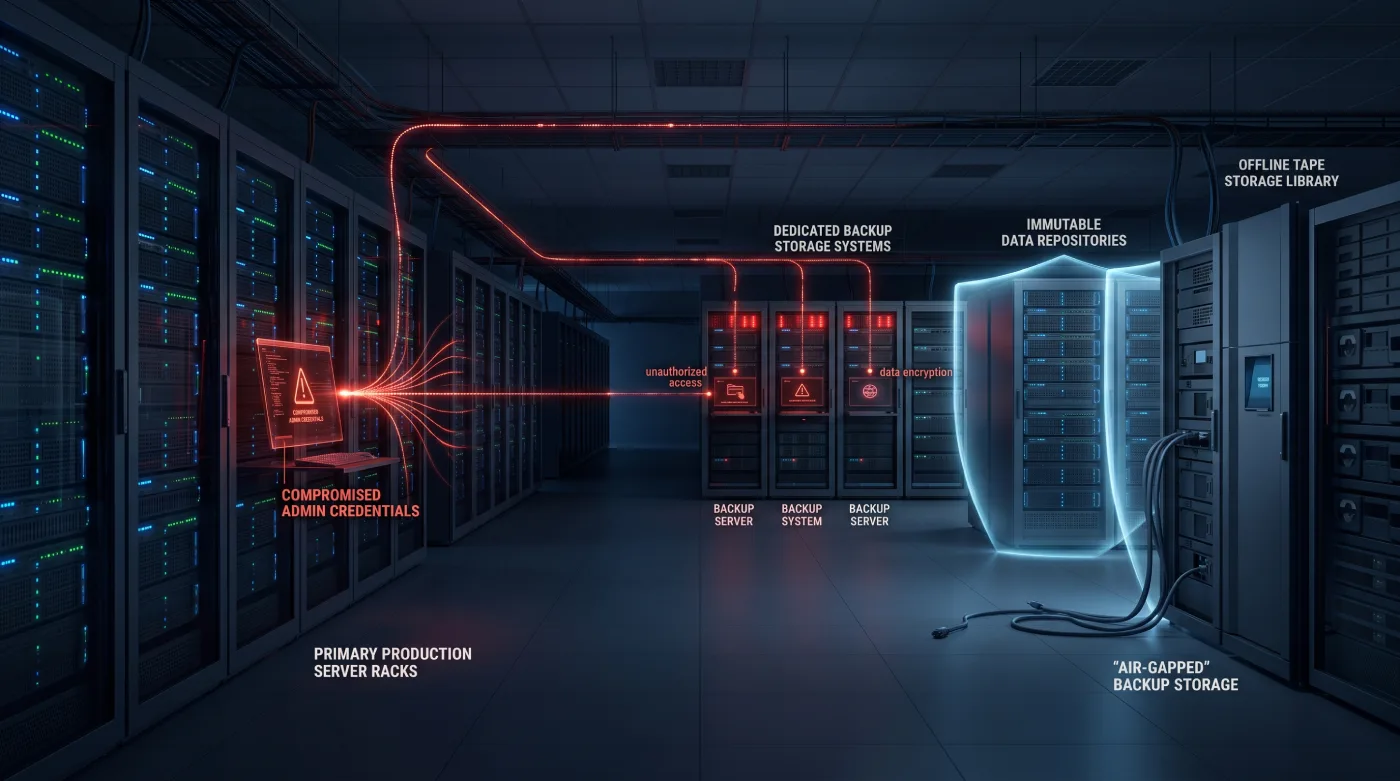
CrashPlan includes role-based administration, policy controls and audit capabilities within its enterprise protection approach. Its ransomware-resilient backup guidance also emphasizes separating protected data from the Microsoft 365 control plane so that a compromise of the production tenant does not automatically remove the recovery copy.
At the infrastructure level, Quantum’s security approach adds additional protection through immutable disk and object storage alongside offline tape copies that are no longer directly reachable through the active network.
The objective is not to make one backup repository defend against every possible attack. It is to create multiple barriers so that compromising one layer does not destroy the organization’s last usable recovery copy.
One of the most important layers is immutable backup, which protects selected recovery points from alteration or premature deletion.
Immutable, Isolated and Offline Recovery Copies
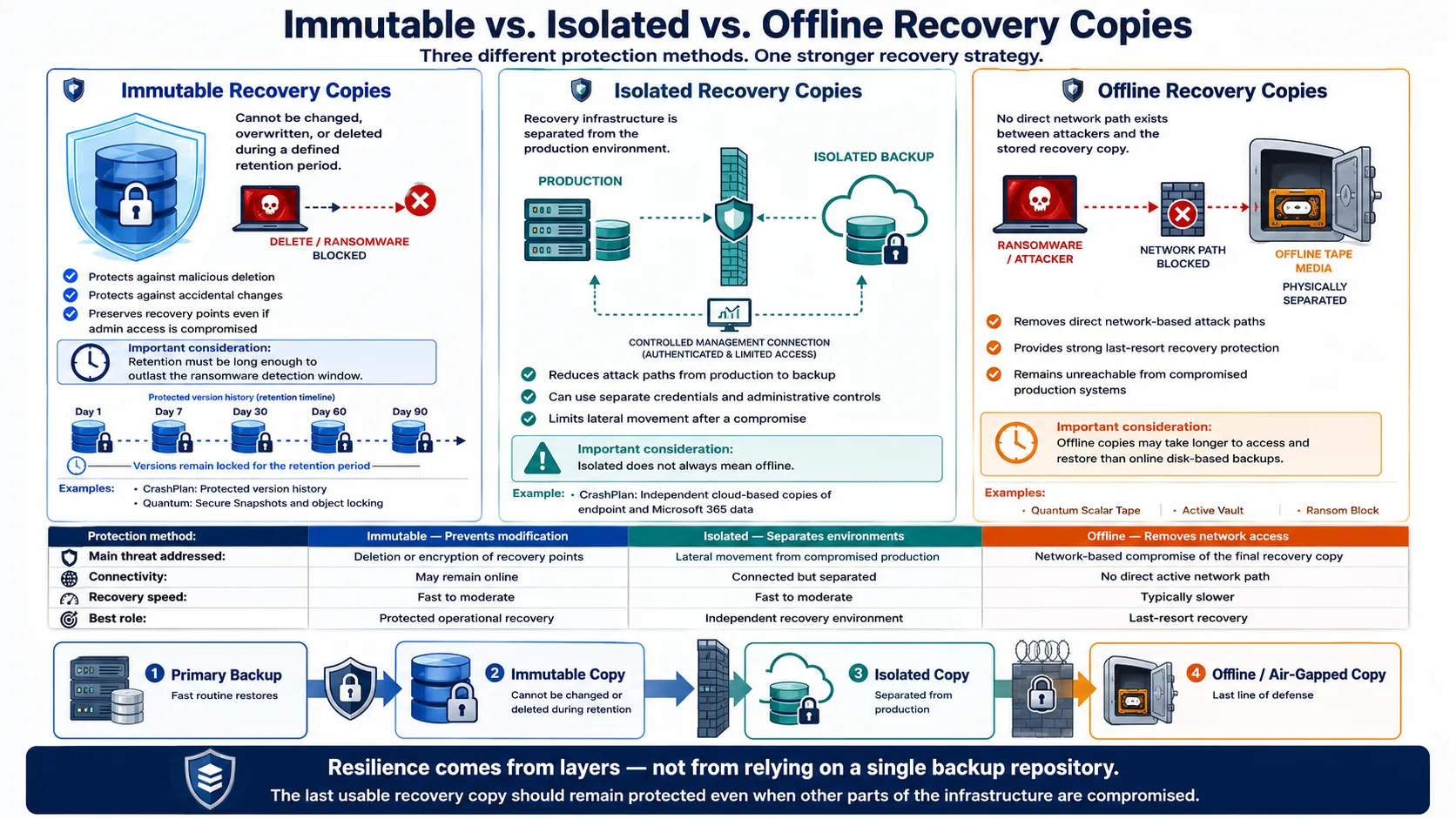
The terms immutable, isolated and offline are often used together, but they describe different approaches to protecting recovery data.
A resilient recovery strategy can combine all three.
Immutable Recovery Copies
An immutable backup cannot be changed, overwritten or deleted during a defined retention period. Even if an attacker gains administrative access, the protected version remains preserved until the retention policy expires.
This provides protection against both malicious activity and accidental deletion.
CrashPlan applies this principle by maintaining protected versions of data that organizations can return to when files are deleted, corrupted or encrypted.
At the infrastructure layer, Quantum enterprise data protection includes technologies such as Secure Snapshots on DXi appliances and object-locking capabilities on ActiveScale, helping protect recovery points from unauthorized modification or deletion.
Immutability is important, but retention periods must be configured carefully. Policies should reflect the organization’s risk profile and expected ransomware detection window. If immutable copies expire too quickly, an attacker who remains undetected for an extended period may outlast the available clean recovery versions.
Isolated Recovery Copies
Isolation means separating recovery infrastructure from the systems it is designed to protect.
This may involve separate administrative credentials, segmented networks or backup platforms that operate independently from the main production environment.
CrashPlan’s cloud-based approach creates an independent copy of endpoint or Microsoft 365 data that does not rely solely on the original device or production tenant. Continuous protection and version history can provide multiple recovery points when an organization needs to return to data from before an attack.
By reducing the number of paths between production systems and recovery infrastructure, organizations make it more difficult for an attacker to move directly from compromised systems to backup data.
However, isolation is not necessarily the same as being offline. A system may be separated from production while still remaining connected to a management network.
Offline Recovery Copies
An offline recovery copy removes the direct network path that ransomware would normally use to reach stored data.
This is one reason tape continues to play an important role in modern cyber-resilience strategies. When tape media is physically separated from active network access, attackers cannot modify it through the compromised production environment.
Quantum’s Scalar tape libraries include technologies such as Active Vault, which can move selected tapes into a separated area of the library, while Ransom Block is designed to introduce a physical barrier between protected media and network-based access.
This does not mean every backup should be written only to tape. A balanced architecture can combine fast disk storage for rapid recovery, immutable storage for protected recovery points and offline tape for long-term or last-resort recovery.
A layered recovery strategy may look like this:
- A primary backup copy for fast, routine restores.
- An immutable copy that cannot be changed or deleted during its retention period.
- An isolated copy separated from the primary production environment.
- An offline or air-gapped copy for worst-case recovery scenarios.
This layered strategy reduces dependence on any single recovery repository.
The organization’s last line of defense should remain available even when other parts of the infrastructure have been compromised.
Recovery Time, Recovery Point and Business Impact
During a major incident, two questions become critical: how much recent data can the organization afford to lose, and how long can a business service remain unavailable?
These requirements are normally expressed through the Recovery Point Objective (RPO) and Recovery Time Objective (RTO).
Recovery Point Objective (RPO)
The Recovery Point Objective represents the acceptable amount of data loss measured in time.
For example, an RPO of four hours means the organization should be able to recover data from no more than approximately four hours before the incident. Any work created after the available recovery point may need to be recreated.
Recovery Time Objective (RTO)
The Recovery Time Objective represents the target amount of time required to restore a service after an interruption.
If a critical service has an RTO of eight hours, the recovery architecture and process should be capable of restoring that service within the defined window.
RPO and RTO values should not be selected by IT alone. They need to reflect actual business impact.
Losing several hours of work on a non-critical document is very different from losing access to a payment platform, healthcare system or essential government service for the same amount of time.
Infrastructure leaders should therefore classify workloads according to operational importance.
- Tier 1 – Mission-critical services: Systems directly connected to revenue, safety or essential operations. These typically require the fastest recovery.
- Tier 2 – Essential business systems: Applications required for day-to-day operations that can tolerate a limited interruption.
- Tier 3 – Standard business data: Important information that does not need to be restored immediately after an incident.
- Tier 4 – Long-term retention: Historical or compliance data that can tolerate longer retrieval times.
This classification helps organizations prioritize both investment and recovery activity. During an incident, critical systems should not be delayed because low-priority data is being restored first.
Quantum’s backup and archive portfolio supports different recovery tiers. DXi appliances provide disk-based backup and recovery, ActiveScale supports durable immutable object storage and Scalar tape provides offline retention. This allows organizations to align different storage technologies with their RTO, RPO and retention requirements.
CrashPlan supports configurable policies, continuous protection and multiple recovery versions for endpoint and cloud data. Granular recovery can restore selected files or folders without rolling back unrelated information, reducing disruption when only part of a dataset has been affected.
Business impact calculations should also consider more than direct revenue loss.
Organizations should account for staff time, operational disruption, reputational damage, regulatory exposure and the cost of rebuilding affected systems. A recovery strategy is therefore not simply a storage investment; it is part of the organization’s broader business-continuity and cyber-resilience planning.
How to Test Clean Recovery Before an Incident
The worst time to discover that a recovery plan does not work is during an active ransomware incident.
Testing is the only reliable way to confirm that backup data is complete, clean and usable.
A meaningful recovery test goes beyond restoring a single file. Teams should attempt to restore an application or service inside a safe, isolated environment and confirm that its data, configuration, dependencies and security controls all function correctly.
Recovery testing should answer questions such as:
- Can the team identify a clean recovery point?
- Can authorized administrators access the backup platform during an outage?
- Are the required encryption keys and credentials available?
- Can the data be restored to new or reformatted infrastructure?
- Does the application start successfully after restoration?
- Are database relationships and permissions preserved?
- How long does the complete recovery process take?
- Does the measured recovery time meet the stated RTO?
- Is the restored data recent enough to satisfy the RPO?
- Can the team verify that the recovered system is free from malware?
Recovery should normally take place inside a clean environment that is separated from compromised production systems.
CrashPlan recommends restoring data to a clean or reformatted device and checking for malware before reconnecting it to the production environment. This helps prevent clean recovery data from being restored into infrastructure that remains compromised.
Testing should also include older recovery points. The newest available version may not always be the safest version if an attacker was already present before the incident was detected.
A complete testing program can include:
- File-level recovery tests: Confirm that individual files and previous versions can be restored successfully.
- Application recovery tests: Restore an application together with its required data and dependencies.
- Endpoint recovery tests: Verify that an employee’s working data can be restored to a replacement or reformatted device.
- Cloud-data recovery tests: Confirm that protected mailboxes, OneDrive files, SharePoint data or other cloud information can be recovered.
- Offline copy tests: Retrieve information from isolated or tape-based recovery tiers and verify that both the media and procedures remain operational.
- Full incident simulations: Run controlled exercises involving IT, security, management, legal, communications and relevant business departments.
Every recovery test should be documented. Teams should record which recovery point was used, how long the process took, what failed and which procedures need improvement.
The objective is not simply to prove that a recovery plan works on paper. It is to identify weaknesses before a real incident forces the organization to depend on it.
Solution Fit for GCC Enterprises
Enterprises across the GCC operate in an increasingly demanding data environment.
Many organizations are expanding across multiple branches while increasing their use of cloud applications, smart infrastructure, video surveillance, digital services and artificial intelligence. Data may be distributed across headquarters, remote offices, employee laptops, data centers and Microsoft 365 tenants.
Quantum addresses the infrastructure side of the recovery strategy. DXi appliances can support fast disk-based backup and recovery, ActiveScale provides immutable object-storage capabilities and Scalar tape can add an offline or air-gapped recovery layer for large datasets.
CrashPlan complements this approach by protecting endpoint and cloud-based user data. Maintaining an independent history of protected files can provide a recovery path when an endpoint is encrypted, a file is deleted or a cloud account is compromised.
D3’s role is to help organizations across the GCC connect these technologies to their actual operational requirements.
Rather than starting with a product list, the process should begin by assessing where critical data is stored, who has access to it, which recovery gaps exist and how quickly different workloads need to return after an incident.
The goal is a practical, tiered recovery strategy in which each technology has a defined role. Fast storage supports rapid restoration, immutable and independent backup copies preserve clean recovery points and offline tape provides an additional layer of protection for severe ransomware scenarios.
Ultimately, a recovery plan should provide more than a compliance checkbox. It should give the organization a tested and repeatable answer to the most important question after an attack: How do we restore clean data and return to business safely?
With protected recovery copies, clearly defined priorities and a recovery process that has already been tested, organizations are in a much stronger position to respond when primary systems are compromised.