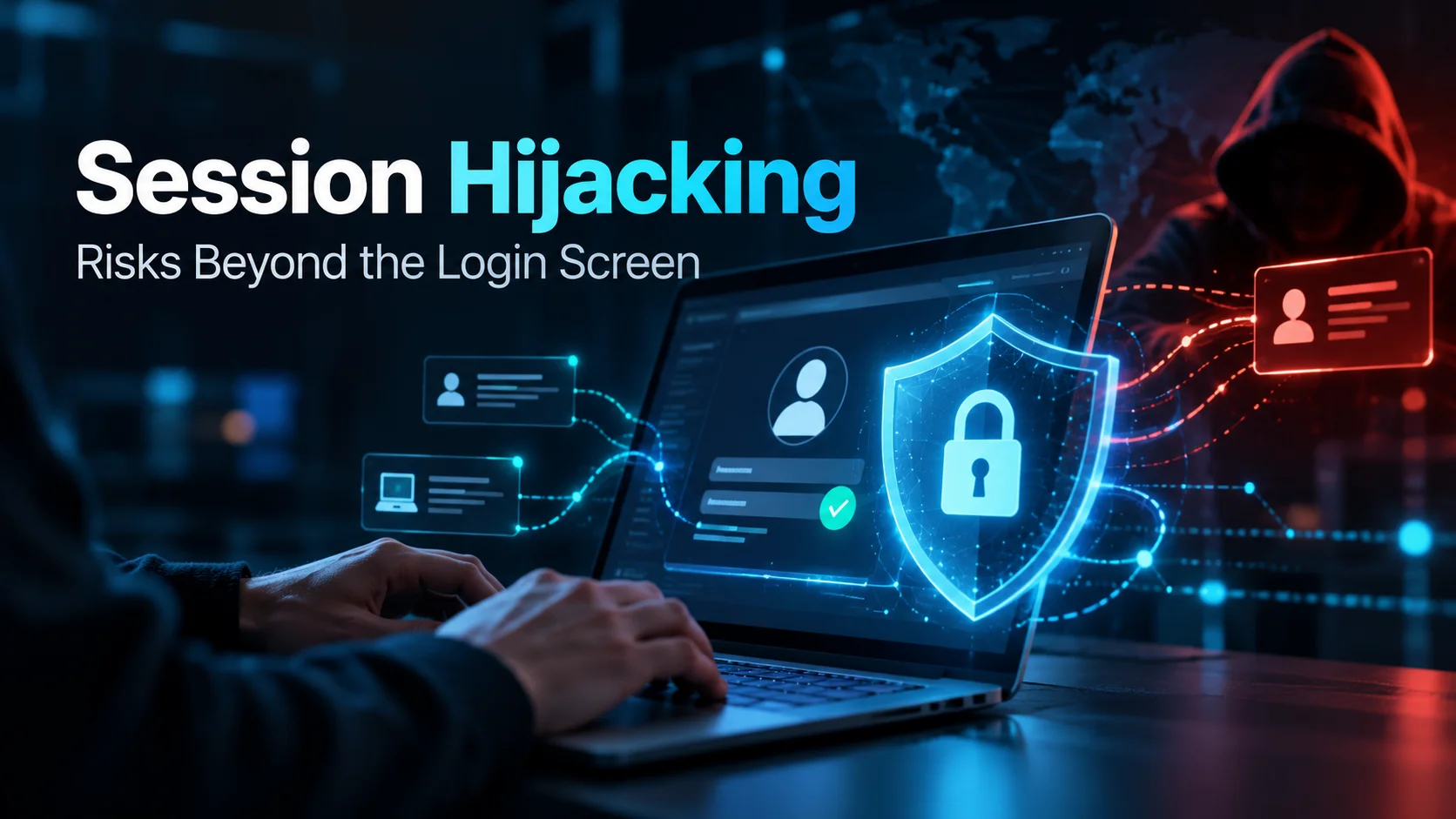
When people talk about access security, they usually focus on the login screen. Are passwords complex enough? Is MFA switched on? Is the device recognized and is the user signing in from a normal location?
These checks are essential, but they overlook a critical question:
What happens after a user successfully logs in?
Take a scenario where an admin logs in legitimately, completes MFA and opens an RDP session to a key server. To the identity system, everything looks completely fine: the credentials match, MFA passed and the device is authorized. However, if an attacker hijacks that session five minutes later, those initial login checks alone may not prevent the takeover. This is precisely why Session Hijacking poses such a serious threat.
Session Hijacking is particularly relevant to organizations managing distributed operations across Dubai, Riyadh and the broader GCC region, where admins, vendors and service providers regularly access servers and operational systems remotely.
For instance, a logistics company in Saudi Arabia might grant a third-party contractor remote access to a warehouse management system. While the initial connection is fully authorized, trouble starts if an unauthorized party takes over that session midway through. That is why cybersecurity must extend beyond authentication—businesses need to protect everything that occurs between login and logout.
What Session Hijacking Means
Think of a session as the timeframe where a system remembers you’ve already logged in. Without them, websites and apps would force you to type in your password every single time you clicked a link or changed pages. To avoid that hassle, the system creates a temporary digital pass to keep track of your logged-in status.
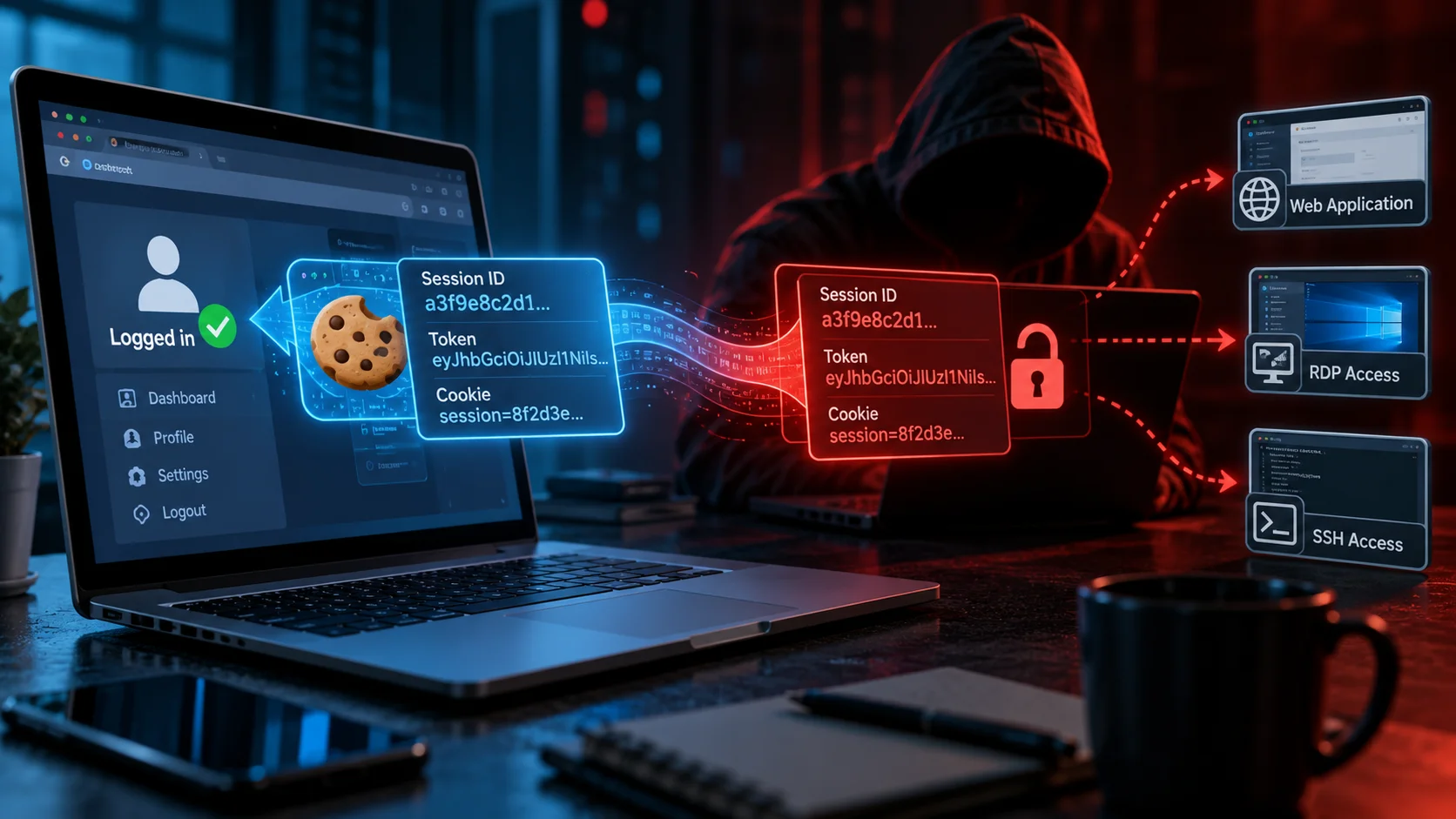
For web apps, that pass usually takes the form of a session ID, token or cookie. OWASP explains Session Hijacking as the compromise of a valid session token, which lets an attacker pretend to be you without needing to go through the actual login screen. That distinction is huge. An attacker doesn’t always need to crack or steal your actual password. If they can get their hands on whatever proof the app uses to verify an active login, that session pass itself becomes all the access they need.
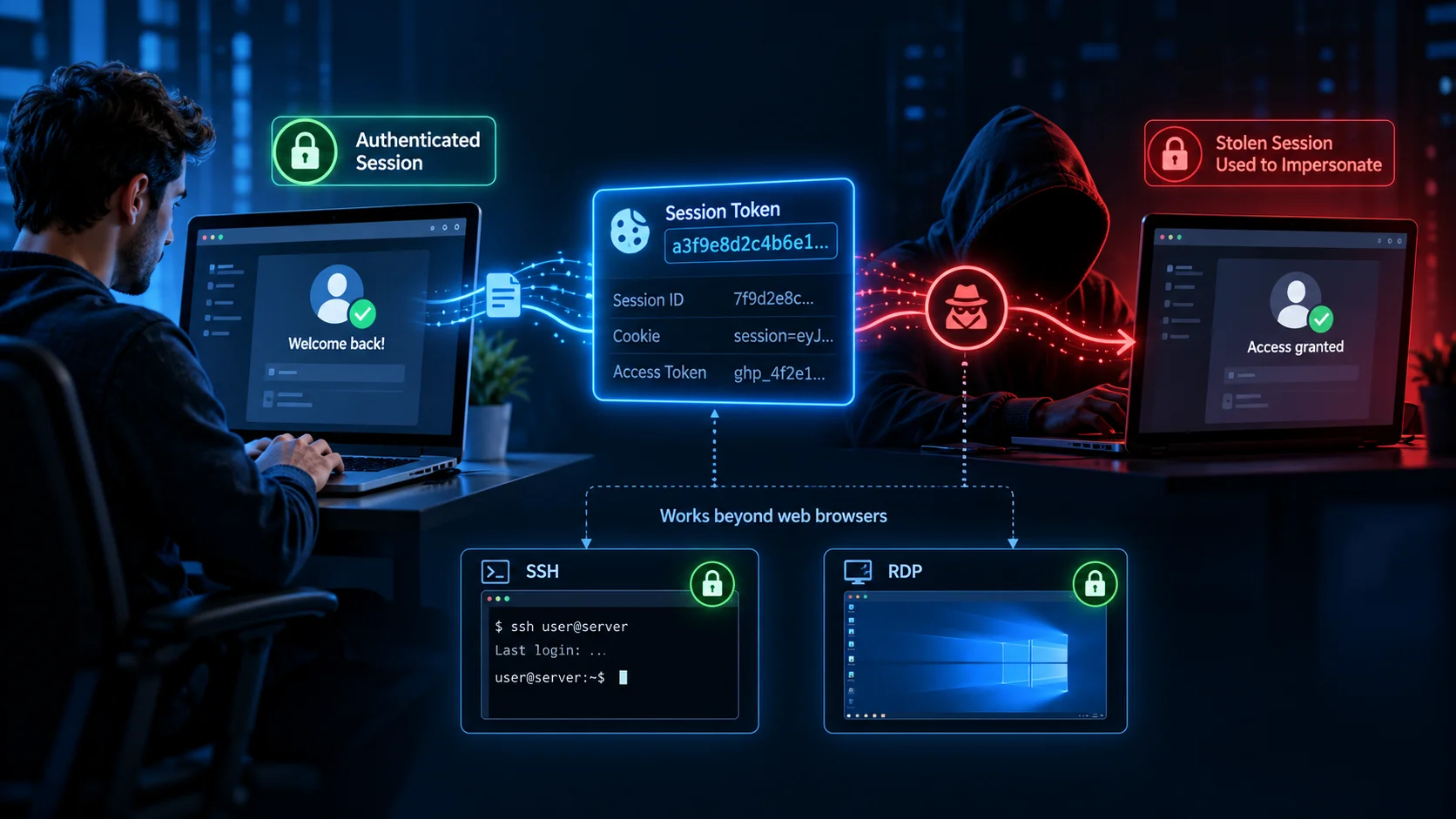
OWASP highlights that if a session identifier gets leaked or stolen, an attacker can impersonate the legitimate user. Its session-management guidance treats session IDs with the same sensitivity as authentication credentials. The risks of Session Hijacking go beyond standard web browsers, too.
Remote admin connections like SSH and RDP rely on a similar trusted pipeline. Once the initial connection is approved, many security systems simply assume all ongoing activity inside it is legitimate user behavior. This is exactly why security after the login step is so crucial. A successful login only confirms who signed in at that specific moment. It does not necessarily prove who is controlling every action afterward.
How an Authenticated Session Is Abused
Session Hijacking can happen in a few different ways.
Sometimes an attacker swipes the session token directly. Other times, they take over the device itself and piggyback on a session that’s already logged in. These are distinct techniques: the first can involve replaying a stolen token, while the second uses the compromised device as a proxy. Either way, the root problem is misplaced trust. Because the app or server sees traffic tied to an approved session, it simply assumes everything is fine and lets it pass. That’s what makes Session Hijacking so tough to spot.
Stolen Browser Sessions
Most web applications use cookies or tokens to remember that you’re signed in.
If someone grabs that token and uses it from another machine, they can often jump right in as you—no password or MFA prompt required.
Microsoft has highlighted how adversary-in-the-middle phishing attacks snatch both credentials and active session cookies, allowing attackers to replay the session and impersonate users. It leaves security teams in a tough spot. You might have MFA properly configured. Your employees might follow every rule and complete their prompts.
But attackers don’t need to bypass MFA if they can just steal the key handed out after authentication succeeds. That’s why preventing browser-based Session Hijacking has become such a high priority.
Newer safeguards are helping close this gap. For instance, Microsoft Entra offers token protection that binds supported sign-in session tokens to their original device. This can help prevent stolen-token replay in supported applications. Even so, support varies by app and setup, so security teams shouldn’t just assume every cloud session is automatically tied to a specific device.
Compromised Remote Workstations
Remote administrative access introduces a different spin on Session Hijacking. Picture an engineer in Dubai remoting into a server for a distribution center in Riyadh. They sign in legitimately and open an RDP session. Now imagine their laptop was already compromised.
The attacker doesn’t need to trigger a suspicious login from somewhere else—they can just piggyback on the employee’s existing connection. Because the traffic comes from a trusted computer over an already-approved stream, it blends right in.
KeyStrike refers to this as turning a legitimate workstation into a command relay. Their research on workstation-as-a-proxy attacks shows how attackers leverage active RDP or SSH sessions instead of running obvious malware. This is particularly dangerous when it comes to privileged accounts.
Admins often hold keys to file servers, backups, network gear and domain controllers. A hijacked session inherits all of that authority.
For companies operating warehouses, logistics centres and multi-site infrastructure across KSA, the same risk applies to third-party maintenance. The vendor might be legitimate. The credentials might be legitimate. The maintenance window might be pre-approved. The question is whether the actions taking place inside that session still belong to the person who was approved.
Why MFA Cannot Prevent Every Session Hijacking Attack
MFA is still easily one of the best defenses any company can put in place. You should absolutely enforce it across administrators, remote connections, cloud environments and any sensitive systems.
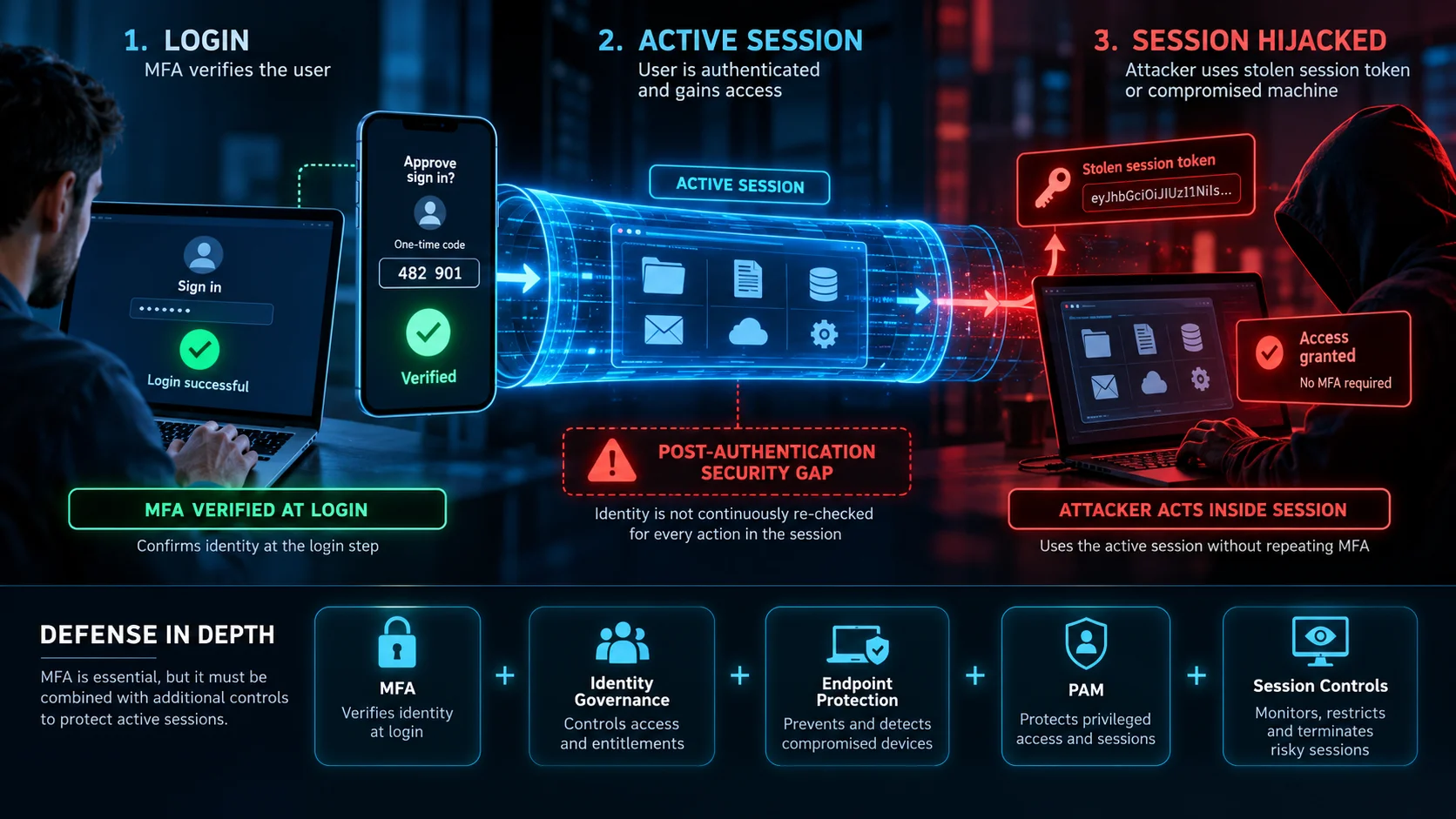
However, MFA really only answers a single question:
Can this user prove who they are right now?
What it doesn’t do is continuously re-check that identity before every single keystroke, admin command, or click. This leaves what KeyStrike calls a post-authentication security gap. Identity providers, MFA tools, PAM solutions and ZTNA gateways can enforce controls throughout the access lifecycle. However, not all deployments verify the physical origin of individual actions within an active remote session. KeyStrike’s explanation of the post-authentication gap zeroes in on this vulnerable window between login and logout.
That doesn’t mean MFA is failing. It means MFA and session security solve different problems. If an attacker only has a password, MFA creates a huge roadblock for them. But if they’ve stolen a valid session token or are piggybacking on a compromised machine where the user is already signed in, you need another layer of protection. Instead of looking for a single silver-bullet security tool, smart architectures combine multiple safeguards.
MFA, identity governance, endpoint protection, PAM and session controls should reinforce each other.
Controls for Browser and Remote Sessions
When it comes to web apps, solid session security really comes down to protecting the token itself.
You should always enforce HTTPS, use secure cookie settings, and set reasonably short expiration times for sensitive applications. If risk levels shift, active sessions ought to be revoked immediately. For critical applications, it’s worth exploring stricter protections like token binding or tying sessions directly to specific devices to reduce Session Hijacking risks.
OWASP also points out that session IDs should be regenerated whenever user permissions change, kept out of URLs entirely and given carefully managed timeout rules. OWASP’s Session Management Cheat Sheet provides detailed controls for protecting authenticated sessions.
Remote admin access demands a different strategy altogether. Privileged access should strictly cover the specific systems needed and only for as long as necessary. Admin credentials ought to be kept completely separate from everyday work accounts, while third-party permissions should automatically expire as soon as the task is done instead of running indefinitely. The devices used for admin work also need far tighter safeguards.
An admin’s laptop isn’t just standard hardware if it has keys to critical infrastructure, it needs to be treated accordingly. For external contractors, just-in-time and temporary access windows go a long way in minimizing exposure. KeyStrike’s framework for vendor and contractor remote access emphasizes restricting permissions and access windows while keeping an eye on live activity inside active sessions.
If a warehouse automation provider in Riyadh needs a four-hour RDP session to run an update, there’s no reason for them to maintain open access once that window closes. Rapid regional growth shouldn’t mean leaving permanent backdoors open just because it’s convenient.
What to Do After a Suspected Takeover
If you suspect Session Hijacking, changing a password alone may not terminate every active session. Depending on how the app and authentication are set up, compromised sessions or access tokens might stay usable. Your first priority should be containment. Revoke any active sessions linked to the affected account wherever possible. Invalidate tokens where supported, reset passwords and credentials and suspend privileged access until you can figure out what happened.
Don’t forget to check the affected device itself. If the takeover happened because the workstation was compromised, letting the user log back in right away from that same computer will just recreate the exact same vulnerability.
During a Session Hijacking investigation, security teams need to review login logs, session activity, device telemetry and any changes made during the suspicious timeframe. For privileged accounts, look closely at which downstream systems were accessed from that hijacked session. Understanding the full scope is key.
If an attacker used an administrator’s active RDP session to reach another server, the incident response should not stop after cleaning the first workstation. Businesses should also determine what credentials, files or administrative changes may have been exposed inside the session. This highlights why centralizing your audit data is so crucial. Knowing someone logged in at 2:10 PM is good to know. Knowing everything that happened between 2:10 PM and when that session ended is far more valuable.
Where Live Session Verification Fits
Most standard security tools are still completely necessary, of course. Identity governance makes sure someone should actually have access in the first place. MFA adds a strong front door check. PAM keeps a tight handle on admin credentials. ZTNA guards network access points. Endpoint protection keeps an eye on the actual workstation. And SIEM platforms pull together all your event logs.
While many existing security tools monitor sessions and enforce access policies, they do not necessarily verify the physical origin of every keyboard or mouse action within a live remote session. That is the specific control point KeyStrike is designed to address.
According to KeyStrike’s technical documentation, its session-layer governance model uses device-bound cryptographic attestation to verify the origin of keyboard and mouse input in supported remote sessions. This helps distinguish verified actions from unverified input.
Where the required components and enforcement controls are enabled, unattested input can be blocked before reaching the remote system rather than flagged in a log hours later. KeyStrike frames this as continuous control over the session from start to finish.
This makes live verification a natural addition to tools like MFA and PAM, rather than a replacement.
- You still need strong logins.
- You still need secure credentials.
- You still need least-privilege policies.
And you still need solid endpoint defense. Live verification simply carries those safeguards forward into the session itself.
For companies expanding across Dubai, Riyadh and other GCC locations, this is particularly relevant. Remote admin access is standard operating procedure across data centers, logistics hubs, warehouse systems, critical infrastructure and third-party tech support.
D3 supports these regional needs as a KeyStrike Distributor across Dubai and the GCC. Along with local consulting and system design, D3 is also expanding its engagement with the Saudi Arabian market, following its 2026 Riyadh channel partner launch, with a focus on supporting enterprise technology projects and regional system integrators.
For a logistics team, that might look like protecting remote connections to warehouse platforms. For a systems integrator, it means keeping tighter governance over temporary contractor access to client servers. And for an enterprise operating across both the UAE and Saudi Arabia, it means keeping security standards consistent even when users and infrastructure are spread across borders. At its core, it requires a mindset shift.
Authentication proves someone was trusted to log in. It shouldn’t mean every single action inside that session is blindly trusted forever. That’s the real threat of Session Hijacking beyond the login screen and why modern security needs to follow the session all the way until logout.