Not every app running on a company laptop is there because IT gave it the green light. An employee grabs a free PDF converter online. Someone else installs a favorite chat app. A warehouse team sets up a quick remote desktop tool so a vendor can help fix a glitch on the spot. Or maybe an engineer sticks with an older version of a software tool just to avoid messing up their workflow with a new update.
On the surface, none of this feels like a security threat. Yet every single extra piece of software adds more background files, open connections and potential security holes for the organization to keep track of.
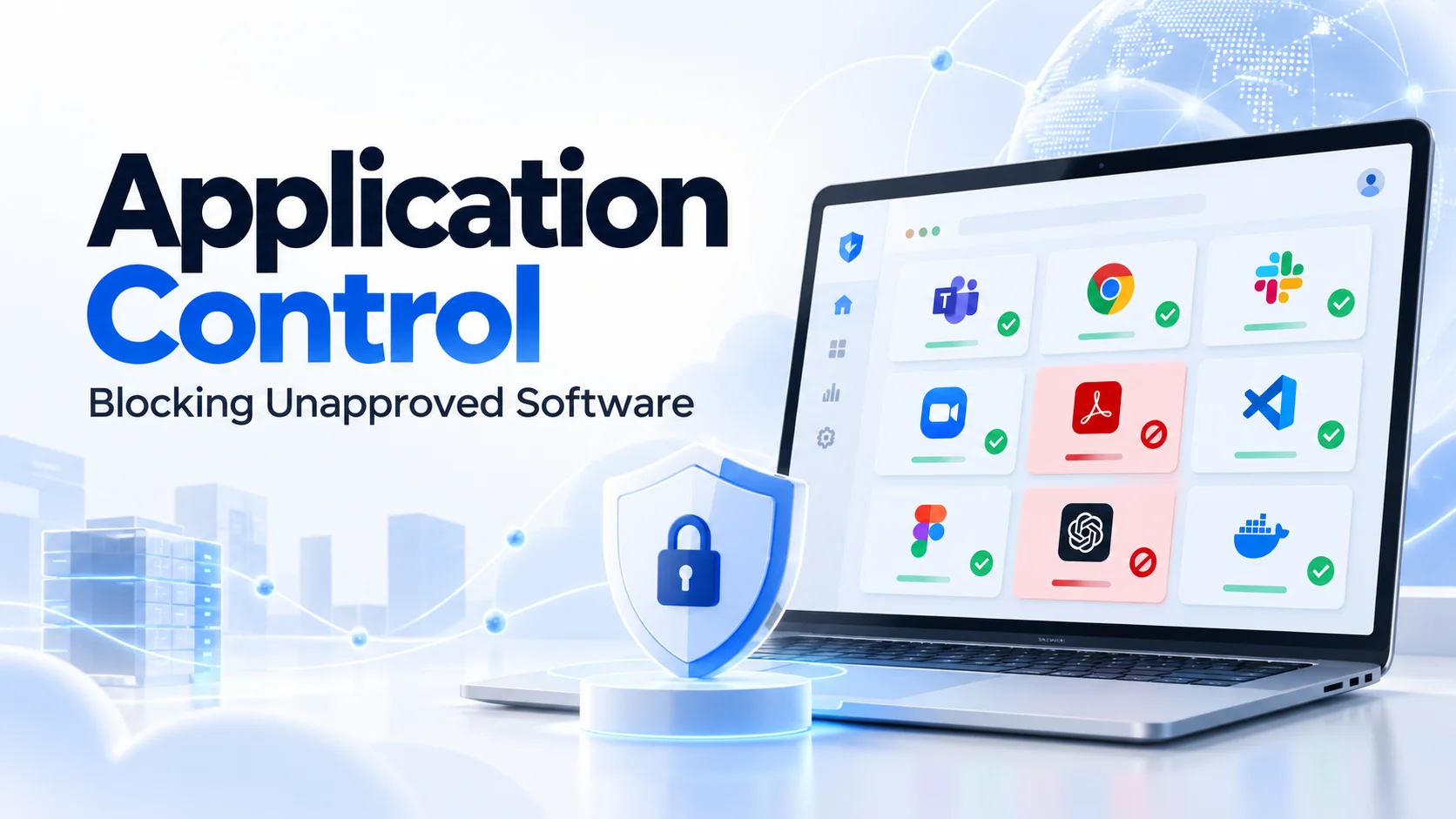
That’s exactly where application control steps in.
It gives IT teams a clear way to decide which programs can run on company devices, which versions are allowed and even whether an approved app should be able to connect to the network or the internet. The goal isn’t to lock down every laptop like a fortress terminal. It’s simply to shrink the attack surface while letting everyone do their daily work smoothly.
This is especially key for companies operating across Dubai, Riyadh and the broader GCC region, where one IT team often manages devices for corporate offices, sales reps on the go and warehouse hubs across multiple locations.
Take a warehouse terminal in Saudi Arabia: it usually only needs a few specific tools. Letting workers install unverified remote-support software, file-sharing tools or random utilities introduces real security risks without adding any practical benefit.
A solid application control policy always starts with one simple question:
What software does this user actually need to do the job?
What Application Control Does
At its core, application control decides whether software is allowed to run in the first place or depending on your security setup, what it’s permitted to do once it does.
As noted in NIST’s Guide to Application Whitelisting, it works by setting an approved baseline to control which applications and components are allowed on a system. When properly configured, allowlisting can prevent many unauthorized executables, including malware, from running. This adds an essential extra layer of defense alongside your standard antivirus and EDR tools. Traditional antivirus tools focus on detecting known malware or suspicious behavior.
Application control, however, asks a much simpler question:
Even if this file is not currently classified as malware, should it be running on this company’s device at all?
That distinction is huge when dealing with unapproved remote access tools, crypto miners, torrent clients, legacy software, unauthorized chat apps or standalone executables that bypass traditional installations.
In fact, CISA’s ransomware guidance recommends using application allowlisting and/or endpoint detection and response to help prevent unauthorized software execution instead of relying only on detection after the fact. With K7 Endpoint Security, administrators can restrict unapproved apps from launching or limit their network access, while managing policies centrally across their team. That central management is essential. A policy that depends on individual employees deciding what is safe is not really application control.
Allowlisting vs Blocklisting
There are two common ways to think about software-control policy.
Blocklisting operates on an “open by default” mindset: every app is permitted to run unless IT explicitly flags it as forbidden.
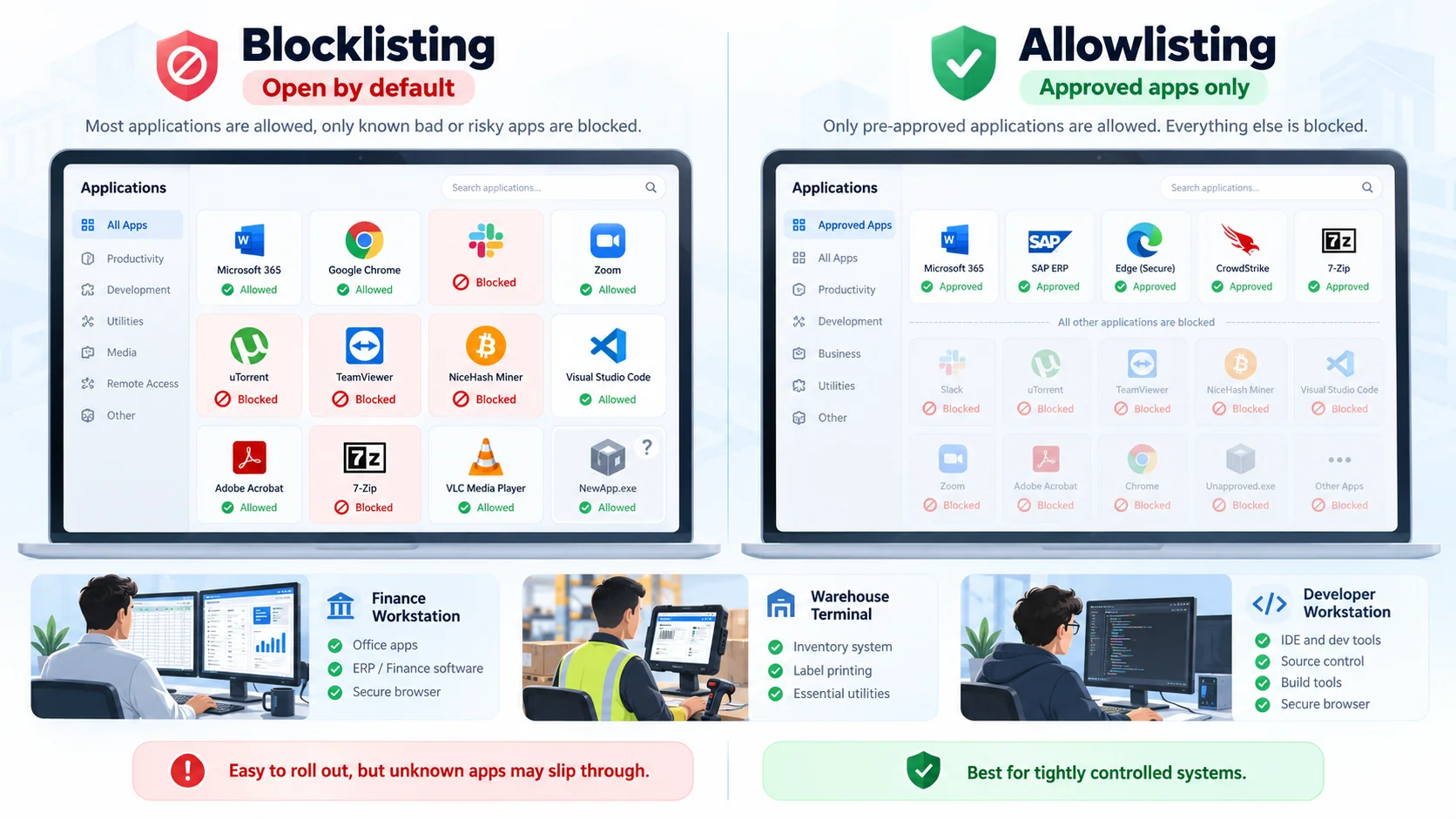
Under this approach, IT might block things like:
- Torrent clients
- Known unauthorized remote-access tools
- Cryptocurrency software
- Certain messaging applications
- Vulnerable software versions
- Known unwanted utilities
This model is relatively straightforward to roll out because everyday software keeps working seamlessly right up until something gets added to the block list. The catch, of course, is that IT has to actively know about a threat before they can block it. That means a brand-new or unknown executable can easily slip right past the list.
Allowlisting turns that entire logic upside down. Only pre-approved applications are allowed to run, while everything else gets stopped in its tracks unless someone specifically grants permission.
NIST sums up the distinction well: blocklists try to filter out known bad activity while leaving the rest open, whereas allowlists focus on explicitly permitting known good activity and shutting down everything else. That makes allowlisting far more effective in tightly controlled settings.
Take a finance workstation: it really only needs Microsoft 365, an ERP client, a secure browser, endpoint security tools and a handful of core utilities. A dedicated warehouse terminal usually requires even less. Compare that to a software engineer’s machine, where compiling and running new code daily is just part of the job.
Your security policies should reflect those distinct needs. For highly specialized systems like payment terminals, warehouse stations, kiosks, servers or field hardware allowlisting offers top-tier security. For general office users, a carefully maintained combination of approved software and targeted restrictions may create a better balance between security and usability.
Build an Approved Application Inventory
Application control becomes difficult when IT does not know what employees are already using.
Before you start blocking anything, the first step is building a clear application inventory. And no, you don’t need to manually walk around checking everyone’s desk. Instead, lean on your endpoint or asset management tools to automatically scan installed apps, see active versions and check which machines they’re running on. For example, K7’s enterprise platform bundles software asset management right alongside application control, making it easy for admins to keep tabs on installs, updates and removals across managed devices through K7 Computing.
A good place to start is organizing applications into practical categories:
1- Approved core tools: The official software the company officially backs.
2- Team-specific apps: Programs greenlit only for particular departments.
3- Unknown software: Unrecognized apps that need a quick look.
4- Unapproved but harmless apps: Safe programs that simply don’t have a clear business need.
5- Outdated versions: Apps that are fine in concept, but currently running vulnerable builds.
Remember to look beyond standard desktop software during your audit. Keep an eye out for browser extensions, scripts, remote access tools, portable executables and standalone utilities copied straight onto endpoints.
If your business spans multiple regional hubs like sales in Dubai and operations in Riyadh don’t assume a single software lineup fits everyone. A logistics team in KSA relies on barcode scanners, warehouse systems and remote support utilities. Meanwhile, a marketing team in Dubai needs creative design and content production software. And finance will naturally need dedicated ERP software and banking tools. Different roles simply require different tools to get the job done.
Choose Rules That Can Be Maintained
If an application control policy looks great on paper but causes endless headaches for IT, it’ll eventually just end up turned off. That’s why any successful setup has to strike a real-world balance between rock-solid security and keeping daily work running smoothly.
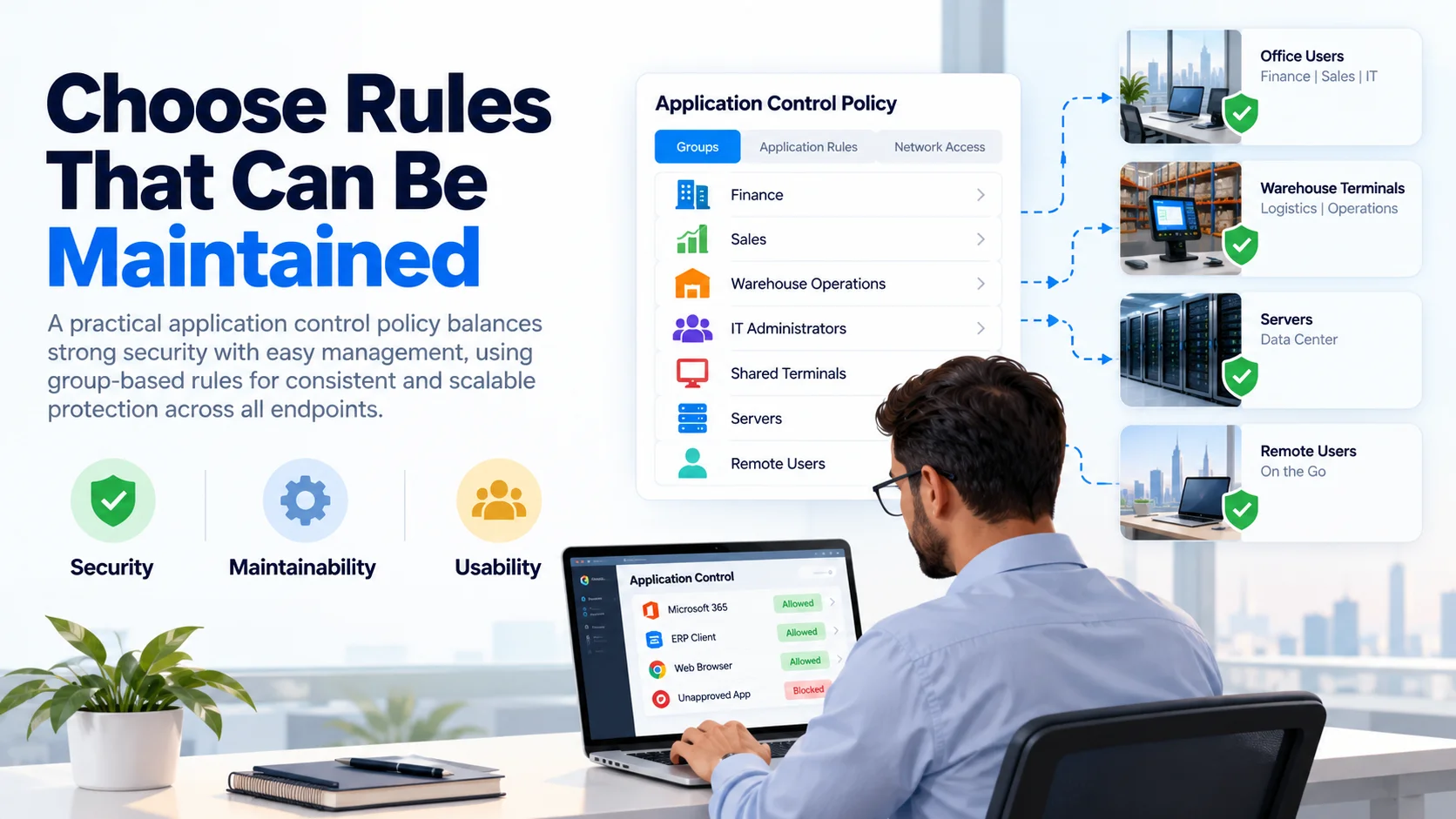
NIST specifically recommends choosing application attributes with security, maintainability and usability in mind and warns that overly simple identification methods can be weak when used alone. The policy should also be understandable. Instead of creating hundreds of exceptions for individual endpoints, organize policies around meaningful groups:
- Finance
- Sales
- Warehouse Operations
- IT Administrators
- Shared Terminals
- Servers
- Remote Users
K7 supports group- and policy-based application controls, letting administrators assign app restrictions and network access rules to defined groups. This is a massive time saver for companies expanding into Saudi Arabia. When opening a new logistics hub in Riyadh, IT shouldn’t have to configure every machine from scratch when those systems are doing the same job as existing ones. You can simply test and tweak a standard warehouse policy once, then roll it out everywhere with confidence.
File Identity, Path and Version
You have a few different options when it comes to pinpointing an application.
K7 lets you manage apps based on criteria like version, file path and MD5 checksum, according to its enterprise security documentation. Each method has advantages.
A path-based rule is straightforward to set up, but relying on file location alone isn’t foolproof if users can swap or rename files in those folders.
A hash-based rule helps identify specific file binaries. However, checksums such as MD5 are not proof that software is trustworthy, and every standard software update changes the hash, creating extra maintenance work for your team.
A version-based rule shines when an application is generally fine to use, but specific older builds carry known security risks.
For example: Adobe Reader may be approved. Adobe Reader version X may not be. That distinction lets you keep essential software while blocking outdated versions, rather than banning the tool altogether.
NIST discusses identification approaches using cryptographic hashes, publisher signatures and other attributes, where the technology and operational requirements support them. Modern hashes such as SHA-256 and validated publisher signatures provide stronger assurance than relying on MD5 alone. The rule should be strong enough to prevent easy bypass, but manageable enough that legitimate patching does not become a weekly emergency.
Execution vs Network Access
There are plenty of times an app needs to run locally, but shouldn’t be talking to external servers. That’s where network access controls come into play.
With K7, admins can allow an app to launch while cutting off its external or web connections. This is ideal for older internal tools that are still vital for operations, but have zero need to reach the internet. It also gives you a safe middle ground for apps whose local functions are totally fine, but whose phone-home behavior isn’t.
Execution control asks:
Should this application run?
Network control asks:
If it runs, where should it be able to communicate?
Treating those as separate decisions gives IT more flexibility than simply choosing between “completely allowed” and “completely blocked.”
Pilot the Policy with One User Group
First off, don’t just flip the switch and enforce a strict allowlist across 500 laptops on day one. Start small with a solid sample group instead. NIST advises running application control in monitoring mode before full enforcement. This lets you test how the setup reacts to routine software changes and updates, helping you catch operational hiccups early through a phased rollout.
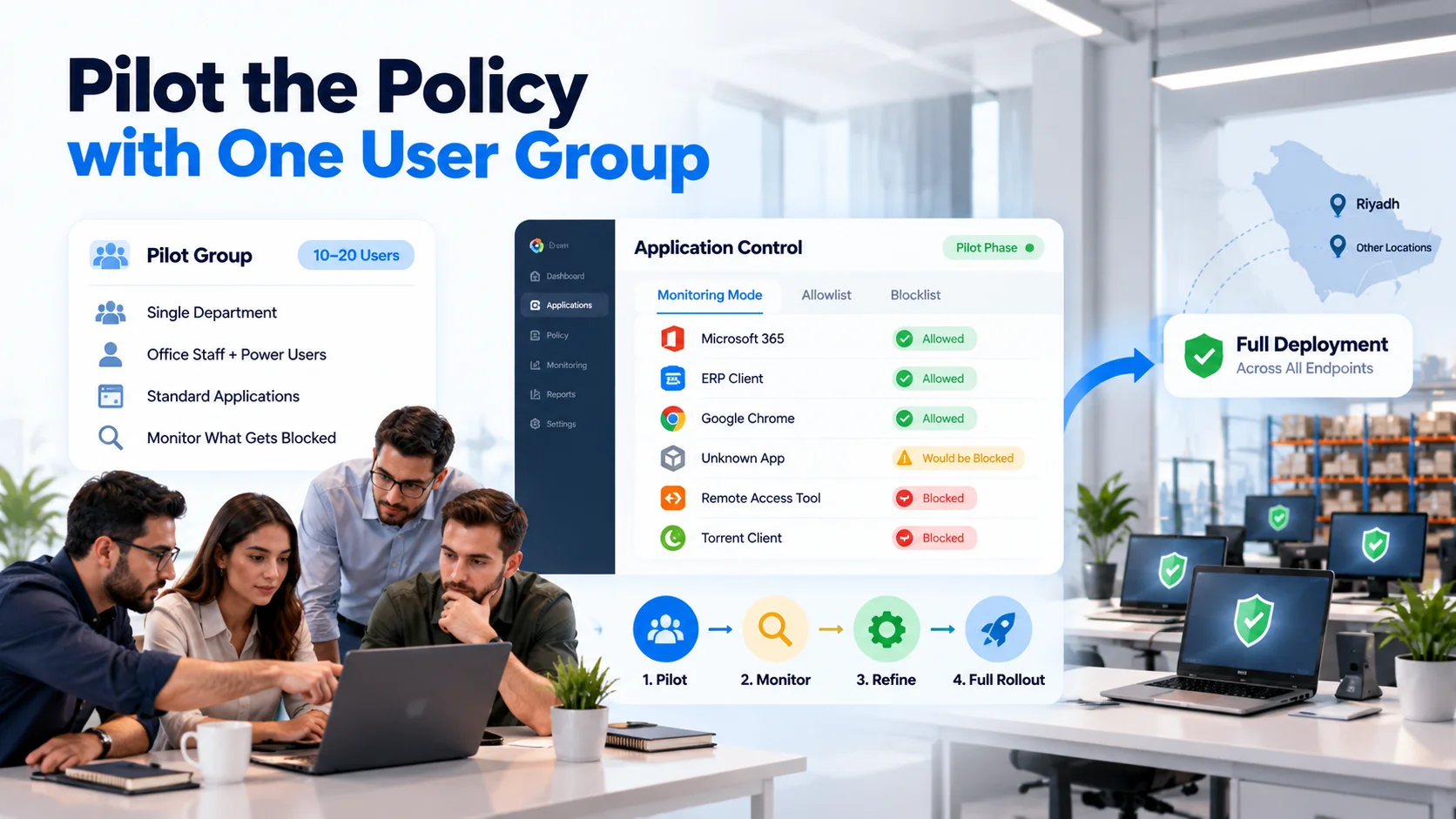
A good pilot test group might look something like this:
- 10–20 active users
- a single targeted department
- a mix of typical office staff and tech-savvy power users
- all the standard applications planned for the final rollout policy
- Always run the policy in monitoring or audit mode first.
- Take a close look at what would have been blocked.
Some flags will highlight legitimately unwanted programs. Other times, you’ll uncover essential tools the IT team simply overlooked. For instance, a logistics trial could start with a small group of warehouse terminals in Riyadh before expanding across your whole Saudi network.
If the policy starts interrupting scanning, shipping labels or warehouse-management functions, the organisation discovers that during the pilot not in the middle of a busy distribution shift.
Handle Updates and Exceptions
Let’s face it: software changes all the time. That’s easily one of the biggest hurdles when you’re setting up application allowlisting.
A trusted tool updates and gets a brand-new executable. A team starts using a new piece of software. A vendor drops an emergency patch. Or a tech needs a quick diagnostic utility for an hour. Your policy needs a clear game plan to deal with all of these moving parts.
Make sure you lay out:
- Who can request an exception?
- Who actually gives the green light?
- How fast can urgent requests be handled?
- Does the exception expire?
- Who goes back to review temporary approvals later?
If you’re using version based rules, updates can actually work in your favor. With K7, IT can block outdated app builds while allowing current, approved ones, making it much smoother to transition everyone off risky software. Whenever possible, set firm expiration dates for temporary passes.
A tool you approved for a quick one-week project shouldn’t end up quietly lingering on your standard build forever. This is super critical when working with third-party logistics and tech support teams. An outside engineer might legitimately need diagnostic or remote-access software while fixing a problem at a KSA warehouse, but that doesn’t mean that software should sit on the system indefinitely after they finish the job.
Measure Blocks Without Disrupting Work
In the end, application control isn’t about trying to rack up a high score of blocked apps. It’s really all about keeping risks down while letting everyone get their actual work done without getting in their way.
Here are a few metrics worth keeping an eye on:
- How many times did someone try to run an unapproved app and get stopped?
- Which applications generate the most requests?
- How often are safe tools getting blocked by mistake?
- How long does an exception take to approve?
- Which outdated versions still exist?
- Which teams or departments ask for the most exceptions?
- Have these software restrictions actually cut down on support tickets or unwanted tools?
Having centralized reporting is key here. K7’s cloud setup offers centralized application-control policies and reporting, so IT teams can see the real-world impact of their policies instead of enforcing rules blindly. Over time, a well tuned policy should quiet down significantly.
If hundreds of legitimate apps are getting blocked every single day, that doesn’t mean your users need a lecture it usually just means the policy itself needs a redesign.
For companies operating across Dubai, Riyadh and the wider GCC, D3 supports application control and broader endpoint security efforts as a K7 Cybersecurity Distributor. D3’s K7 lineup includes endpoint protection with centralized application, device and network controls, while its wider expansion into Riyadh strengthens its regional channel presence and technical engagement with enterprise partners.
Having that regional foundation makes a huge difference, especially as sales and logistics scale up in KSA. Security policies should naturally adapt as new devices, branch offices, warehouses and team members come onboard rather than needing to be rebuilt from scratch every time.
Application control works best when employees hardly even notice it’s running. The software they need runs normally. The tools they don’t need never get the chance to become an unmanaged security hazard. And IT can easily answer the one question that gets harder as any business grows:
What is actually allowed to run on our endpoints—and why?