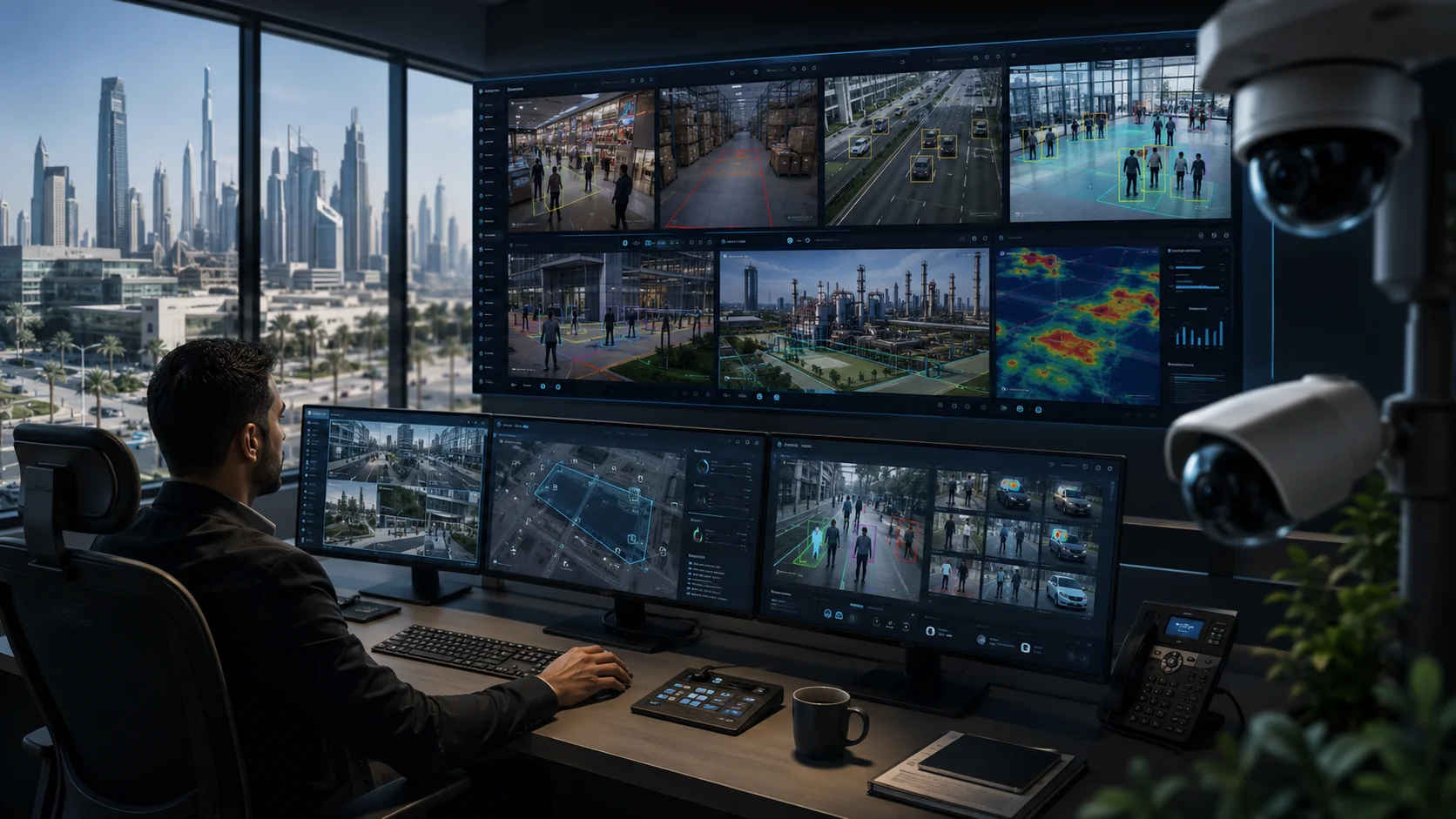
AI CCTV analytics gives these systems a way to actually understand what they’re looking at in real-time. Instead of just flagging every little movement, the system is smart enough to tell the difference between a person, a car, or just some leaves blowing in the wind. It can spot unusual behavior, help you search through recordings using simple details, and let your security team know the second something important happens.
Your cameras are doing much more than just gathering video now; they’re providing useful insights that help keep everything running smoothly and safely every day.
This is a big deal for businesses here in the GCC because surveillance is getting more complex. If you’re managing hundreds of cameras across offices, warehouses and retail spots, it’s just not humanly possible for anyone to watch every single screen at once.
AI does not remove the need for trained operators. Its real value is helping them focus their attention where it is needed.
What AI Analytics Adds to Traditional CCTV
For the longest time, traditional CCTV has been pretty reactive. It basically just sits there recording video and showing live feeds, waiting for a human to go back and find footage after something has already gone wrong.
That’s still useful, of course, but it puts almost all the pressure on the people watching the screens.
An operator has to either catch an incident right as it happens or have a good guess of the time and place to even start searching the archives. When you’ve got a massive control room with dozens of different scenes fighting for your attention, it’s incredibly easy to blink and miss something important.
This is where AI analytics comes in, it adds a layer of context to the whole system.
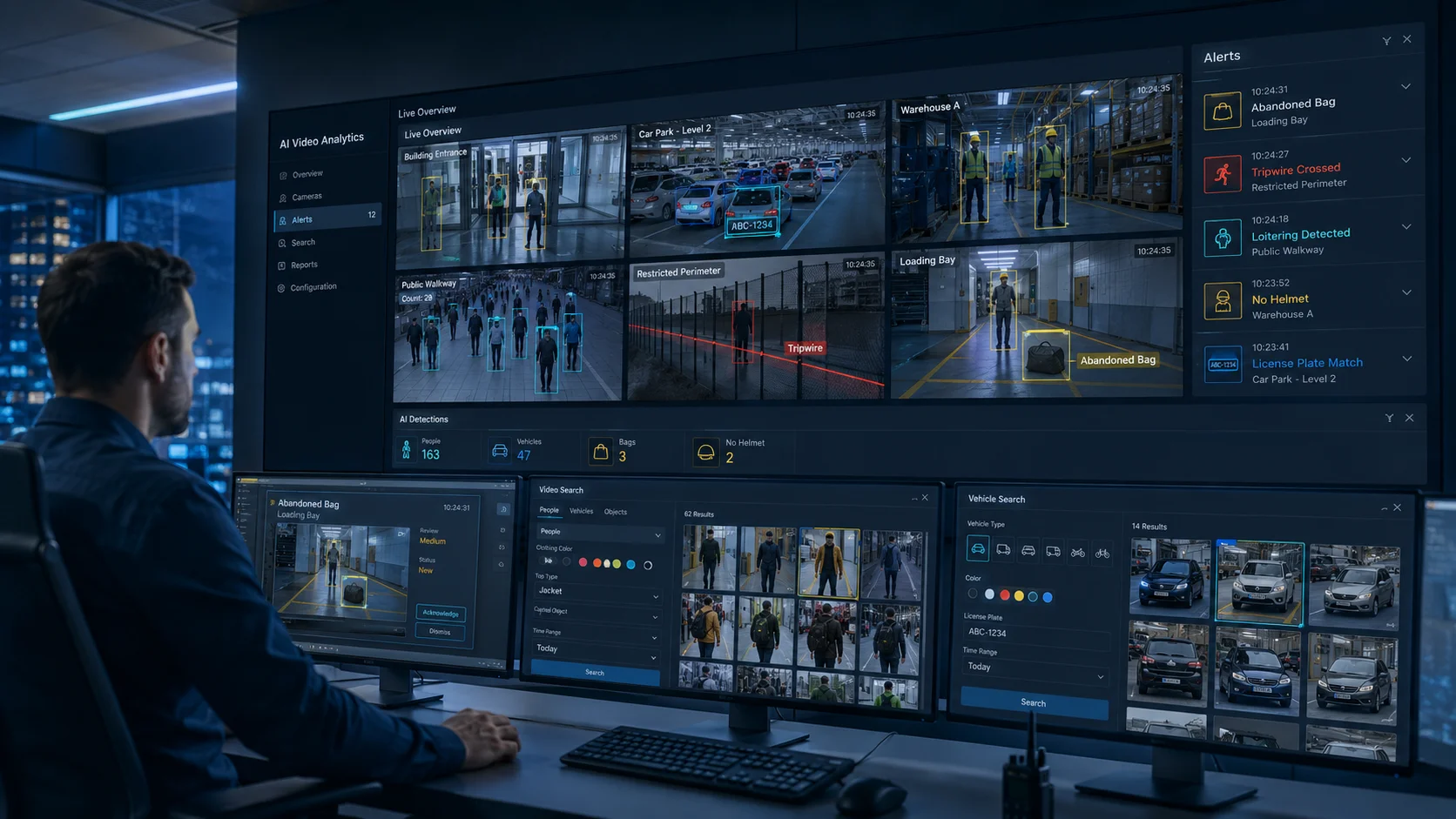
The software analyses frames from the video stream and generates metadata about what it sees. Depending on the camera, recorder and analytics platform, it may classify an object as a human or vehicle, detect a line crossing, recognize prolonged loitering or identify that an object has been removed.
Many Tiandy AI NVR platforms, for example, support functions including perimeter detection, tripwire rules, human and vehicle classification, people counting, heatmaps, face search, loitering detection and object-abandonment alerts.
This completely changes the game for surveillance in three major ways.
First, it alerts you while the event is actually happening. If someone walks into a restricted yard at 2 a.m., you get a notification immediately, rather than discovering it the next morning while scrolling through hours of old footage.
Second, it reduces the amount of irrelevant activity an operator must investigate. Basic motion detection may trigger because of shadows, rain, animals, trees or changing headlights. Human and vehicle classification helps the system focus on objects that are more likely to matter.
Third, the metadata makes recorded video easier to search. Instead of watching an entire afternoon of footage, an investigator may be able to narrow the results to people entering a particular area or vehicles crossing a defined point.
This is where smart surveillance moves beyond just security. These same tools can help businesses understand things like foot traffic, how busy their loading bays are and where operational bottlenecks are slowing things down.
At the end of the day, the technology isn’t useful just because it has “AI” in the name. It becomes valuable when you use it to answer real business questions.
What are you trying to detect? Who needs the alert? How fast do they need to react, and what happens once the event is confirmed?
If you don’t have those answers, even the most advanced system just becomes a source of endless notifications that everyone eventually starts to ignore.
Detection, Classification, and Search Use Cases
AI video analytics isn’t just one thing—it’s a broad term for a collection of different capabilities. Understanding the differences helps you avoid buying features you don’t need or expecting the system to perform a task it wasn’t built for.
- Detection asks whether a defined event has happened. Examples include a person crossing a virtual boundary, a vehicle entering a restricted lane or an object remaining in a location for too long. Detection is normally rule-based: the organization defines the area, schedule and behavior that should trigger attention.
- Classification is the next step up. It figures out what actually caused that alarm. Traditional motion sensors often react to anything that moves, like shadows or swaying trees. AI classification is smart enough to tell the difference between a person, a vehicle and random background movement. This is a game changer for perimeter security because it filters out those annoying false alarms. For instance, many Tiandy AI recorders can specifically track things like tripwires, loitering or human versus vehicle movement.
- Recognition tries to pin down who or what is in the frame. This could mean using face recognition to match someone against a database or identifying a vehicle by its license plate. Just keep in mind that this is more sensitive technology. It relies heavily on image quality and needs a clear, legal and justified purpose. It’s a tool for matching, but it’s not infallible proof on its own, so it requires human oversight.
- Search analytics is a huge time-saver for reviewing footage after the fact. Instead of manually scanning hours of video to find an incident, you can search for specific things like a person wearing a certain color, someone carrying a bag or a vehicle in a specific loading zone. Some Tiandy AI NVRs even let you search by attributes like safety helmets or duty status, which makes digging through archives infinitely easier.
Other practical use cases include:
- Detecting an abandoned bag in a public area
- Counting people entering or leaving a location
- Detecting crowd formation in a defined zone
- Verifying whether protective equipment is being worn
- Identifying vehicles entering outside approved hours
- Following movement between connected cameras
Each analytic rule should have a clear operational response.
An alert about a person crossing an external perimeter may require an immediate operator review. A people-counting report may be reviewed weekly by facilities or retail management.
A face-match alert may require a trained employee to examine the image and confirm the context before any action is taken.
The technology can prioritize an event. Responsibility for the decision remains with the organization.
Retail, Logistics, Education and Smart City Applications
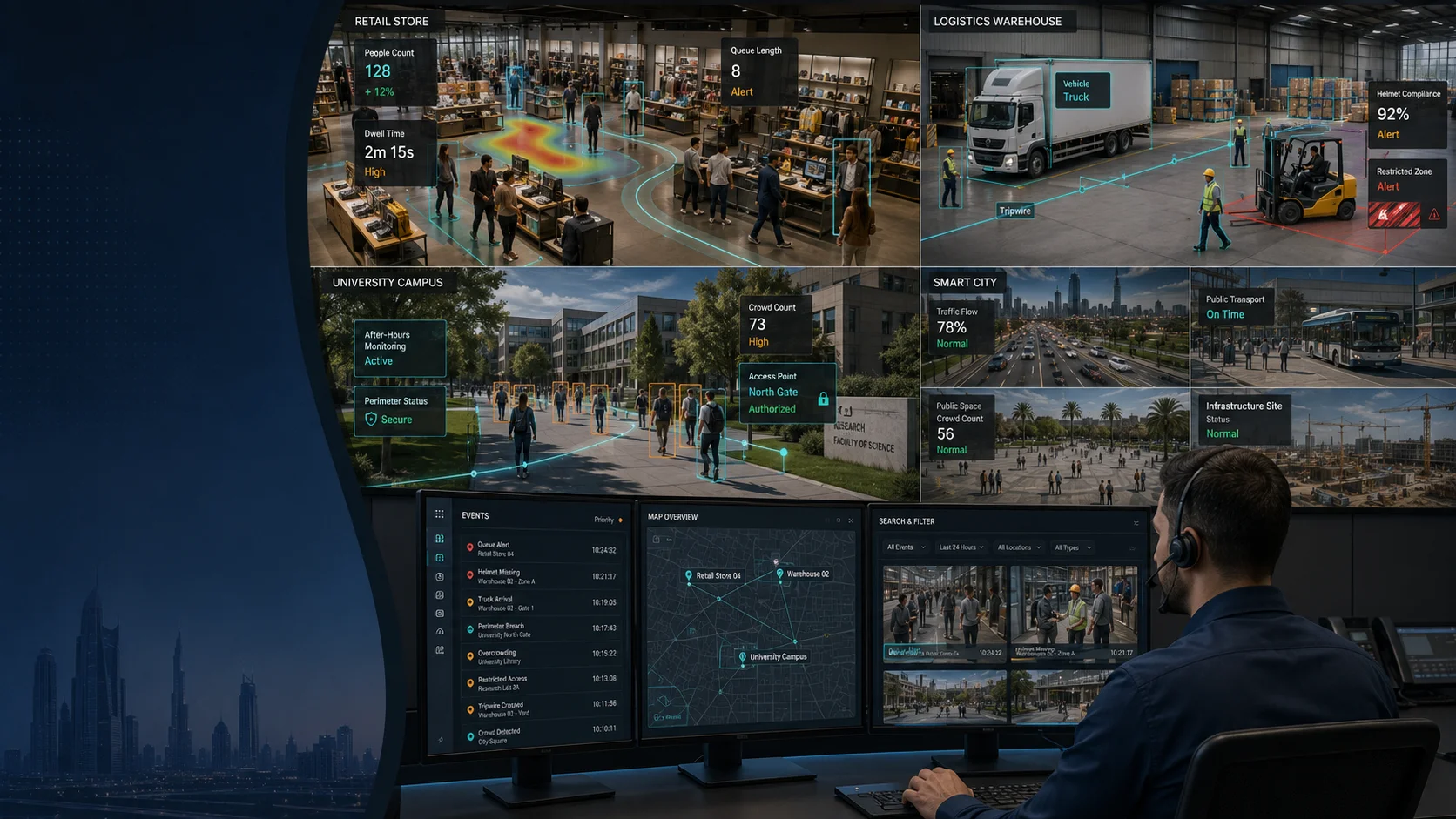
AI analytics starts making a lot more sense when you look at how it actually works on the ground in different industries.
In retail, CCTV is traditionally associated with theft prevention and incident evidence. AI can extend its role by helping managers understand how people move through a store.
People counting can show differences between busy and quiet periods. Heatmap analytics can indicate which areas receive the most attention. Queue monitoring may help teams respond before checkout lines become unmanageable.
These insights should not be confused with perfect customer intelligence. They are indicators based on camera views and configured analytics. However, when combined with sales, staffing and store-layout information, they can support better decisions.
In logistics and warehousing, the focus shifts toward efficiency and site control.
Security needs to keep an eye on the perimeter and loading bays, while the operations side wants to verify delivery times or check if anyone’s wandering into restricted zones. It’s about having eyes everywhere at once without needing a human to watch every single screen.
By using human and vehicle classification, you can cut out those annoying false alarms that usually plague perimeter fences. You can set up “tripwires” to flag movement in areas that should be empty and use vehicle analytics to quickly find out exactly when a truck arrived at the gate.
There is also a big safety angle detecting whether people are wearing helmets or spotting unusual behavior in a crowd. Just remember that these tools are there to support your supervisors and safety protocols, not replace them entirely.
In education, schools and university campuses must balance security with privacy and the need to maintain a welcoming environment.
Useful applications may include after hours perimeter monitoring, detecting entry into restricted facilities, monitoring overcrowding and improving incident search across a large campus.
More sensitive functions, especially face recognition, require a much stronger justification. The organization must consider the age of the people being recorded, the purpose of the system, access to the information and the consequences of an incorrect match.
For smart city surveillance, scale becomes one of the biggest challenges. Municipal environments may include roads, transport locations, public areas, infrastructure sites and remote facilities. The value of analytics is not simply adding more cameras; it is helping control rooms identify meaningful events across a very large field of view.
The D3 Tiandy portfolio supports GCC organizations with intelligent detection, traffic monitoring, centralized management, perimeter protection and multi location visibility across smart cities, industrial sites and large campuses.
Specific objectives make it possible to select the right camera, position it correctly, configure the analytics and measure whether the system is working.
Accuracy, Lighting, and Camera Placement
People often talk about AI like it’s a magic fix for a bad surveillance setup, but that’s just not true.
Your analytics are only as good as the video coming in. If a camera is in the wrong spot, even the smartest software in the world is going to struggle to give you accurate results.
To get it right, you have to look at a few practical factors.
Lighting is one of the most important. Strong backlighting can turn a person into a silhouette. Low light may introduce noise and reduce visible detail. Reflections, headlights and fast transitions between sunlight and shade can make classification more difficult.
Tiandy’s camera technology is designed to capture images in very low-light environments, with selected models combining low illumination, wide dynamic range and infrared support.
However, a low-light specification alone does not guarantee that every analytic function will perform equally well. The full scene must be tested under the actual conditions expected during the day and night.
Camera angles are just as important.
A camera mounted high up might be great for seeing the whole room, but it’ll probably miss the clear facial angles needed for recognition. License plate cameras and people-counting setups also have their own specific requirements for distance and speed.
Image size matters, too. It’s not enough to just see a car in the distance; the object has to take up enough pixels for the AI to actually do its job.
Keep in mind that simple detection is easier than full recognition. Your system might tell you a person is there, but if the image quality isn’t high enough, it won’t be able to tell you who they are.
Obstructions are another obstacle. Things like shelves, pillars or even a sudden crowd can block the view. A scene that looks clear during a quiet install might become useless during a busy workday.
Even the US National Institute of Standards and Technology has pointed out how much lighting and focus affect performance, which just goes to show how vital image quality is.
Before accepting an AI CCTV deployment, businesses should test it using real site conditions:
- Daylight, darkness and artificial lighting
- Quiet and busy operating periods
- Expected clothing and protective equipment
- Different vehicle types and movement speeds
- Weather, dust and reflective surfaces
The team should also measure false positives and false negatives.
A false positive occurs when the system raises an alert for an event that does not meet the intended rule. A false negative occurs when the event happens but the system fails to detect it.
No serious AI deployment should rely only on a demonstration conducted in ideal conditions. Accuracy must be evaluated at the site, with the final camera positions and settings.
Privacy and Responsible Deployment
Just because your system has the power to analyze video doesn’t mean you have a free pass to use every single feature it offers.
Surveillance footage is full of personal data. Things like faces, how people behave, where they go and what they drive can become very sensitive very quickly, especially if that info is being used to identify or profile someone.
Under the UAE Personal Data Protection Law, any organization handling personal info has to take things like lawful processing, privacy, security, and the actual rights of the people being recorded very seriously.
Rules can change depending on which GCC country you’re in or what industry you’re in, so it’s always a smart move to get your legal, compliance and IT security teams involved before you switch on any sensitive analytics.
Using these tools responsibly starts with knowing exactly why you’re using them in the first place.
A business needs to be able to explain why an analytic is necessary, what specific problem it’s solving and why they couldn’t just use a less unwelcome way to get the same result.
Once you have that purpose, keep your data collection strictly tied to it. If you have a perimeter camera to spot trespassers, you probably don’t need facial recognition. If you’re just counting heads in a shop, you definitely don’t need to know exactly who those people are.
You also need to keep a tight lid on who can access what. Just because an employee can see a live CCTV feed doesn’t mean they should have the power to search for faces, download clips or manage watchlists.
For higher-risk use cases, organizations should consider a privacy or data-protection impact assessment. This helps document the purpose, risks, safeguards, retention period, access controls and expected effect on individuals.
The NIST AI Risk Management Framework points out that trustworthy AI should be reliable, safe, secure and transparent while keeping privacy and bias in check.
And remember, human oversight is non-negotiable whenever an alert could lead to a big decision.
If a system flags a facial match, treat it as a “maybe” that needs checking, not a final fact. Operators need to look at the image quality and the context before they take any further action.
A responsible policy should also cover:
- The approved purpose of each analytic
- Who can access analytics and recordings
- How long data and metadata are retained
- How watchlists are created and reviewed
- How false alerts are documented
- When a human must verify the result
Responsible use protects more than privacy. It protects the credibility of the surveillance programmed itself.
Buyer Checklist for AI Surveillance
Before you dive headfirst into a new AI surveillance setup, it helps to take a step back. It’s easy to get distracted by a long list of flashy features, but you’ll get much better results if you focus on how the technology will actually work in your day-to-day operations. Here’s what you should really be thinking about:
- What are you actually trying to achieve?
Start with the problem, not just the tech. Define the specific events or risks you’re worried about so you know exactly what kind of response you need when something happens. - Which analytics are genuinely necessary?
Separate essential capabilities from features that may never be used. - Where is the “brain” of the system located?
Whether the analytics run on the camera itself, a local recorder, or in the cloud changes everything from your hardware costs to how fast the system reacts. - Can the system classify people and vehicles?
This can significantly reduce false alarms in perimeter and motion-detection applications. - How easy is it to find footage when you’re in a rush?
Make sure you can search by the things that matter, like clothing color, vehicle types, or specific behaviors, rather than just scrolling through timelines. - Can the cameras handle the real lighting conditions?
Test entrances, outdoor areas, warehouses and low-light locations at different times. - Is the camera actually pointing at the right thing?
A camera mounted for a “bird’s eye view” might be useless for capturing faces or license plates. Match the placement to the specific task. - What happens after an alert?
Define who receives it, how it is verified and what response is expected. - How are you measuring success?
Decide on what counts as “accurate” before you sign off. You need to know how many real events it catches and how many false alarms it lets through. - Can the solution scale across multiple sites?
A growing business should be able to manage branches, warehouses and remote locations from a consistent platform. - How are analytics and recordings protected?
Review encryption, access control, audit logs, user permissions, retention and cybersecurity requirements. - Have you built in privacy from day one?
Only turn on the features you have a clear legal reason to use. If you don’t need facial recognition to secure a perimeter, keep it turned off. - Does the storage design support analytics?
AI-enabled systems may generate additional metadata, alerts and search workloads. Storage and recorder performance must be sized accordingly. - Can the supplier support deployment after the sale?
AI surveillance requires camera selection, positioning, configuration, testing, training and ongoing optimization.
D3 helps organizations across Dubai and the GCC plan and deploy enterprise-grade Tiandy surveillance systems around real operational requirements, not simply around the number of cameras on a quotation. Its regional support covers product selection, system sizing, multi site architecture, storage planning and technical deployment guidance.
AI CCTV analytics does not make a surveillance system intelligent by itself.
Intelligence comes from matching the right technology to a clear purpose, placing the cameras correctly, testing the system honestly and giving trained people the information they need to act.
When those pieces come together, CCTV stops being a passive archive of yesterday’s events.
It becomes a practical source of operational intelligence for what is happening now.