Why UPS Sizing Is More Than Total Wattage
Most businesses start by looking at total power consumption. It’s a necessary figure, but honestly, it’s just the tip of the iceberg.
Think about a data center with ten servers, each rated at 1,000 W. On paper, that looks like a 10 kW requirement. In reality, those power supplies rarely ever run at their absolute maximum capacity.
If your actual setup usually pulls around 5.8 kW, sizing your UPS based only on those “nameplate” maximums leads to a lot of wasted, expensive capacity.
But the opposite mistake is even riskier: buying a UPS that only covers your current load with no breathing room for sudden peaks or future growth.
The opposite mistake is more dangerous: measuring the current load and purchasing a UPS with almost no capacity left for growth or temporary peaks.
A better approach starts with both measured consumption and planned capacity.
Existing facilities should use information from intelligent PDUs, current monitoring systems, UPS logs or electrical measurements where possible. New projects may need to begin with equipment specifications and realistic utilization assumptions, then validate those assumptions during commissioning.
The UPS must also support loads that do not behave perfectly.
Servers, storage systems, network switches and other electronic devices use switching power supplies. Their behavior can create peak currents and other electrical characteristics that have to remain within the UPS manufacturer’s limits.
Future growth is another consideration. Eaton’s UPS sizing guidance, for example, recommends choosing capacity above the immediate requirement and uses at least 15% as a general allowance for expected growth, while noting that actual expansion plans may require more.
That 15% should not become another universal rule.
A stable network room with no expansion planned may require one margin. A growing data center expecting another rack within 12 months may require considerably more.
The design should therefore ask:
- What is connected today?
- What is the measured peak load?
- What equipment will be added?
- What happens if a power module fails?
- How much load must remain protected during maintenance?
Those questions often change the UPS requirement more than the headline wattage.
kVA, kW, Power Factor, and Runtime
When you look at UPS specs, you’ll usually see two different numbers: kVA and kW.
While they’re definitely related, it’s a mistake to think they mean the same thing.
kW (kilowatts) is what we call “real power”. Basically, the actual juice available to do the heavy lifting for your equipment.
kVA (kilovolt-amperes) is “apparent power,” which includes the total energy flowing through the system.
The link between the two is the power factor and the math is pretty straightforward:
kW = kVA × power factor
So, if you have a 10 kVA UPS with a power factor of 0.9, you’re actually only getting about 9 kW of usable power.
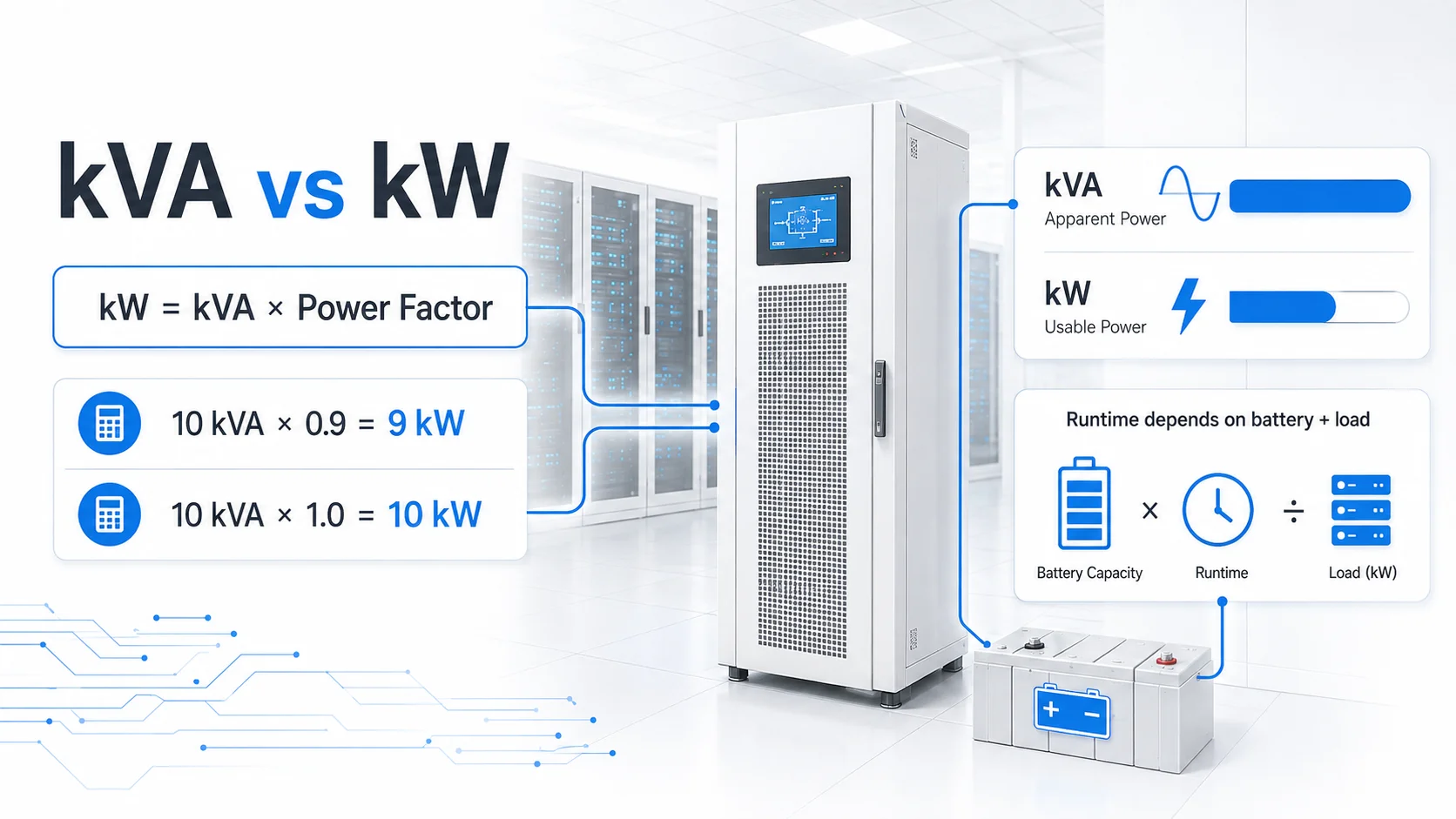
On the other hand, a 10 kVA unit with a “unity” power factor (1.0) lets you use the full 10 kW.
This is why selecting a UPS only by its kVA label can create problems.
Tecnoware’s EVO DSP PLUS PF1 range, for example, includes 6 kVA/6 kW and 10 kVA/10 kW models with power factor 1. The systems use online double-conversion technology and are positioned for LAN, data center and industrial applications.
For larger three-phase UPS requirements, the EVO DSP PLUS TT PF1 platform includes 10, 20 and 30 kVA configurations delivering corresponding 10, 20 and 30 kW active-power ratings.
Capacity, however, still does not tell you runtime.
A 20 kW UPS doesn’t automatically give you more backup time than a 10 kW one. Runtime is all about your battery setup and how much equipment you’re actually running on it.
Naturally, the harder you push the load, the faster those batteries will drain.
That’s why saying a UPS lasts 30 minutes doesn’t mean much unless you also know how much equipment it’s powering during that time.
For any business, the conversation about runtime should really start with one question:
What’s the plan once the power goes out?
If you have a generator that kicks in within seconds, the UPS just needs to bridge that short gap and maybe cover you if the generator fails to start.
Without a generator, you need enough battery time to shut everything down properly without crashing your systems.
Some applications may require significantly longer autonomy.
External battery cabinets allow the runtime to be extended without unnecessarily increasing the UPS power rating. Tecnoware’s enterprise online systems support external Battery Box configurations for extended autonomy.
Runtime should therefore be calculated using the manufacturer’s battery data at the expected load rather than a simple theoretical watts-times-hours calculation.
Online UPS vs Line-Interactive UPS
You don’t always need the most advanced architecture for every piece of gear. Usually, you’ll be choosing between two main types: line-interactive and online double conversion.
A line-interactive UPS is like a smart filter. It mostly feeds power directly from the wall but uses automatic voltage regulation (AVR) to smooth out minor dips or spikes without touching the battery. If the power actually cuts out, it quickly switches over to the battery and inverter.
This setup is great for office PCs, individual routers, or small setups where a tiny, millisecond-long gap in power won’t crash your hardware. For instance, Tecnoware’s ERA PLUS line-interactive range handles these transitions in about 2 ms fast enough for most desktop equipment.
But for mission critical gear, you want an online UPS. This system is always running the power through a double conversion process: it turns incoming AC into DC and then back into a perfect AC signal for your equipment. Because the load is already running through the inverter, there is no “switching” involved.
As Vertiv points out, this gives you total isolation from any messiness on the grid. Systems like Tecnoware’s EVO DSP PLUS three-phase range offer a 0 ms transfer time, meaning your servers never even feel the power flicker.
In short: if it’s a single office PC, line interactive is fine. But for virtualization hosts, core switches and data center infrastructure, you need online double conversion. Your decision should be based on how much downtime you can afford, not just the price tag on the box.
Battery Cabinets, Bypass, and Redundancy
Once the basic UPS capacity is selected, the next question is what happens around it.
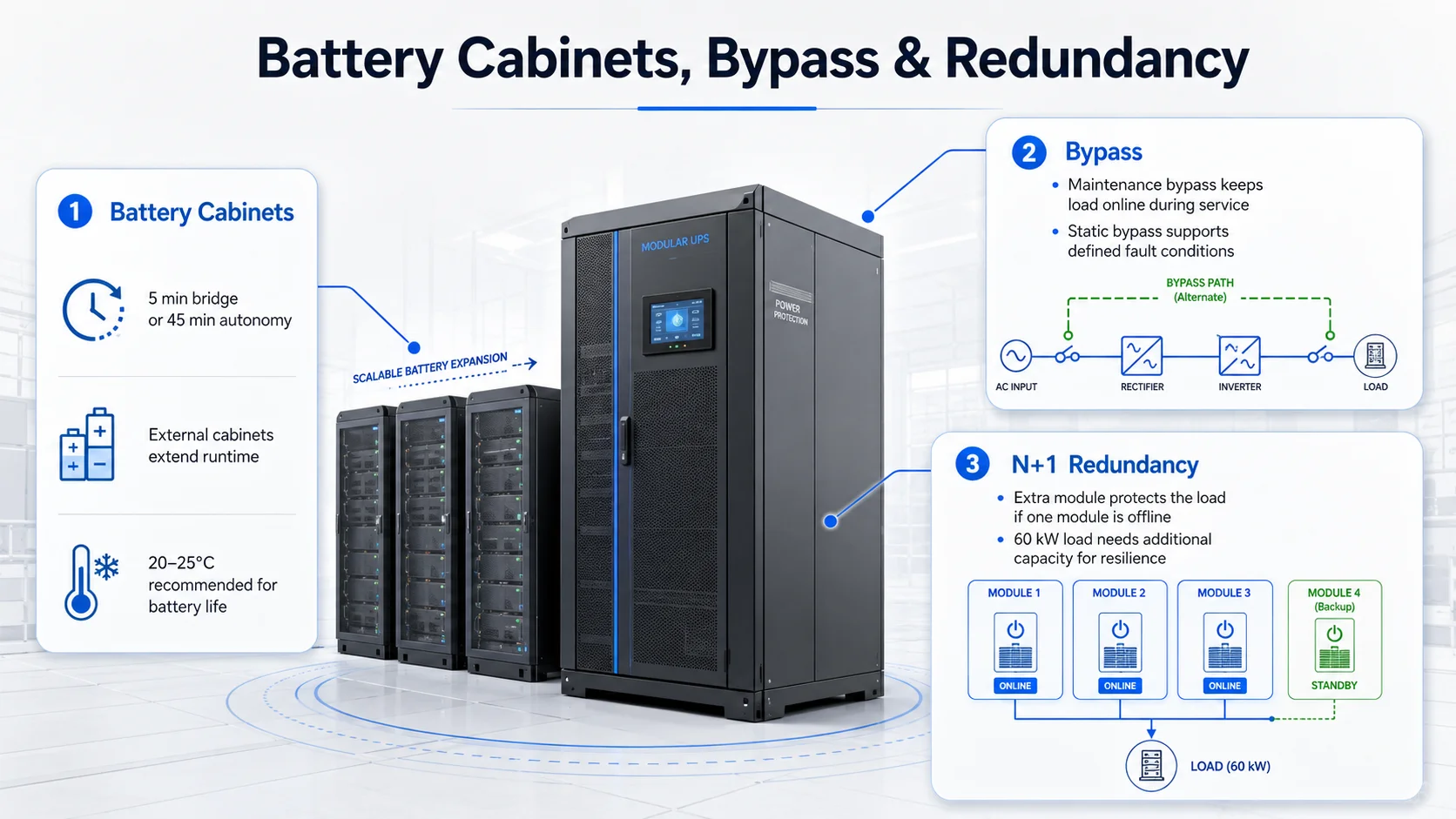
The battery system determines how long the load can remain supported when the normal source fails.
A business that needs five minutes while a generator starts has a very different battery requirement from one that needs 45 minutes for controlled operations.
Tecnoware’s current modular data center UPS portfolio supports scalable battery configurations, including external battery architecture designed to extend backup time and simplify battery maintenance.
Battery planning should also consider environment and lifecycle.
Tecnoware specifies 20–25°C as the recommended operating range for longer battery life on several enterprise UPS ranges. This becomes particularly relevant in GCC installations, where UPS and battery rooms require properly designed cooling rather than relying on the wider building environment.
Then there is bypass.
A maintenance bypass provides an alternative electrical path so the UPS can be serviced without necessarily switching off the critical load. Static bypass provides another path under defined operating or fault conditions.
For environments where downtime is unacceptable, these are not minor accessories. They are part of the maintenance strategy.
Tecnoware’s larger EVO DSP PLUS systems include static and manual maintenance bypass.
Redundancy takes the design further.If the load requires three UPS modules to operate, an N+1 configuration adds another module so the system can continue supporting the load if one module becomes unavailable.
Tecnoware’s EVO DSP PLUS Modular architecture supports N+1 and N+X redundancy approaches and uses modular power architecture intended to simplify expansion and maintenance.
This is a big deal because redundancy changes your math.
Just because you have a 60 kW load doesn’t mean a 60 kW system is enough. If you want N+1 protection, you need enough total capacity to handle that full 60 kW load even if one module is offline.
Basically, you can’t calculate your capacity and your resilience in silos—you have to think about them together.
Network Shutdown and Monitoring
You shouldn’t just tuck your UPS away and forget about it until the power actually fails.
Today’s systems give you a lot of useful data, like how much load you’re carrying, the health of your batteries and any active alarms. You really want to plug that information into your regular monitoring tools so you always know what’s happening.
In a server room, having that network connection means your IT team gets a heads up early on, rather than finding out only when the batteries are nearly dead.
Tecnoware handles this with SNMP connectivity and management tools that send out alerts and can even trigger an automatic shutdown. Their software is designed to save your files and shut down the operating system properly before the power runs out.
This is crucial because a UPS isn’t an infinite power source. If you have 20 minutes of battery and no generator, but nobody notices the power is out until minute 18, you’re in trouble. You won’t have enough time to safely close down your databases and virtual machines.
It’s much better to have a set plan in place:
First, the power goes out. The UPS immediately supports the load.
Monitoring tools immediately alert your IT and facilities teams.
You give the generator a specific window of time to start up.
If the generator doesn’t take over, you start shutting down the non-critical systems first.
Finally, you follow an organized sequence to shut down your critical apps before the battery hits a dangerous level.
Your monitoring should tell you more than just “on” or “off.” You need to see the load percentage, estimated runtime, bypass status, and even the temperature in the room.
For larger installations, these alerts can feed into network or infrastructure monitoring platforms through SNMP, Modbus or dry-contact interfaces depending on the selected UPS.
UPS Sizing Checklist
Before you sign off on your UPS project, take a second to run through this reality-check list:
Get the real numbers.
Don’t just read the labels on the back of your servers. Check your PDU or UPS logs to see what you’re actually pulling day-to-day.
Record both kW and kVA requirements.
Make sure neither the real-power nor apparent-power limit of the UPS will be exceeded.
Check the power factor.
Remember that two UPS units with the same kVA might have very different usable kW. Make sure yours can actually handle the work.
Understand peak and startup behavior.
Review the manufacturer’s overload and crest-factor specifications for the intended load.
Include realistic growth.
Account for planned servers, switches, storage and rack expansion rather than filling the UPS from the first day.
Pick your runtime strategy.
Are you just bridging the gap until a generator takes over, or do you need enough battery to walk through a full, controlled shutdown?
Size batteries for your actual load.
The “math on paper” often lies. Use the manufacturer’s specific charts for your expected load to see how long you’ll really last.
Use the right tech for the job.
Line-interactive is fine for basic office gear, but for the core stuff that keeps your business alive, stick with online double conversion.
Match your phases.
Once you get into serious data center territory, single-phase power usually won’t cut it. Three-phase is often the way to go.
Define redundancy properly.
If the requirement is N+1, confirm that the remaining modules can carry the full critical load after one module is unavailable.
Include maintenance bypass.
The design should allow planned maintenance without creating unnecessary downtime.
Review generator compatibility.
UPS input characteristics, generator capacity and switching behavior should be engineered together.
Mind the environment.
Batteries hate heat. Make sure your battery room has its own cooling and enough space for someone to actually get in there and work.
Add network monitoring.
SNMP or other management interfaces should provide load, alarm and battery information to the team responsible for the infrastructure.
Define the shutdown sequence.
Know which workloads shut down first and how much battery runtime must remain when the process begins.
Test the complete scenario.
Do not stop at commissioning the UPS. Test power failure, generator transition, alarms, bypass and controlled shutdown under an appropriate managed procedure.
D3 supports businesses and infrastructure partners across the GCC with Tecnoware UPS and power protection solutions, covering professional rack UPS systems, online double-conversion platforms and modular solutions for mission-critical data center environments. D3’s role is to help connect the UPS specification to the real application: load, runtime, redundancy, battery expansion, network management and future growth.
Buying significantly more UPS capacity than the business requires is not automatically good design.
Buying too little is obviously worse.
The right design sits between those two mistakes. It begins with the real IT load, then adds the runtime, resilience and growth the organization can justify.
Because at the end of the day, we aren’t just trying to match a number on a spreadsheet.
We’re making sure that when the lights go out, your business stays on.