From the outside, a business network might look pretty simple. People get on the Wi-Fi, phones connect, cameras stream and servers do their job so everyone assumes the switches in the rack are just passing traffic along.
As the network expands, though, an important question comes up:
Should your switches just link devices together or should they also handle routing between networks?
That’s really what the Layer 2 vs Layer 3 Switch debate comes down to.
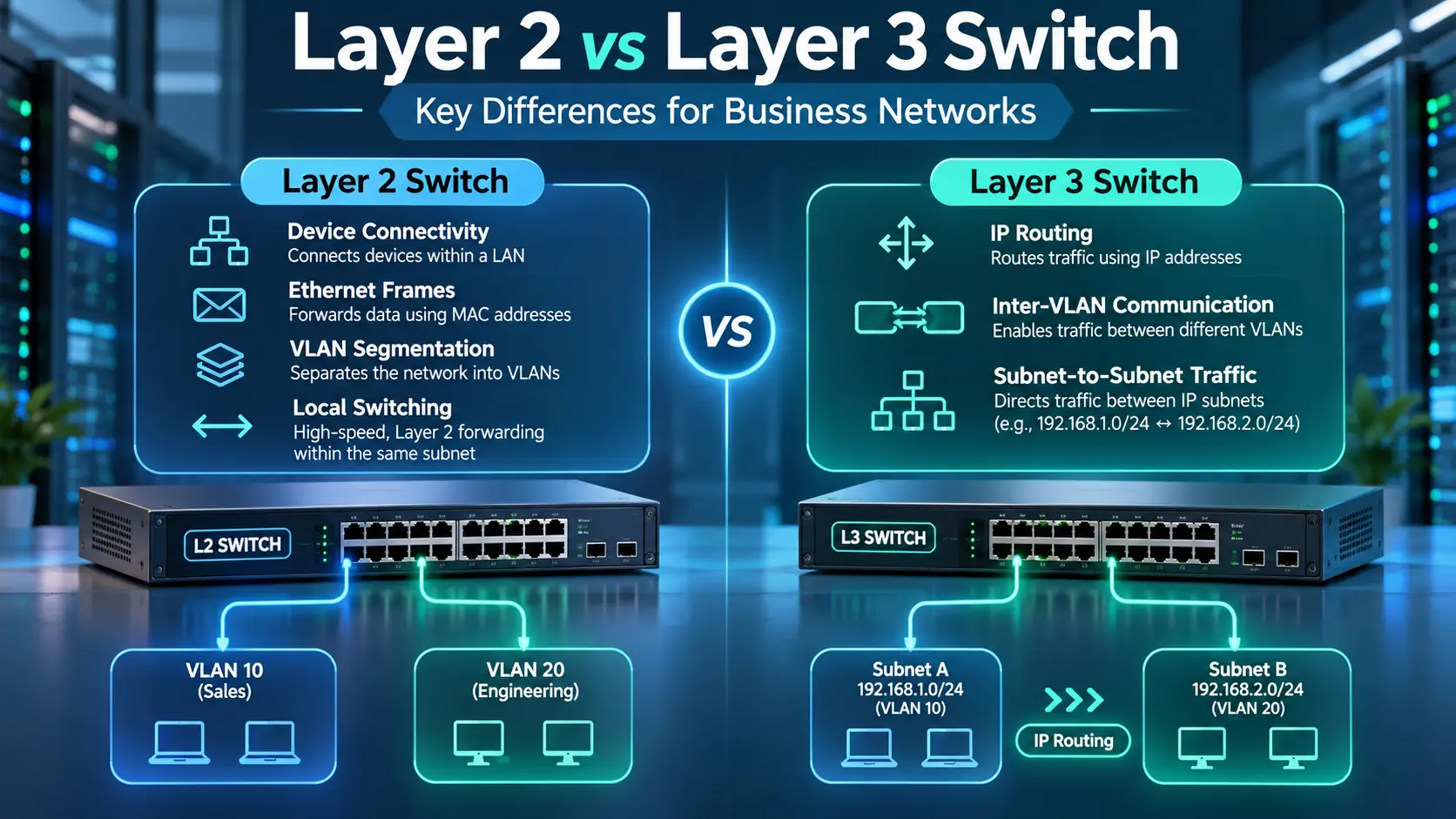
A Layer 2 switch mainly forwards Ethernet frames within the same segment using MAC addresses. A Layer 3 switch adds IP routing into the mix, letting traffic move between different subnets and VLANs without relying constantly on a separate router. Both play a role in modern business networks.
In the Layer 2 vs Layer 3 Switch decision, a small office may need only reliable Layer 2 access switching. A large campus, data centre or logistics facility may benefit from Layer 3 switching closer to the users and devices so traffic can move efficiently between departments, operational systems and service networks.
For growing businesses across Dubai, Riyadh and the broader GCC, this matters a lot in multi-site setups. Take a logistics hub in Riyadh it might have employee laptops, Wi-Fi, CCTV, warehouse scanners, VoIP, guest access and servers that all need to be segmented and managed separately.
So the real question isn’t simply “is Layer 3 better?”
Instead, ask yourself:
Where should switching end and routing take over in your network?
What Is a Layer 2 Switch?
Simply put, a Layer 2 switch lives at the data-link layer of your network. Its main job comes down to figuring out MAC addresses and pushing Ethernet frames right where they need to go.
Whenever a device sends data, the switch checks the target MAC address against its internal lookup table. If it sees a match, it sends that frame straight to the correct port instead of blasting it out to every device on the wire. That targeted forwarding is really the bread and butter of efficient Ethernet switching. You’ll also typically rely on Layer 2 switches to handle standard functions like:
- VLAN creation
- Port isolation
- Link aggregation
- Spanning Tree
- Loop prevention
- MAC address learning
- Trunk links
- LLDP
- Basic segmentation
In fact, H3C’s current Layer 2 switching configuration guidance maps out features like MAC tables, link aggregation, port isolation, VLAN setup, loop detection and spanning tree directly under its core Layer 2 architecture. This is enough for many access-layer use cases. Take a typical branch office with:
- 40 employee laptops
- 8 IP phones
- 5 wireless access points
- 12 CCTV cameras
One or more managed Layer 2 switches can keep all those devices organized into distinct VLANs while supplying physical connectivity, provided there are enough ports and sufficient PoE capacity.
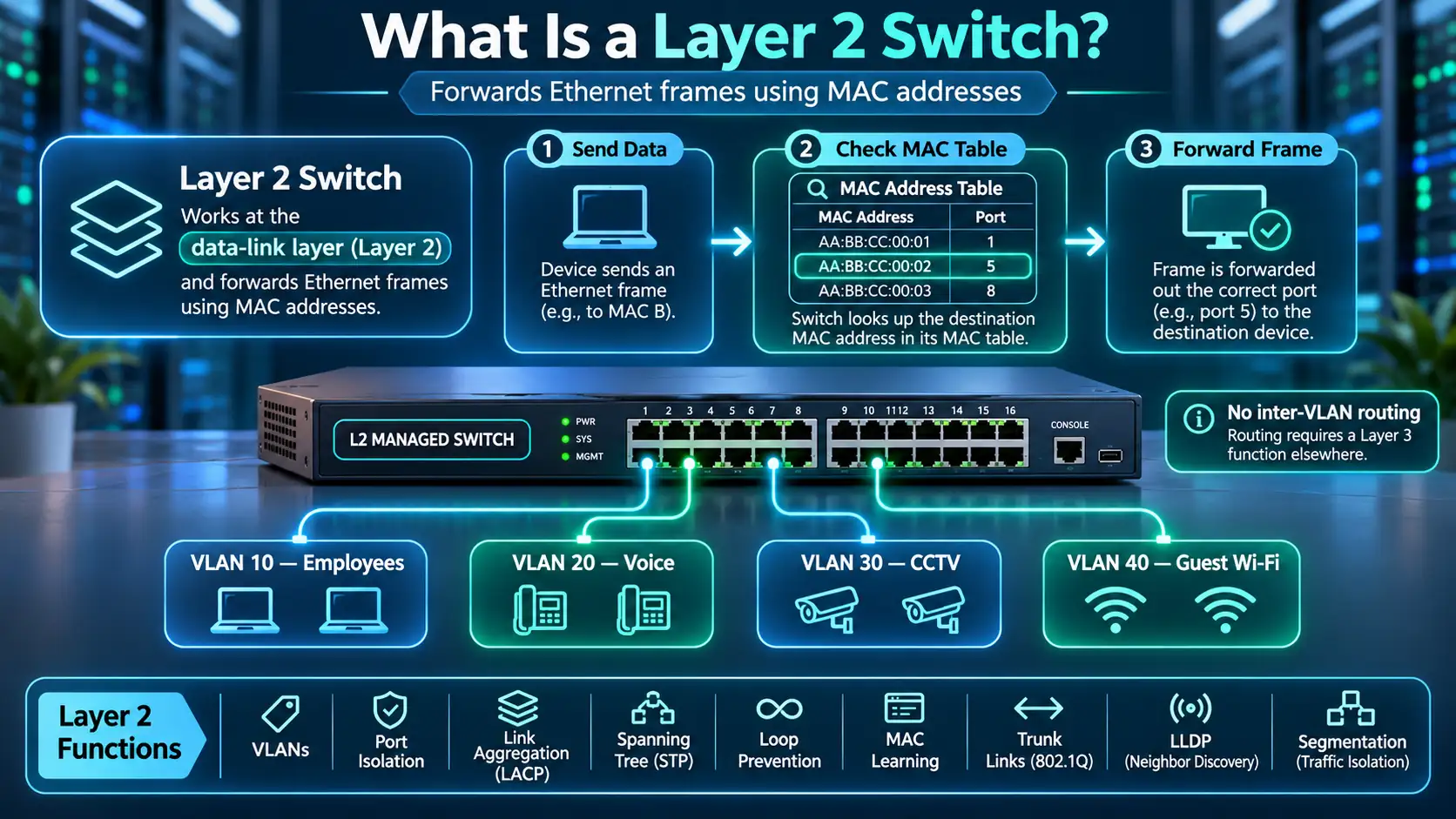
Your breakdown might look something like this:
VLAN 10 — Employees
VLAN 20 — Voice
VLAN 30 — CCTV
VLAN 40 — Guest Wi-Fi
In the Layer 2 vs Layer 3 Switch comparison, the Layer 2 switch does a great job of isolating those broadcast domains from one another. Where it runs into a wall unless it packs built-in Layer 3 capabilities is routing data across those separate VLANs. That requires a routing function somewhere else in the network.
What Does a Layer 3 Switch Do?
Put simply, a Layer 3 switch takes standard Ethernet switching and mixes in actual IP routing capabilities. It still handles all the usual Layer 2 tasks you expect from an enterprise switch, but it can also read IP addresses and make smart routing decisions right on the spot.
H3C draws a clear line in the Layer 2 vs Layer 3 Switch comparison through its setup guides: Layer 2 handles fundamentals like VLANs and basic switching, whereas Layer 3 introduces IP addressing, ARP, DHCP services and packet forwarding. On supported models, H3C’s routing configuration covers static routes, OSPF, BGP and policy-based routing as well.
The most common business use is inter-VLAN routing. Imagine someone in VLAN 10 needs to send files to a server sitting over in VLAN 50. Because those devices live on separate IP subnets, they can’t talk directly without a router.
A Layer 3 switch solves this by setting up a virtual interface for each network, acting as their default gateway. Data flows smoothly like this:
Employee → Layer 3 switch → Server VLAN
This approach can improve performance by keeping inter-VLAN traffic within the switching infrastructure, particularly when it avoids a slower external routing path.
Depending on the model and software, Layer 3 switches can also support advanced features like:
- Static routes
- Dynamic routing protocols
- Access control lists
- Policy-based routing
- Multiple IP subnets
- Redundant gateway setups
- Core and distribution functionality for campus environments
Those capabilities can make them a good fit for larger corporate networks that need to move heavy amounts of internal traffic efficiently.
Layer 2 vs Layer 3 Switch Comparison Table
Here is a quick Layer 2 vs Layer 3 Switch breakdown across essential features, performance and ideal use cases.
| Requirement | Layer 2 Switch | Layer 3 Switch |
|---|---|---|
| Forward Ethernet frames | Yes | Yes |
| Uses MAC address table | Yes | Yes |
| VLAN support | Yes | Yes |
| Trunk ports | Yes | Yes |
| Link aggregation | Common | Common |
| Spanning Tree | Common | Common |
| Route between VLANs | No, unless another routing device is used | Yes |
| Uses IP routing table | No | Yes |
| Static routes | No | Yes |
| Dynamic routing | No | Model dependent, commonly supported |
| Best fit | Access layer, simple LANs | Distribution, core, larger campus networks |
| Complexity | Lower | Higher |
| Cost | Often lower | Often higher |
| Internal routing performance | Requires external Layer 3 device | Can route locally at switch speed |
Keep in mind, though, that the Layer 2 vs Layer 3 Switch comparison doesn’t mean you should immediately go out and swap all your Layer 2 switches for Layer 3 gear. A reliable network is built in layers, with each level serving a clear purpose.
At the edge, simple access switches usually just need to plug users and their devices into the network. Moving up to the distribution layer is typically where routing makes the most sense.
Meanwhile, the core handles heavy-duty routing traffic and keeps connections redundant and resilient. At the end of the day, solid network architecture comes down to putting intelligence right where it provides real value.
Inter-VLAN Routing in Practice
Inter-VLAN routing is one of the biggest reasons organizations upgrade to Layer 3 switches. VLANs divide a physical network into separate logical segments. This separation helps boost network performance, simplify administration and tighten security.
Eventually, though, devices on different VLANs will need to talk to each other.
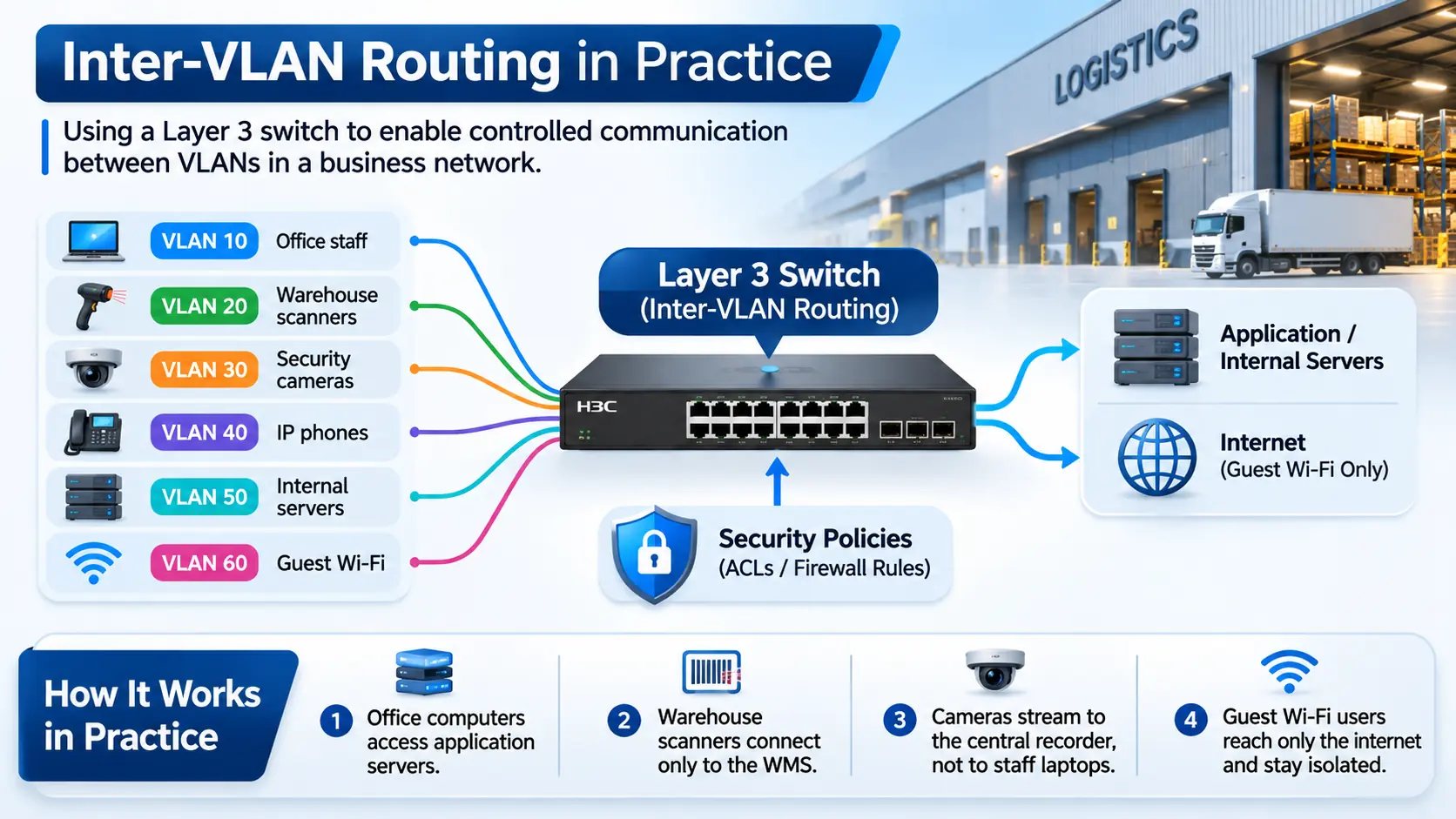
Take a typical logistics hub in Riyadh as an example.
The network may include:
VLAN 10 — Office staff
VLAN 20 — Warehouse scanners
VLAN 30 — Security cameras
VLAN 40 — IP phones
VLAN 50 — Internal servers
VLAN 60 — Guest Wi-Fi
Without Layer 3 routing enabled, these groups stay completely isolated from one another.
H3C’s VLAN termination guide explains how VLAN interfaces and Layer 3 subinterfaces process VLAN-tagged traffic for Layer 3 forwarding. That doesn’t mean every single VLAN should have unrestricted access to every other VLAN. Routing opens up the pathways for communication. Your security rules dictate which devices are actually allowed to cross those paths.
Here’s how that works in practice:
- Office computers need access to application servers.
- Warehouse scanners only need to connect to the warehouse management system.
- Security cameras should stream to the central recorder, not interact with staff laptops.
- Guest Wi-Fi users should only reach the internet and stay isolated from local assets.
- This is where ACLs and firewall rules become essential.
- The Layer 3 switch handles the routing foundation. Security policies then govern exactly what traffic gets permission to travel those routes.
Performance, Security and Management Trade-Offs
Using a Layer 3 switch can improve network performance when internal traffic avoids a slower external routing path. On a larger corporate or school campus, this can reduce potential routing bottlenecks. That extra routing power comes with a trade-off, though it takes more work to keep everything running seamlessly. A basic Layer 2 access switch is usually pretty simple to manage.
A Layer 3 switch may contain:
- Gateway interfaces
- Static routes
- OSPF configuration
- ACLs
- DHCP relay
- Routing policies
- Redundancy protocols
Because of this added complexity, your IT team will need sharper network management skills to stay on top of it all. Security needs a different approach, too.
Dividing your network into segments only works if your routing policies actually keep tight control over who gets access. If every VLAN can talk to every other VLAN without restrictions, you’ve separated them on paper without actually securing them. Clear visibility into your network becomes just as crucial.
Enterprise Layer 3 switches offer rich data on routes, network topology and traffic flows, but you need thorough documentation to make sense of it all. So the core decision isn’t just about price.
It comes down to this:
simplicity vs control
For a smaller location, the Layer 2 vs Layer 3 Switch decision may favor simple access switches with centralized routing. For larger sites, distributing Layer 3 functions across the campus can improve performance and reliability when the network design calls for it.
Campus and Branch Deployment Scenarios
If you run a small branch office, basic Layer 2 switching is often all you really need. Your devices plug into the switch and any traffic passing between VLANs simply travels up a trunk line to a router or firewall, which takes care of the routing.
That design is simple and easy to operate. For a larger branch location, though, bringing Layer 3 switching into the mix can make a lot of sense if you have heavy internal traffic. For instance, when employees constantly pull files from local servers or storage units, handling that routing locally can reduce unnecessary load on a separate firewall or router.
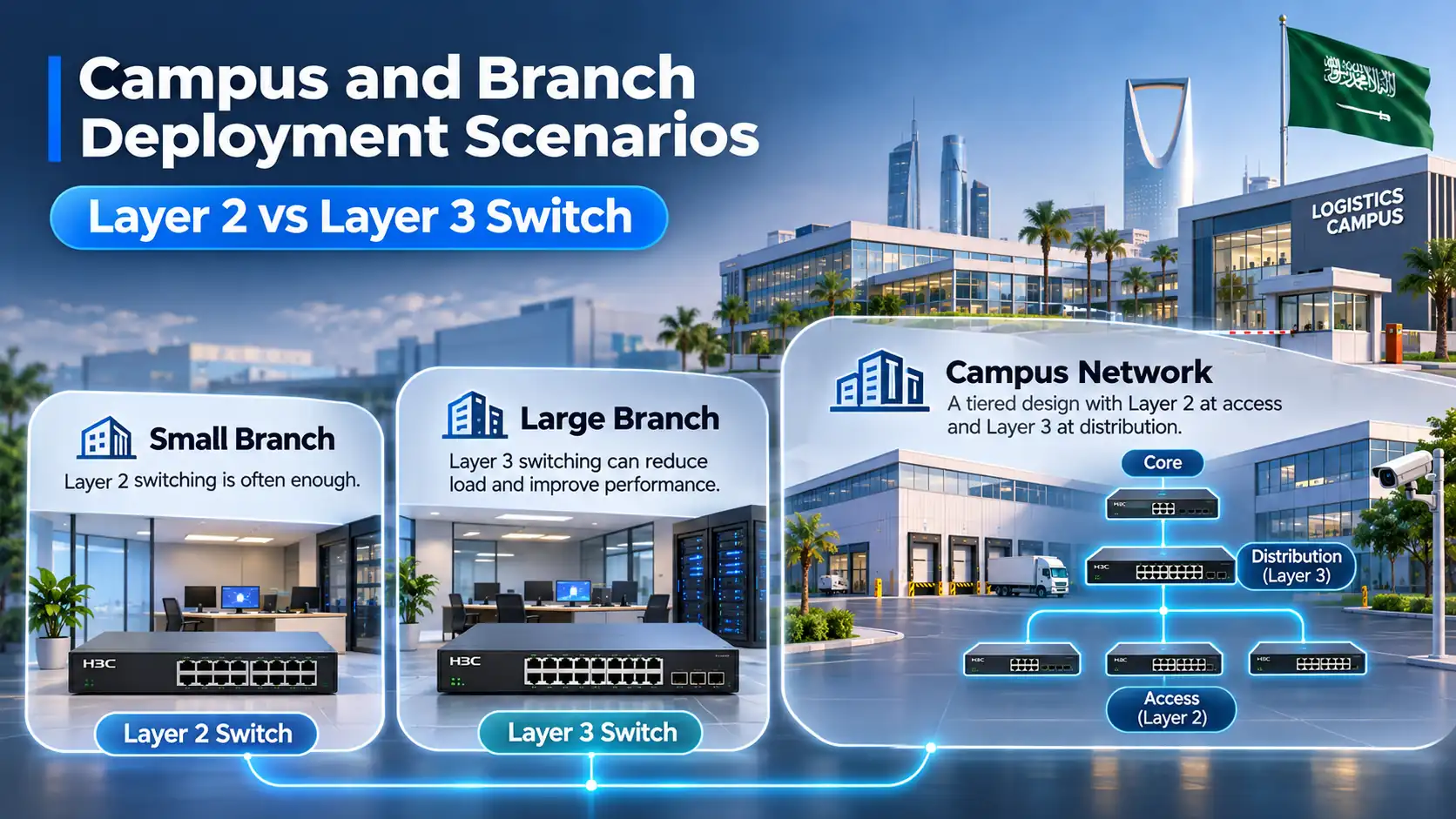
In a full campus network, the Layer 2 vs Layer 3 Switch decision becomes especially important. Across multiple buildings, access switches can connect back to distribution switches, allowing the distribution layer to handle inter-departmental routing while core switches carry heavy traffic across the wider network.
H3C’s enterprise switching portfolio is built around this exact tiered design, spanning access, aggregation and core switches. When you look at a logistics campus in Saudi Arabia, the operational requirements get even more granular.
A single large facility might need to connect:
- Warehouse floors
- Offices
- Gatehouses
- CCTV networks
- Wi-Fi
- Access control
- Barcode scanners
- Operational servers
- Guest networks
- Building-management systems
Trying to run all those diverse systems on a single, flat network introduces huge management headaches and security risks. In this Layer 2 vs Layer 3 Switch scenario, a structured network layout using managed Layer 2 switches at the access level and Layer 3 switches at distribution can give you tighter control over traffic.
That is where D3 plays a practical role in the region. As an H3C distributor, digidisti delivers switching, cloud and connectivity solutions for projects throughout Dubai and the broader GCC . For teams handling IT projects in Riyadh and across KSA, D3 provides hands-on help with product selection, network architecture, regional supply and deployment planning ensuring you get a tailored solution rather than just off-the-shelf hardware.
Misconceptions About Managed Switches
One common myth is that any managed switch automatically doubles as a Layer 3 switch.
That’s actually not true. A managed Layer 2 switch still packs plenty of useful features, including:
- VLAN configuration
- STP
- SNMP
- Port monitoring
- QoS
- Link aggregation
- Port security
- Access control features
All of this happens without handling any IP routing. Another misconception is that Layer 3 switches make traditional routers completely obsolete. That’s rarely the case in practice.
Dedicated routers and firewalls remain important in many enterprise networks for tasks like:
- WAN connectivity
- Internet access
- NAT
- VPN
- Advanced security inspection
- SD-WAN
- Branch connectivity
Layer 3 switches deliver their greatest value when managing routing within your internal enterprise network. People also frequently assume that switching to Layer 3 routing instantly makes their setup more secure.
In reality, routing simply establishes the connections. True security comes down to the access rules and policies you put in place around those pathways.
Finally, there’s a belief that every access switch in the building ought to perform Layer 3 operations. Taking that route often overcomplicates your network unnecessarily. A common approach is to keep Layer 2 switches at the edge while letting distribution or core layers handle Layer 3 routing, although routed-access designs may also be appropriate.
Switch Selection Checklist
Before making a Layer 2 vs Layer 3 Switch decision, take a moment to run through a few key questions:
- How many devices need connectivity? Include users, cameras, phones, access points and operational systems.
- How many VLANs will you need? Consider which VLANs need to communicate and how much traffic must be routed between those groups.
- Where will inter-VLAN routing happen? Firewall, router, distribution switch or core switch?
- How heavy is internal, local traffic? If devices are constantly sharing large amounts of data back and forth locally, on-switch Layer 3 routing can really speed things up.
- Will you be using dynamic routing protocols? Determine if your design requires protocols like OSPF to handle routing dynamically across larger networks.
- 6. Are ACLs required between VLANs? Routing and policy should be planned together.
- Will your switches need to supply Power over Ethernet (PoE)? Access switches often need PoE to power equipment like IP phones, cameras and Wi-Fi access points.
- What uplink speed is required? 1G, 10G, 25G or faster depending on the site.
- Is redundancy required? Review stacking, IRF, M-LAG and redundant uplinks.
- How do you plan to manage the equipment? Figure out whether your team prefers a web UI, standard CLI, SNMP tools, or a centralized cloud management system.
- What is the growth plan? Do not design only for today’s endpoint count.
- Is this site connected to a larger multi-building campus? Expanding into a campus footprint can change where it makes the most sense to split Layer 2 and Layer 3 duties.
- Are there logistics or operational systems? Warehouse, CCTV and IoT networks may need stronger segmentation.
- Does your IT team have experience managing routed networks? Keep network complexity aligned with the day-to-day skill set and bandwidth of your technical staff.
- Is local hardware support available nearby? For projects across the GCC, having local inventory, expert guidance and fast deployment assistance greatly reduces operational risk.
For businesses across UAE, Saudi Arabia and the wider GCC, D3 assists with the Layer 2 vs Layer 3 Switch decision through H3C’s enterprise networking line, helping teams build architectures around real-world needs instead of simply picking the top-spec switch.
The goal isn’t to force Layer 3 onto every corner of your network. It’s about placing routing exactly where it adds real value without making things needlessly complex.
If the switch only needs to connect devices inside VLANs, Layer 2 may be enough. If you need fast, local routing across multiple subnets or are building out a larger campus environment, stepping up to Layer 3 makes much more sense. The key isn’t picking the most advanced layer available. It’s giving each switch the right role for your setup.
Layer 2 connects your network together, while Layer 3 directs traffic where it needs to go next.