To pick the right one, you need to look at the bigger picture: how many cameras you’re running, where they are, how much internet bandwidth you have, how long you need to keep recordings, how you’re handling security, what your team is comfortable managing and most importantly, what happens if things go down.
For businesses here in the GCC, these questions get messy fast. You might have a main headquarters in Dubai, a warehouse in Riyadh and a bunch of remote sites, all with completely different network setups. At the end of the day, you want a system that isn’t just going to work today, but one that’s easy to support and reliable as your business expands.
What an NVR Does
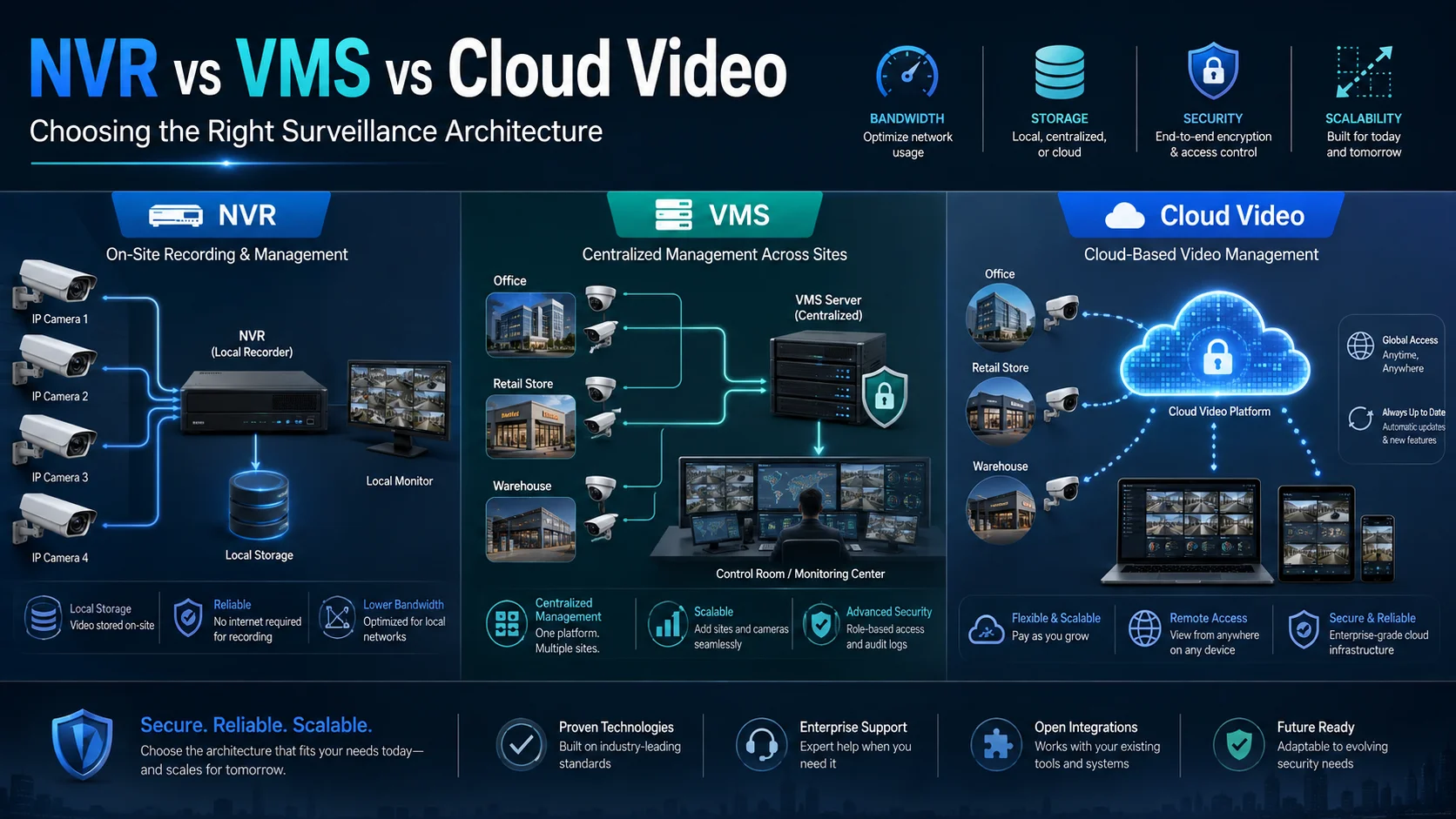
A Network Video Recorder (NVR) is essentially the brain of a standard security setup. It grabs the live feeds from your IP cameras, saves them onto local hard drives and gives you an easy interface to watch live, review old footage and manage your settings.
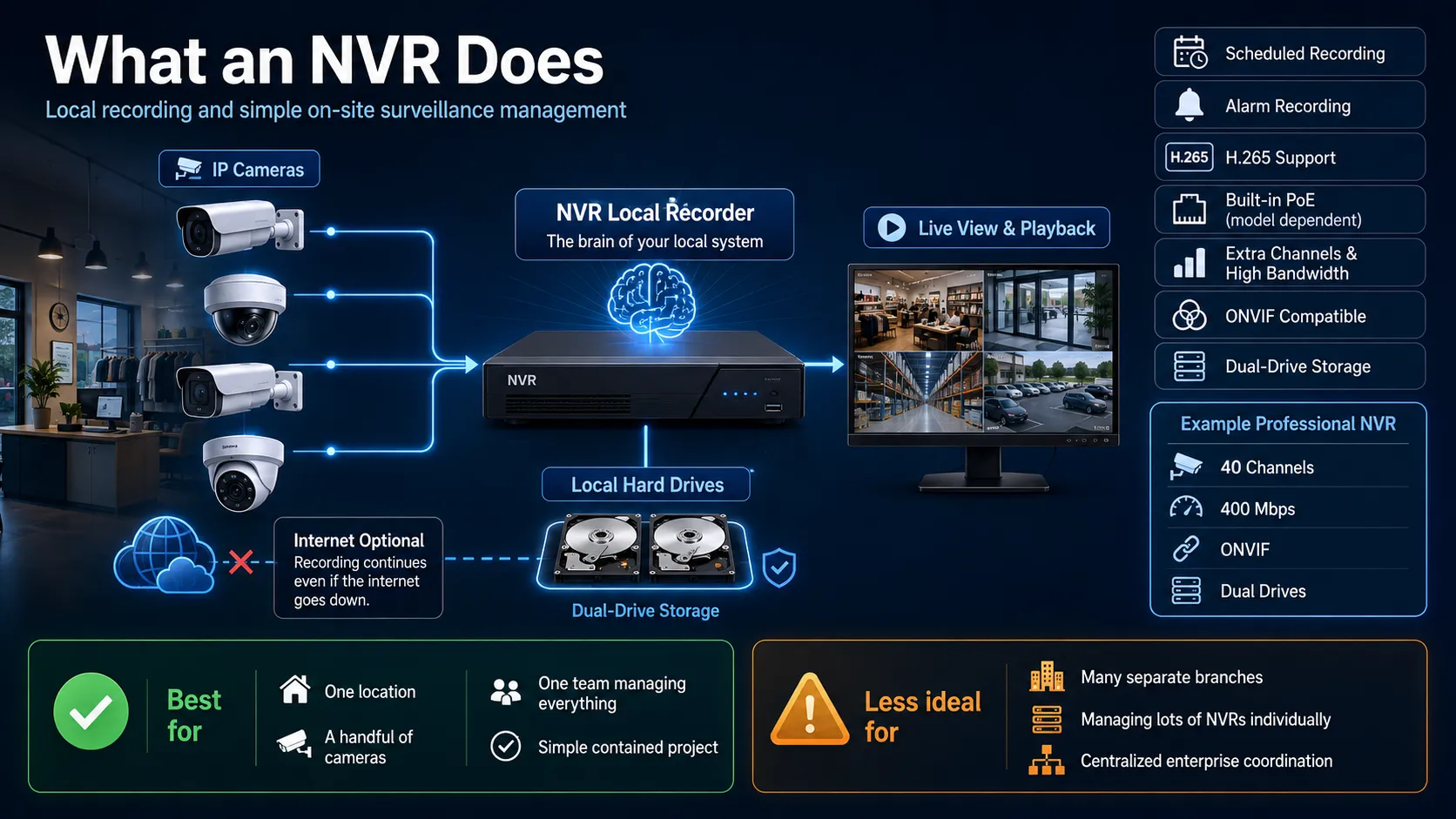
For smaller setups like a single shop or office this is a fantastic, simple solution. Because everything is local, your cameras and recorder talk to each other without needing to hop across the internet. Plus, if your internet connection goes down, your recording continues uninterrupted.
Most NVRs, like those from Tiandy, come packed with standard features: they handle scheduled or alarm triggered recordings, playback and they support efficient video formats (like H.265).
Depending on the model, you might get built-in PoE ports for your cameras or, if you need more power, versions with extra channels, higher bandwidth and massive storage capacity.
Take Tiandy’s 40-channel professional NVR as an example. It handles a solid 400 Mbps of bandwidth, is ONVIF compatible and uses dual drives for storage. You can check out all the technical specs in their official documentation.
Because of this, NVRs are ideal for simple, single site operations where one team is managing everything in one place.
However, things get tricky when you have to juggle a bunch of NVRs at once.
Think about a retailer with 30 different store locations. Even if every single recorder is working perfectly, the security team is left with a headache: they have to manage permissions, health checks, software updates and video evidence individually for every single site. What felt simple for one store becomes a massive, complex project to manage centrally.
So, the golden rule here is that an NVR is your best friend when you have a clear, contained project.
One location, a handful of cameras and no real need for complex enterprise wide coordination.
What a VMS Adds for Larger Sites
Think of a VMS as the bridge between your cameras and your team. Instead of just recording footage on a single device, it acts as a central hub that ties your cameras, servers, storage and user controls into one smooth environment.
This is a game changer for larger sites or multiple locations. Rather than jumping from one NVR to the next, a VMS gives you a bird’s eye view of everything, allowing your team to monitor the entire operation from one place.
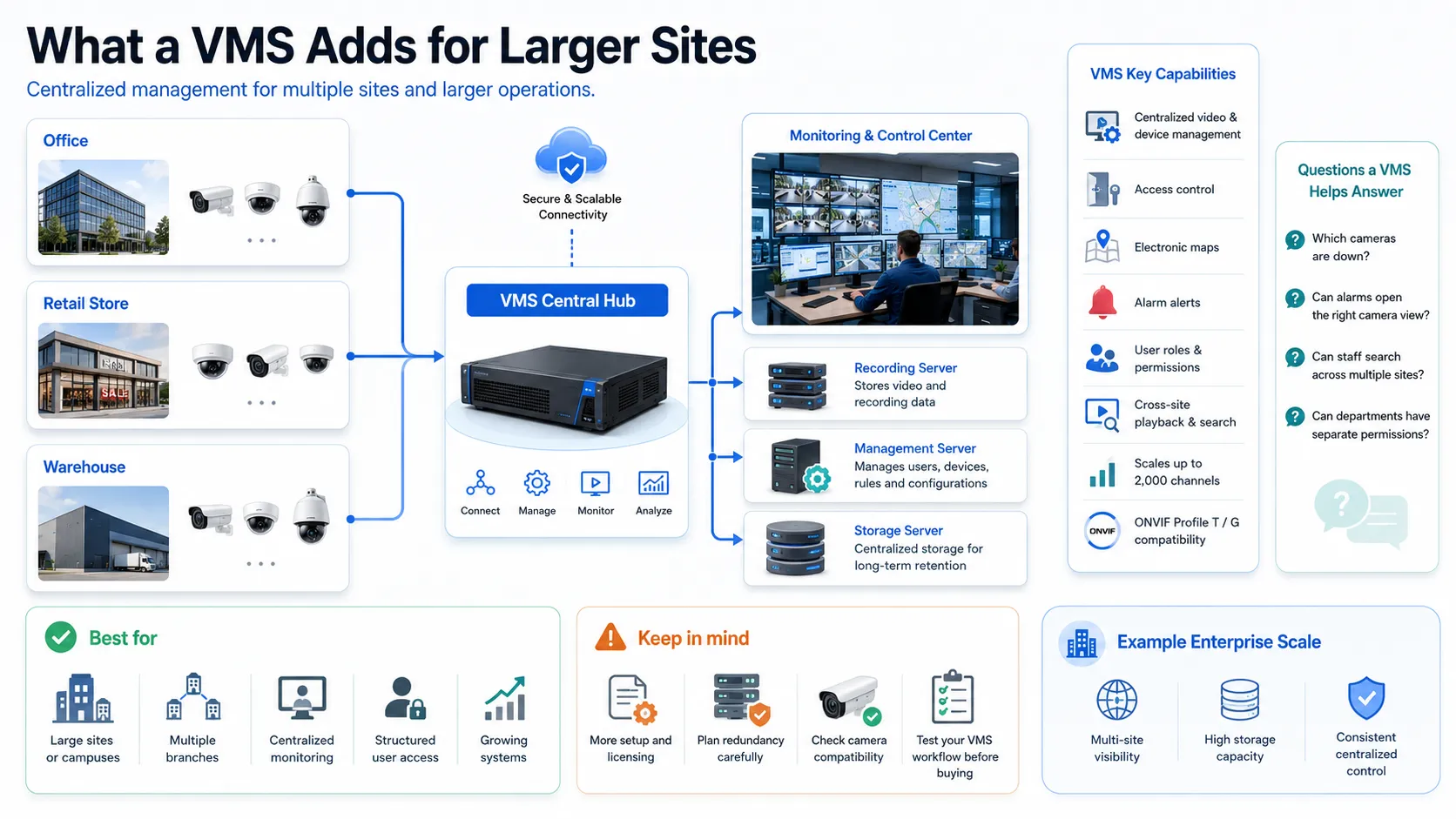
For example, Tiandy’s Easy7 CMS acts as this command center, handling everything from basic video and device management to access control, electronic maps and alarm alerts. It simplifies the heavy lifting like configuring settings, setting up user roles and managing playback so you aren’t stuck chasing down footage across different systems. More details are available in Tiandy’s Easy7 CMS overview.
It helps solve the nagging questions that pop up in a disconnected system:
- Which cameras are currently down?
- Can alarms automatically pop up the right camera view?
- Can staff search across multiple sites without needing to log in and out of different recorders?
- Can we set specific permissions for different departments without sharing admin passwords?
Essentially, a VMS isn’t just adding more cameras; it’s building a structured, organized way to manage them.
As your needs grow, you can scale things up more intentionally, separating recording, management and storage across different servers.
Platforms like the Tiandy K2000 show how this works, supporting up to 2,000 channels and huge storage capacity far beyond what a standard branch recorder could handle.
Keep in mind that a VMS does bring a bit more complexity in terms of setup, licensing and planning for redundancy. It’s a bigger commitment, but it’s worth it when you need consistent, centralized control rather than just simple, standalone setups.
Finally, always check compatibility. While ONVIF standards like ONVIF Profile T for streaming and ONVIF Profile G for recording help ensure different products play nicely together, they don’t guarantee that every fancy feature will work exactly the same way.
It’s always best to test your specific camera and VMS setup before you buy.
When Cloud Video Makes Sense
Cloud video surveillance replaces part of the local infrastructure with an online service. Cameras may connect directly, use a gateway or record locally while management remains hosted.
Its strongest advantage is not that “everything should move to the cloud.” It is that some organizations need easier remote access, faster site onboarding and less server infrastructure at each location.
A cloud managed model can suit businesses with many small branches, limited local IT support and modest camera counts. A retail group may want one portal and standardized health monitoring without maintaining a VMS server in every country.
Cloud services can also provide elasticity. Computing and storage resources can be provisioned as needed rather than purchased entirely in advance, reflecting the broader NIST definition of cloud computing.
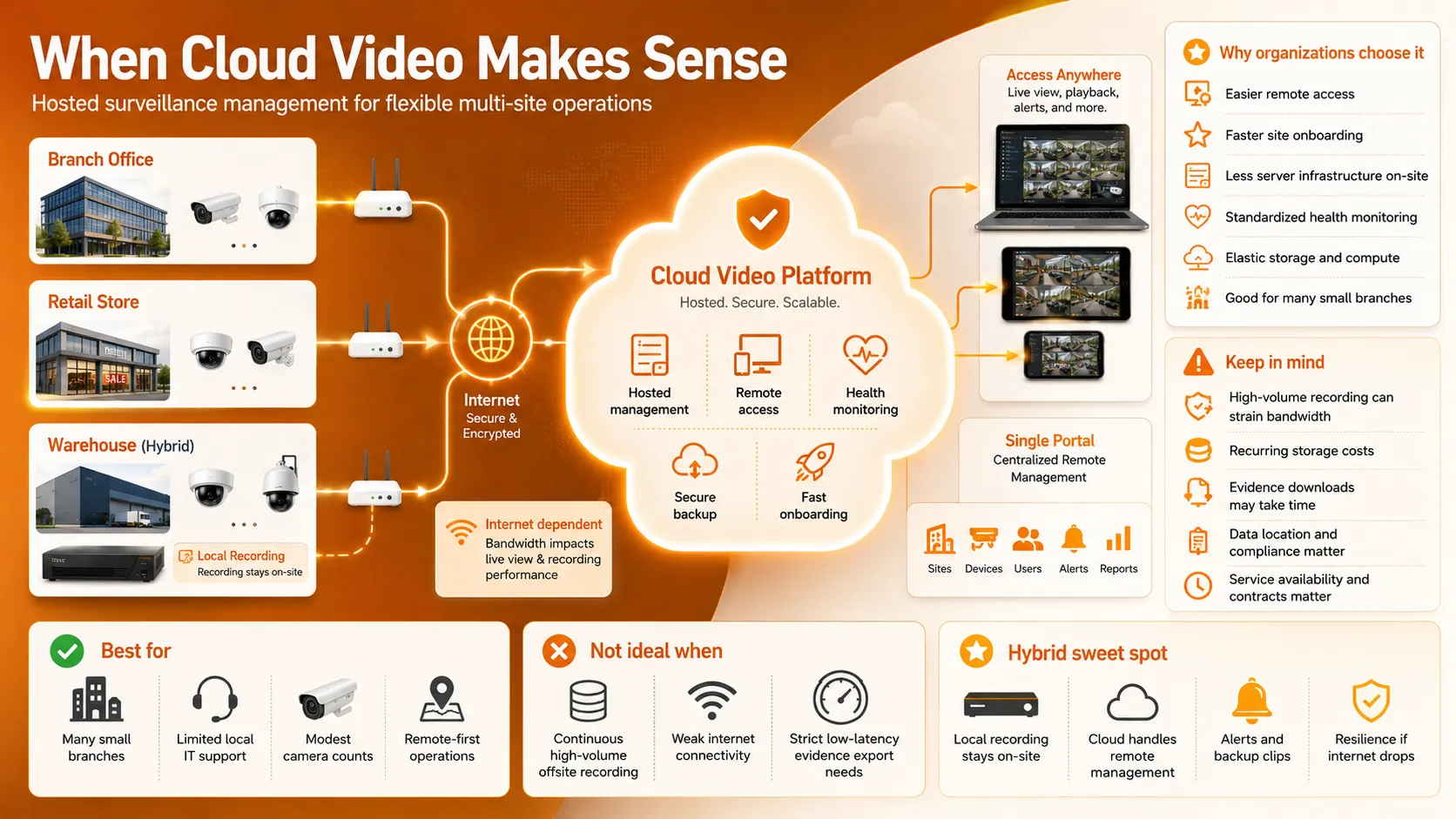
However, cloud video is not automatically the right choice for continuous, high volume recording. Sending many high resolution streams offsite can place a heavy load on internet connections. Retention may create recurring storage charges and downloading large amounts of evidence may take time.
Data location, contractual control and service availability also matter. Regulated organizations may need to know where video is processed, who can access it and what happens when the subscription ends.
For a lot of projects in the GCC, a “hybrid” setup is the most realistic middle ground. You keep your cameras or NVRs recording locally so your system stays up even if the internet drops, but you use the cloud to get that easy remote management, automated health alerts and a secure backup of important clips.
At the end of the day, only move to the cloud if it genuinely solves a headache for you not just because it’s the trendy thing to do.
Bandwidth, Storage and Reliability Considerations
Deciding between an NVR, a VMS, or a cloud system gets a lot easier once you look at how your video data actually travels through your network.
NVRs are great for keeping data local. Since the cameras talk directly to the recorder inside your own building, you only really use your internet connection when you’re logging in remotely to check live footage. It’s a solid choice if you have a reliable local network but not much internet upload speed to spare.
A centralized VMS may pull streams from several buildings into a data center or control room. The design must account for average and peak bitrate, camera count, resolution, frame rate, codec, analytics metadata and simultaneous users.
Cloud systems, however, are a different beast they’re much more reliant on a strong internet connection because your video has to travel off-site to reach the cloud.
To put that in perspective, just one 4 Mbps camera creates about 43 GB of data every single day. If you have 50 of those cameras, you’re looking at over 2 TB of data moving through your internet connection daily. It’s a good example of why you absolutely need to crunch the numbers on your bandwidth before committing to a cloud based system.
Don’t forget about storage, either. NVRs are straightforward but limited by the hard drives you can fit in the box. VMS systems give you more flexibility by spreading storage across different servers. Cloud solutions, meanwhile, turn that hardware cost into a recurring subscription fee.
A good rule of thumb? Never run your system at 100% capacity. You need breathing room not just for normal changes , but to handle things like drive failures, adding new cameras or exporting large clips for evidence without making the whole system crawl to a halt.
When we talk about reliability, we’re really talking about “failure domains” basically, what breaks if one part of the chain goes down?
If you rely on a single NVR, that box is your single point of failure if it breaks, you lose everything. VMS systems are more robust because you can design them with redundancy, like backup servers or secondary storage, as long as you put the effort into setting them up correctly.
Cloud video is often built to be resilient, but don’t be fooled: you’re still at the mercy of your own local internet connection and gateway.
When you’re planning your setup, just ask yourself: what happens when something breaks?
Think about what’s critical for you. Do you still need to be able to record, watch live video, get alarm alerts, log in remotely or pull evidence when things go sideways?
Think of it this way:
a small shop might be fine if they lose remote viewing for an hour as long as the cameras are still recording locally. But for a big logistics warehouse, that’s a non-starter, they’ll need backup servers, secondary network paths and failover storage to keep everything running.
Ultimately, your setup should match the risk. Don’t waste money building industrial grade resilience everywhere; just make sure the solution you choose matches the actual cost of a potential failure for each specific location.
Security and User Access Control
Modern CCTV management platforms are connected IT systems containing cameras, user accounts, network services, applications and stored evidence. They need the same security discipline as other business infrastructure.
Default passwords should never remain in use. Administrator access should be limited, individual accounts should replace shared logins and permissions should reflect job responsibilities.
An operator who needs live view and playback may not need permission to delete video, change retention or create users.
Multi factor authentication should be enabled where supported. Audit logs should record logins, configuration changes and exports. Firmware, clients and servers need a documented update process.
Network design matters too. Cameras and recorders should not be casually exposed to the public internet.
CISA recommends minimizing network exposure for connected operational devices, placing systems behind firewalls, separating them from business networks and using secure remote-access methods where access is required. The recommendations can be reviewed through CISA’s network exposure guidance.
Cloud does not remove the customer’s responsibilities. The provider may secure its infrastructure, but the business still controls identities, permissions, devices, retention settings and integrations.
NIST’s zero-trust guidance emphasizes that access should not be trusted simply because a user or service is inside a particular network. Access decisions should consider identity, authorization and the resource being requested.
The same principle applies on-premises. A local NVR is not secure merely because it sits inside the building. Network access, account privileges and exported evidence still require controls.
Before you go live, make sure you have a clear game plan, know who owns the platform, who approves access, how you’ll offboard former employees, how you’ll manage vendor support and what steps you’ll take to investigate if an incident occurs.
Decision Matrix for Businesses
The right architecture becomes easier to see when the operational requirements are placed side by side.
| Business requirement | NVR | VMS | Cloud video |
| One small or medium site | Strong fit | Often more than required | Useful when remote management is the priority |
| Many small branches | Difficult to manage separately | Strong centralized option | Strong fit with suitable bandwidth |
| Large campus or control room | Limited alone | Strongest fit | Usually hybrid rather than cloud-only |
| Limited internet connectivity | Strong local resilience | Strong if recording remains on-site | Risk unless local recording exists |
| Minimal local IT infrastructure | Simple appliance management | Requires more infrastructure | Strong advantage |
| Advanced roles and workflows | Basic to moderate | Strong | Varies by service |
| Long or complex retention | Limited by drive bays | Flexible with centralized storage | Scalable, but recurring cost must be modelled |
| Fast expansion | Requires more appliances | Scales through server architecture | Rapid when bandwidth allows |
| Data-location control | High | High | Depends on provider and contract |
For many organizations, the answer will not be one column. A branch may use a Tiandy NVR for local recording, a central VMS for enterprise visibility and cloud services for remote access or selected backups.
A single business may also use different models at different sites. The head office could operate through a VMS, smaller branches could rely on NVRs and temporary sites could use cloud-managed cameras.
What matters is that these components belong to one planned surveillance architecture rather than becoming a collection of unrelated systems.
D3 helps businesses across Dubai and the GCC evaluate Tiandy surveillance solutions around the actual operating environment: camera count, network capacity, centralized monitoring, retention, storage growth and technical support.
The aim is not to push every project toward the largest platform. It is to prevent a system that looks affordable on day one from becoming difficult to manage in year three.
Before selecting an architecture, ask six direct questions:
- How many cameras and sites will we have in three years?
- What must continue working during an internet, server or recorder failure?
- Where must recordings be stored, and for how long?
- Who needs centralized access, and what should each person be allowed to do?
- Do we have the internal skills to operate the system?
- What is the full cost across hardware, licenses, bandwidth, cloud storage and support?
An NVR offers local simplicity. A VMS brings structure and centralized control. Cloud video offers flexibility and easier remote management.
The best surveillance architecture is the one that gives the business reliable evidence, clear ownership and room to grow without creating more complexity than the security team can realistically manage.