A backup plan might look rock-solid on paper, but that doesn’t mean it won’t fall flat during a real crisis. The backups finished smoothly, replication was active and storage was healthy. But the second a critical system drops offline, everyone starts asking two big questions:
How much data have we lost?
How long will it take to get the business working again?
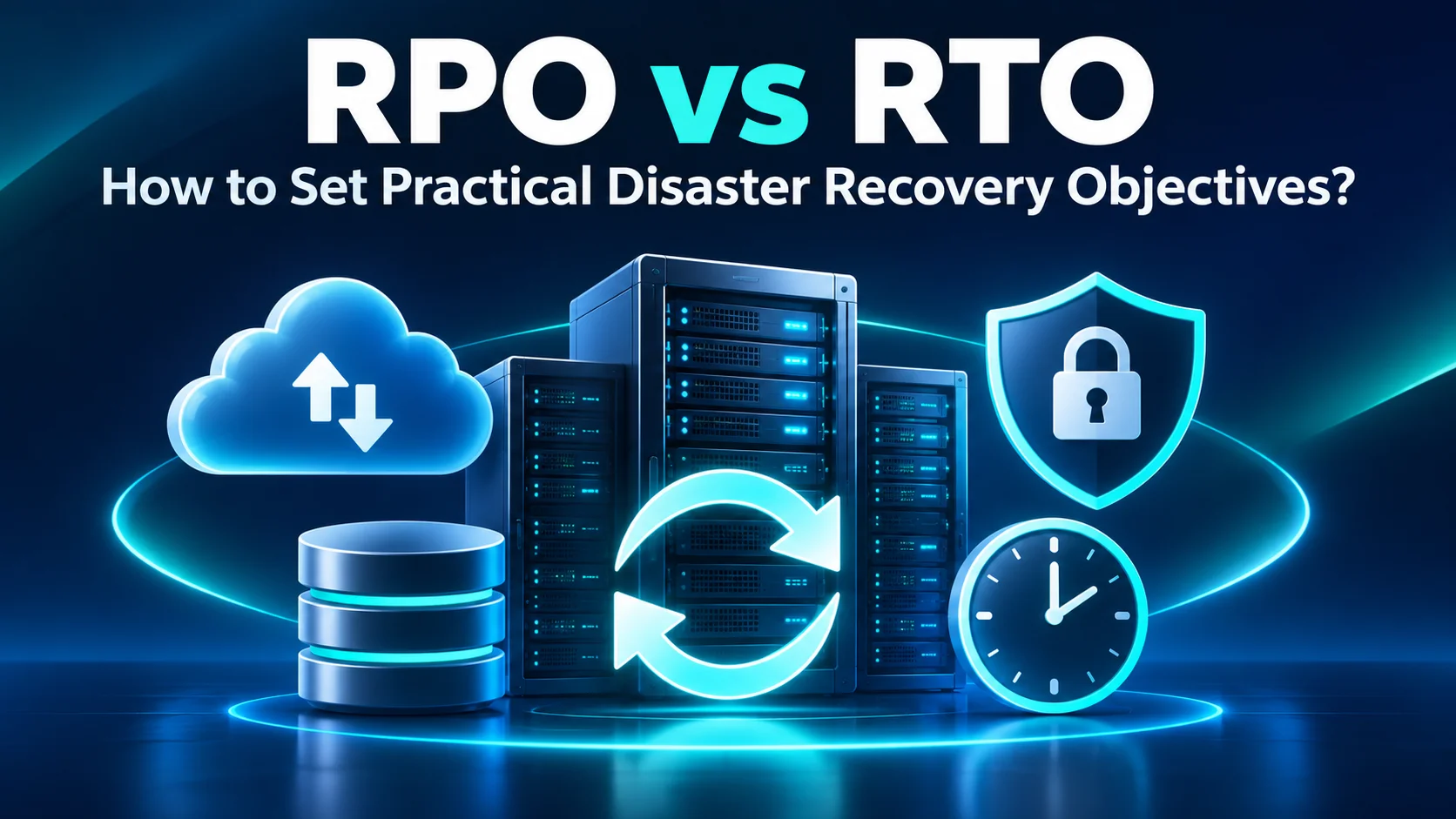
That’s exactly why understanding RPO vs RTO matters.
Recovery Point Objective (RPO) sets how far back in time your business can afford to lose data. Recovery Time Objective (RTO) sets how long you can tolerate having that system down. The concepts themselves are easy to grasp; it’s picking realistic numbers that gets tricky.
A company may say that every system needs zero data loss and instant recovery. Technically, that sounds ideal. Financially and operationally, it can require an architecture far beyond what the business actually needs. A much smarter move is to look at actual business impact first. Take a warehouse management platform in Riyadh: if it goes down, every hour of delay hurts receiving, picking and shipping, so it needs to bounce back fast. On the flip side, an archive storing old documents can easily wait out a longer recovery window.
If you’re running operations across Dubai, Riyadh and the wider GCC, these distinctions matter even more as your IT backbone powers branches, fulfillment centers, cloud setups and multi-site setups. At the end of the day, RPO and RTO should start as business choices first and tech specs second.
What Do RPO and RTO Mean?
Put simply, RPO vs RTO covers two completely different sides of getting back up and running. Your Recovery Point Objective basically answers one key question:
How much recent data can your business realistically afford to lose?
According to NIST, RPO is the exact point in time your data must be restored to after an unexpected outage. For instance, if an app has a four-hour RPO and goes down at 4:00 p.m., you need to be able to roll back and recover everything up to at least noon.
On the flip side, your Recovery Time Objective asks: How long can a system stay down before the downtime starts causing real damage?
NIST frames RTO as the maximum window a system can sit in recovery before the outage begins hurting your core mission or business operations. Even though they go hand in hand, one doesn’t automatically dictate the other.
Take a setup like this, for example:
- RPO: 15 minutes
- RTO: 4 hours
Here, losing more than a quarter-hour of data is unacceptable, but the business can easily tolerate waiting a few hours to get the application fully restored.
Now consider a different system:
- RPO: 24 hours
- RTO: 1 hour
In this scenario, re-entering a day’s worth of data is fine, but getting the app back online fast is non-negotiable. Keeping this distinction in mind stops you from falling into a classic disaster recovery trap: treating RPO and RTO as if they’re the same target.
Recovery Point Objective: Acceptable Data Loss
At its core, RPO is all about how much data loss you can tolerate. Picture a warehouse management system that tracks every single delivery, stock transfer, order pick and shipment in real time. If you only back up that system once a night, a crash in the late afternoon means losing nearly a full day of operational records.
For a busy KSA logistics operation, recreating that information manually could be extremely difficult. That kind of environment naturally demands a much shorter RPO. On the flip side, take a document archive. If your team only uploads a handful of files a day and you can easily recreate them, backing things up once a day is usually more than enough. That’s why your backup frequency has to align directly with your required RPO.

A one-hour RPO generally requires protection often enough that the business is not relying on a backup created several hours earlier. But frequency is not the only factor. You also need to keep a few other key factors in mind:
- Replication delay
- Snapshot frequency
- Application consistency
- Network capacity
- Backup processing time
- Whether recovery points are immutable
- Whether corruption could be replicated to secondary copies
A system creating snapshots every five minutes may appear to support an excellent RPO. If ransomware can delete every one of those snapshots, the effective recovery point during a cyber incident may be very different. That’s why solid recovery planning requires both frequency and resilience.
Recovery Time Objective: Acceptable Downtime
Simply put, RTO is all about timing. Imagine the ERP system for a distribution facility suddenly crashes at 9:00 a.m. How long can you realistically wait before things start going downhill?
Is five minutes your limit? An hour? Four hours? Or can you afford to wait an entire workday? That target needs to come straight from the team running daily operations, not the IT department.
NIST’s guidance ties RTO directly to actual business impact, advising teams to choose recovery tools based on how long a system can be down before the consequences become genuinely severe. In reality, your true recovery timeline is made up of several steps:
Spotting that there’s an outage in the first place
- Figuring out what actually went wrong
- Making the call to kick off recovery procedures
- Finding the right restore point Spinning up backup hardware or cloud systems
- Restoring all necessary data
- Getting applications back online
- Checking connected services and software integrations
- Confirming everything works for end users
- Handing systems back over to production
If your backup tool restores data in 40 minutes, but it takes three hours of internal meetings just to decide who can trigger the restore, you’ve already missed your RTO target.That’s why disaster recovery is ultimately a full operational workflow, not just a line item on a storage spec sheet.
RPO vs RTO: Side-by-Side Examples
The easiest way to wrap your head around the difference is to see how it plays out in real business scenarios.
| Business system | Example RPO | Example RTO | Why |
| Warehouse Management System | 15 minutes | 1 hour | Continuous inventory and dispatch operations |
| ERP / Finance | 1 hour | 4 hours | Important transactions, but temporary manual procedures may exist |
| Corporate email | 1 hour | 2 hours | High operational dependency across teams |
| File collaboration | 4 hours | 4 hours | Work can pause temporarily, but data loss affects productivity |
| CCTV archive | 24 hours | 8 hours | Depends heavily on security and retention requirements |
| Historical archive | 24 hours | 24–48 hours | Data remains important but is not continuously active |
Keep in mind that these are just examples, not one-size-fits-all rules. The CCTV archive figures are illustrative only; live recording systems and legally mandated retention need separate assessment. A massive e-commerce hub in Riyadh will naturally need a much tighter recovery window for its warehouse systems than a smaller operation that can easily pivot to pen and paper for a few hours.
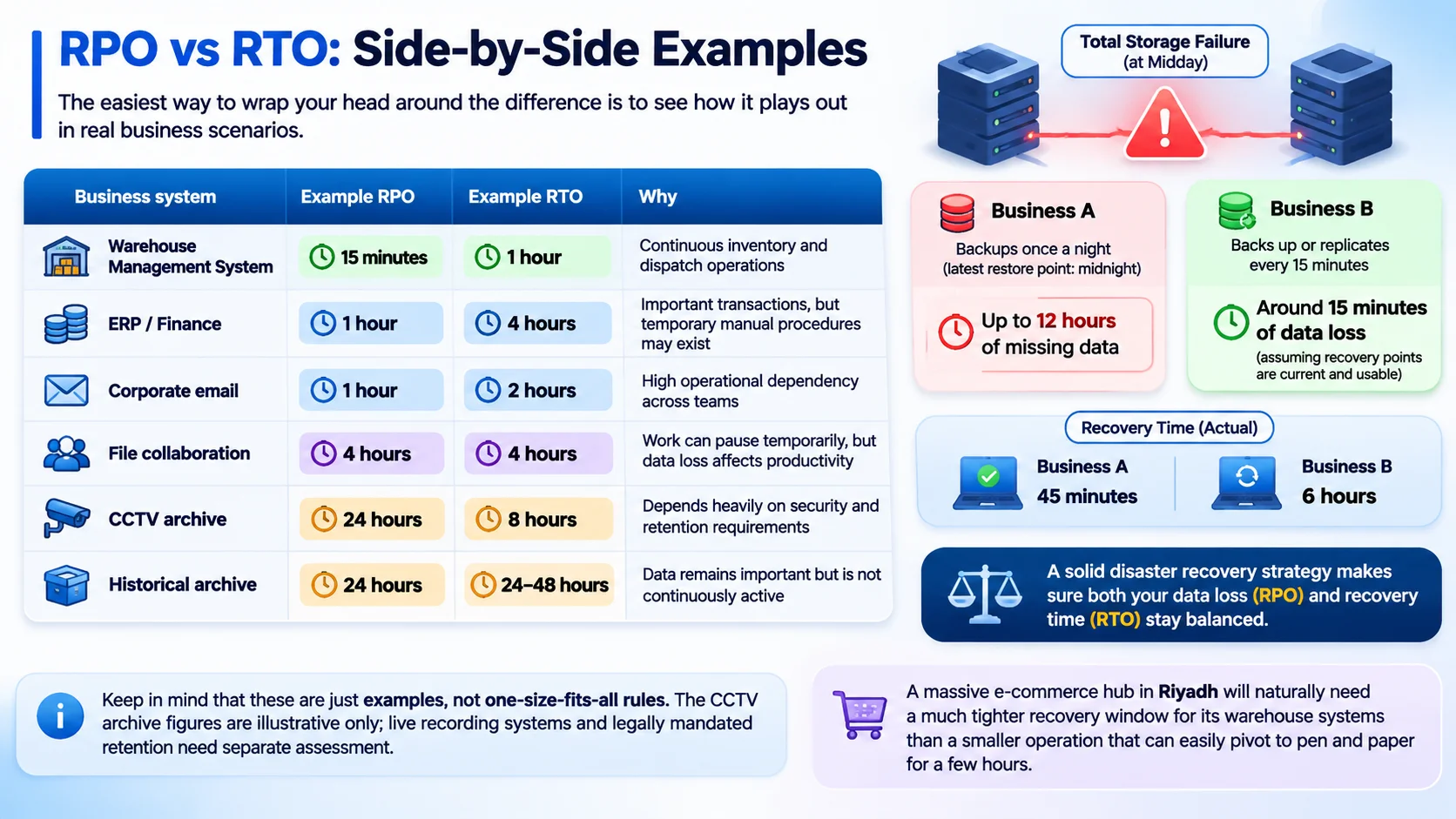
The exact same logic applies to data loss. Imagine two different companies dealing with a total storage failure at midday.
- Business A only runs backups once a night, so their most recent restore point goes all the way back to midnight. That leaves them looking at up to 12 full hours of missing data.
- Business B, on the other hand, continuously backs up or replicates its critical systems every 15 minutes. Their goal is to lose no more than around 15 minutes of data, provided the recovery points remain current and usable. That is the real-world difference an RPO target makes.
Now, let’s say Business A manages to bring everything back online in 45 minutes, while Business B takes six long hours to complete its restore. Business A actually achieved a much shorter recovery time here, even though its data-loss exposure was far worse. A solid disaster recovery strategy makes sure both of these numbers stay balanced.
How to Set Targets Using Business Impact
For effective RPO vs RTO planning, don’t start by asking the IT team what your current backup software can handle. Start with the core business instead. Sit down with each process owner and ask one simple question:
What happens if this application disappears right now?
Then start walking through different outage scenarios step-by-step. What happens after 15 minutes? One hour? Four hours? One day?
You’ll likely hear answers like these:
Orders grind to a halt. Shipments leave the warehouse late. Customers get locked out of services. Staff have to revert to pen and paper. Financial transactions get backed up. Compliance deadlines get missed. Revenue starts dropping immediately. Next, shift to the data loss side of things.
If the application comes back up but is missing the last four hours of data, what does it take to rebuild those lost transactions? Can you actually recreate those records? Will you have to call customers back? Will inventory counts become unreliable? Are there regulatory fines involved?
This entire process is what’s known as a Business Impact Analysis (BIA). As NIST puts it, a BIA helps you map out your critical resources, pinpoint system dependencies and figure out how much downtime you can endure before the damage becomes unmanageable. Grouping your systems into tiers helps keep these conversations clear and manageable.
- Tier 1 — Mission critical
Your core WMS, ERP, authentication and customer-facing services.
- Tier 2 — Business important
Internal team software, communication tools and daily file shares.
- Tier 3 — Non-critical
Archival data, legacy apps and internal reporting tools. Categorizing workloads this way lets you set realistic, tailored recovery goals for each tier instead of spending a fortune trying to make every single system bulletproof.
Mapping Backup and Recovery Architecture to Targets
Once your targets are clear, you can start building the underlying tech to match them.
If you need really low RPOs, you’ll likely be looking at continuous data protection, real-time replication, or taking snapshots every few minutes. Tighter RTOs, on the other hand, mean you need a recovery system that can serve up data and spin things back up in a flash. And for long-term data retention or compliance, a completely separate, cost-effective storage tier usually makes the most sense.
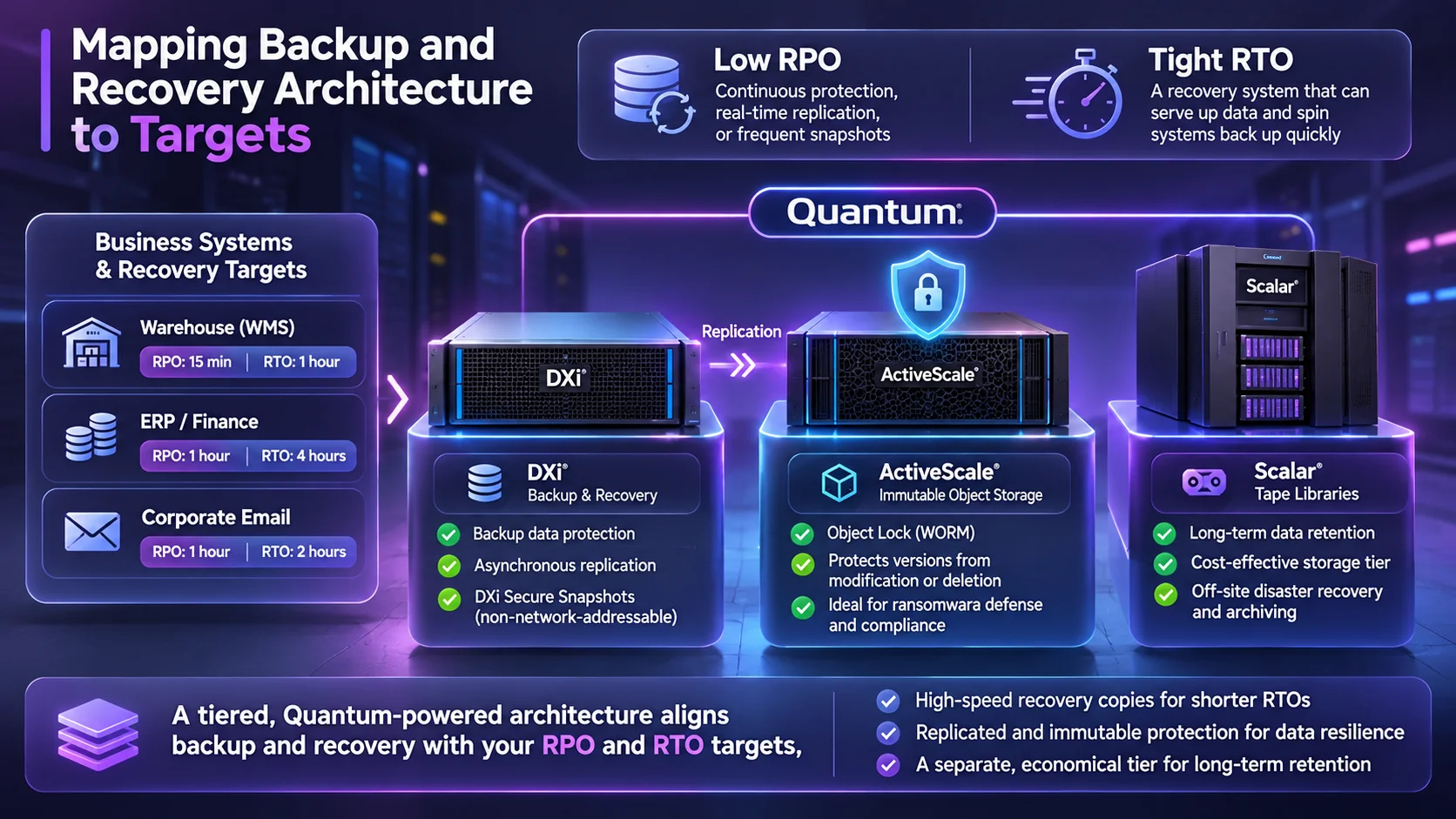
Take Quantum’s disaster recovery setup as a great example of how different tech pieces fit together. Their DXi systems support asynchronous replication of backup data to a compatible secondary DXi system, providing an additional recovery copy if the primary site goes dark.
When it comes to defending against ransomware, Quantum tiers things out even further. DXi Secure Snapshots are isolated in a non-network-addressable blockpool within the DXi system, while ActiveScale Object Lock can protect object versions from modification or deletion during configured retention periods. Older or long-term data backups can then be moved off to a different storage tier altogether. In fact, Quantum designs frameworks that combine DXi replication, immutable ActiveScale object storage and Scalar tape libraries for comprehensive off-site disaster recovery and long-term archiving. The important point is not that every company needs all three. It is that the recovery architecture should correspond to the target.
If you’re targeting a one-hour RTO, keeping a high-speed recovery copy right next to production is completely justified. A seven-year compliance archive does not need the same performance. This tiered approach can also make disaster recovery more economical.
Common RPO vs RTO Planning Mistakes
The biggest misstep people make is trying to set every target to zero. Aiming for zero RPO and zero RTO sounds fantastic on paper, but it’s wildly expensive and complex to pull off.
If a system can handle half an hour of lost data without breaking a sweat, spending a fortune to make sure you lose nothing just doesn’t deliver real business value. Another frequent mistake is leaving IT to figure out these targets all by themselves. Sure, the tech guys can break down what different recovery solutions cost and how fast they move.
But at the end of the day, business leaders need to decide how much data loss they can actually live with. A third trap is assuming that just because backups finish successfully, you’ll automatically hit your RTO.
You still have to put that recovery speed to the test in the real world. Then there’s the mistake of ignoring system dependencies.
You might get your core warehouse app restored in 30 minutes, but if user authentication, DNS, databases, or network connections are still down, your team remains completely stuck. Many organizations also fall into the trap of setting one blanket RPO and RTO for every single system. While that makes documentation nice and simple, it usually leads to an unrealistic and over-engineered architecture.
Finally, targets become outdated. A small Riyadh warehouse may begin with 20 users and modest transaction volumes. Two years later, the facility could support hundreds of employees and substantially more shipments. Sticking with that original four-hour RTO just won’t cut it anymore. As your business expands and changes, your recovery targets need to evolve right alongside it.
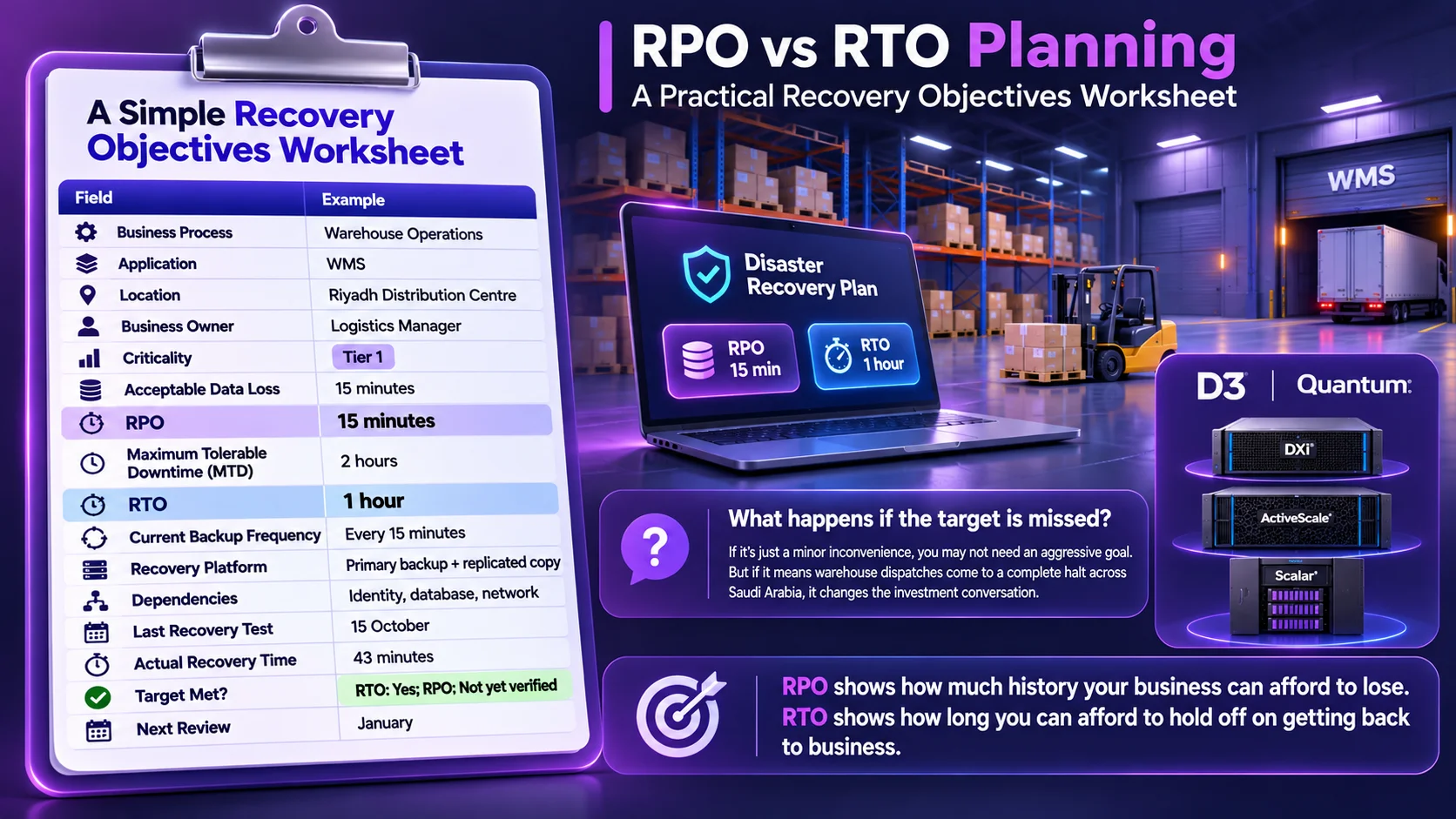
A Simple Recovery Objectives Worksheet
Keeping your RPO vs RTO planning worksheet straightforward makes it much easier to use:
| Field | Example |
| Business Process | Warehouse Operations |
| Application | WMS |
| Location | Riyadh Distribution Centre |
| Business Owner | Logistics Manager |
| Criticality | Tier 1 |
| Acceptable Data Loss | 15 minutes |
| RPO | 15 minutes |
| Maximum Tolerable Downtime (MTD) | 2 hours |
| RTO | 1 hour |
| Current Backup Frequency | Every 15 minutes |
| Recovery Platform | Primary backup + replicated copy |
| Dependencies | Identity, database, network |
| Last Recovery Test | 15 October |
| Actual Recovery Time | 43 minutes |
| Target Met? | RTO: Yes; RPO: Not yet verified |
| Next Review | January |
Be sure to ask one key follow-up question:
What happens if the target is missed?
If missing the target is just a minor inconvenience, you probably don’t need to spend heavily on an aggressive recovery goal.
But if missing it means warehouse dispatches come to a complete halt across Saudi Arabia, that completely changes the investment conversation.
For companies expanding regional infrastructure, D3 helps guide these conversations as a Quantum Distributor. Operating out of Dubai with a regional network, D3 offers full Quantum solutions including DXi backup, ransomware recovery, ActiveScale and Scalar tape libraries.
This setup is especially valuable for logistics and data-heavy businesses in Saudi Arabia. D3’s strategy in the Kingdom highlights data infrastructure, storage and backup as key growth areas, with Quantum serving as a cornerstone of their offering. As D3 expands its footprint in Riyadh, their real value isn’t just delivering storage hardware. It’s working side-by-side with local system integrators and clients to align workloads, backup capacity, retention policies and recovery goals into an architecture that works seamlessly at scale.
That’s what practical RPO vs RTO planning comes down to in the end.
RPO shows how much history your business can afford to lose. RTO shows how long you can afford to hold off on getting back to business.
A smart disaster recovery setup strikes the perfect balance between both without making your business pay for high-tier performance it doesn’t really need.