
Most people only pay attention to a UPS on two occasions: the day it gets installed and the day something goes wrong. In between, it usually just sits quietly in a server room for years. The status light stays green, the batteries stay tucked away out of sight and everyone assumes it will step up the second power cuts out.
That’s a risky assumption to make.
UPS units rely on batteries, fans, filters, capacitors and complex wiring that naturally age over time. On top of that, your overall IT setup evolves as new servers, switches and storage get added. A unit that started out running at a comfortable 40% capacity can easily creep up to 75% a few years down the line without anyone noticing.
That’s why a solid UPS maintenance checklist serves two vital goals: catching wear and tear before it triggers actual downtime and ensuring your system is still properly sized for the equipment it protects.
This is especially important for businesses operating in Dubai, Riyadh and across the GCC. Facilities, data centers, and branch offices in the region run around the clock, and challenging environmental conditions can put extra strain on electrical components and batteries.
As a Tecnoware Distributor, D3 offers solutions ranging from compact UPS models to enterprise online and modular setups. No matter which architecture you use, a UPS maintenance checklist tailored to your system helps ensure the protection you invested in on day one is still reliable years down the road.
Start with the UPS Model and Service History
Before you jump into any hands-on checks, take a moment to make sure you know exactly what model you’re dealing with. A reliable UPS maintenance checklist starts with accurate equipment records. You’ll want to log all the key details: the manufacturer, model, serial number, kVA and kW ratings, commissioning date, battery type, battery install date and whether there are any external battery cabinets attached.

It’s also worth jotting down these items:
- Current protected load
- Number of battery strings or modules
- Firmware or software version where relevant
- SNMP, Modbus or other management interfaces
- Generator connection
- Maintenance-bypass arrangement
- Previous service visits
- Previous battery replacements
- Recent faults and alarms
- Warranty or service-contract status
It might feel like extra paperwork, but having this context helps prevent costly mistakes down the line. For instance, a facilities tech shouldn’t be swapping out batteries based on guesswork from five years ago, and IT shouldn’t just assume the UPS still offers the same backup runtime after piling on several new servers. Keeping these records alongside your UPS maintenance checklist gives the next technician a dependable starting point.
Depending on the specific model, Tecnoware’s enterprise systems offer a range of management tools, battery configurations, and bypass setups. Take their larger EVO DSP PLUS platforms: they come equipped with features like SNMP, Modbus, dry-contact interfaces, static/manual bypass and external battery extensions. Tracking the service history also helps you spot underlying patterns.
Seeing three battery alarms pop up in six months points to a very different issue than a single warning after a brief power outage. Likewise, constant high-temperature alerts might mean the room’s cooling needs attention rather than the UPS itself being faulty. Ultimately, keeping clean maintenance records gives your technicians the clear picture they need before touching any hardware.
Routine Checks for the Site Team
Day-to-day UPS checks don’t mean facilities staff need to pull panels off cabinets or get anywhere near live wiring. A practical UPS maintenance checklist should distinguish safe visual checks from work reserved for qualified technicians.
In fact, they really shouldn’t. Tecnoware’s own safety docs point out that internal maintenance is strictly for qualified, authorized techs since hazardous voltages can stick around even after the unit is unplugged from mains power. The site team’s primary job is simply to keep an eye on things.
A quick monthly walk-through is usually all it takes to catch subtle changes early: .Glance at the display screen.
- Make sure it’s running in its normal mode.
- Check for any active warnings or alarms.
- Note the current load percentage.
- Look over estimated battery health or runtime numbers if displayed.
- Verify that the UPS hasn’t slipped into bypass mode unexpectedly.
- Ensure external battery cabinets look intact and normal.
- Listen out for odd fan noises or electrical humming.
- Double-check that vents aren’t blocked.
- Keep an eye out for dust, moisture or environmental issues nearby.
These steps only take a few minutes, but they give you a solid baseline of normal operation. Using the same UPS maintenance checklist each month makes gradual changes easier to spot. If a UPS usually hovers around a 42% load and suddenly jumps to 68%, it’s not just a matter of checking if it’s still under 100%. Someone needs to figure out what drove that increase.
Alarms, Load and Room Conditions
Never brush off recurring UPS warnings as normal. Even an alarm that clears on its own is telling you something valuable. Your UPS maintenance checklist should include an alarm review, not just a check of the current display. It’s always smart to review event logs for patterns involving:
- Battery status warnings
- Overload warnings
- Input voltage fluctuations
- Bypass switching events
- Elevated internal temperatures
- Cooling fan alerts
- Network or interface communication drops
- Failed battery self-tests
For remote locations, connecting via SNMP or another management protocol routes these alerts directly into your central monitoring platform so IT doesn’t rely on someone physically standing in front of the unit.
Tecnoware provides management options across its professional UPS range, including SNMP, Modbus and dry-contact interfaces for supported systems. Load levels should also be checked routinely. A unit that runs comfortably at setup can easily become stressed over time as new tech is added. This is especially common in warehouses and logistics hubs, where extra security cameras, network switches, wireless access points and inventory management gear gradually get plugged in. Ambient room conditions play a huge part as well.
While Tecnoware rates several units to operate in temps up to 55°C, keeping room temperatures around 20–25°C is ideal for maximum battery life. In GCC environments, this is a critical consideration. Record room temperature and airflow observations in the UPS maintenance checklist so changes don’t go unnoticed. A server room in Riyadh or Dubai shouldn’t just be treated as extra storage that happens to house electrical gear. Air conditioning should run reliably, airflow must stay clear and climate conditions need ongoing oversight.
Ventilation and Visible Battery Changes
Heat remains one of the single biggest threats to battery longevity. Make ventilation a regular item on your UPS maintenance checklist. Take time to inspect air intakes, exhaust grilles and external filters for dust buildup. Ensure boxes, spare parts or supplies haven’t been stacked against the enclosure.
Tecnoware includes step-by-step air filter replacement procedures in their modular UPS documentation, highlighting that maintaining proper airflow is essential, not optional. External battery enclosures should also get a quick visual scan without opening up internal components. Key warning signs to watch out for include:
- Swollen or distorted casings
- Signs of fluid leakage
- Corrosion building up on visible terminals
- Strange or pungent smells
- Unusually high heat radiating from the units
- Cracks in battery housings
- Damaged battery racks or cabinets
- Loose, frayed, or damaged cabling
Eaton’s maintenance recommendations also stress checking for swelling or physical damage, pointing to battery condition as a major factor in UPS reliability. If anything seems out of the ordinary, flag it right away. General office staff or IT team members shouldn’t try to open battery modules, tighten wiring, or work on internal electronics themselves.
Plan Qualified Preventive Maintenance
Having your IT and facilities teams keep an eye on things is great, but it doesn’t replace actual UPS preventive maintenance. Your UPS maintenance checklist should also identify the tasks that require a qualified service engineer. Proper, qualified maintenance goes a lot deeper.
Depending on your specific setup and service plan, a trained engineer will dive under the hood to check electrical connections, internal circuitry, cooling fans, air filters, capacitors, charging systems, battery banks, bypass modes and alarm triggers. A proper service visit usually involves precise electrical measurements and hands-on functional testing, too.
For example, Eaton’s documented UPS service procedures include checking AC voltage and current, testing alarms and static-switch operation, inspecting grounding and insulation, reviewing filters and examining battery-room conditions, terminals, cables and signs of leakage or corrosion. The maintenance interval should follow the manufacturer’s recommendations, equipment criticality and service environment. As a general benchmark, some UPS manufacturers recommend at least an annual preventive maintenance examination.
Eaton specifically recommends yearly checks as a way to identify potential concerns before they create downtime. Critical data-centre systems may justify more structured service arrangements than a small branch-office UPS. The key takeaway here is to get maintenance on the books before warning signs appear. Preventive care is all about staying ahead of trouble because waiting for a UPS to crash is easily the most expensive way to learn that something needs replacing.
Check Battery Health and Replacement Needs
The battery is often the component people worry about most and with good reason.
A UPS can hum along happily on normal grid power while its batteries are quietly losing their ability to hold a charge. You usually only find out when the power actually goes out. That’s why battery condition deserves a dedicated section in the UPS maintenance checklist. You shouldn’t rely on just one single metric to judge battery health. Take a look at age, monitoring logs, automated self-tests and hands-on technician readings all together.
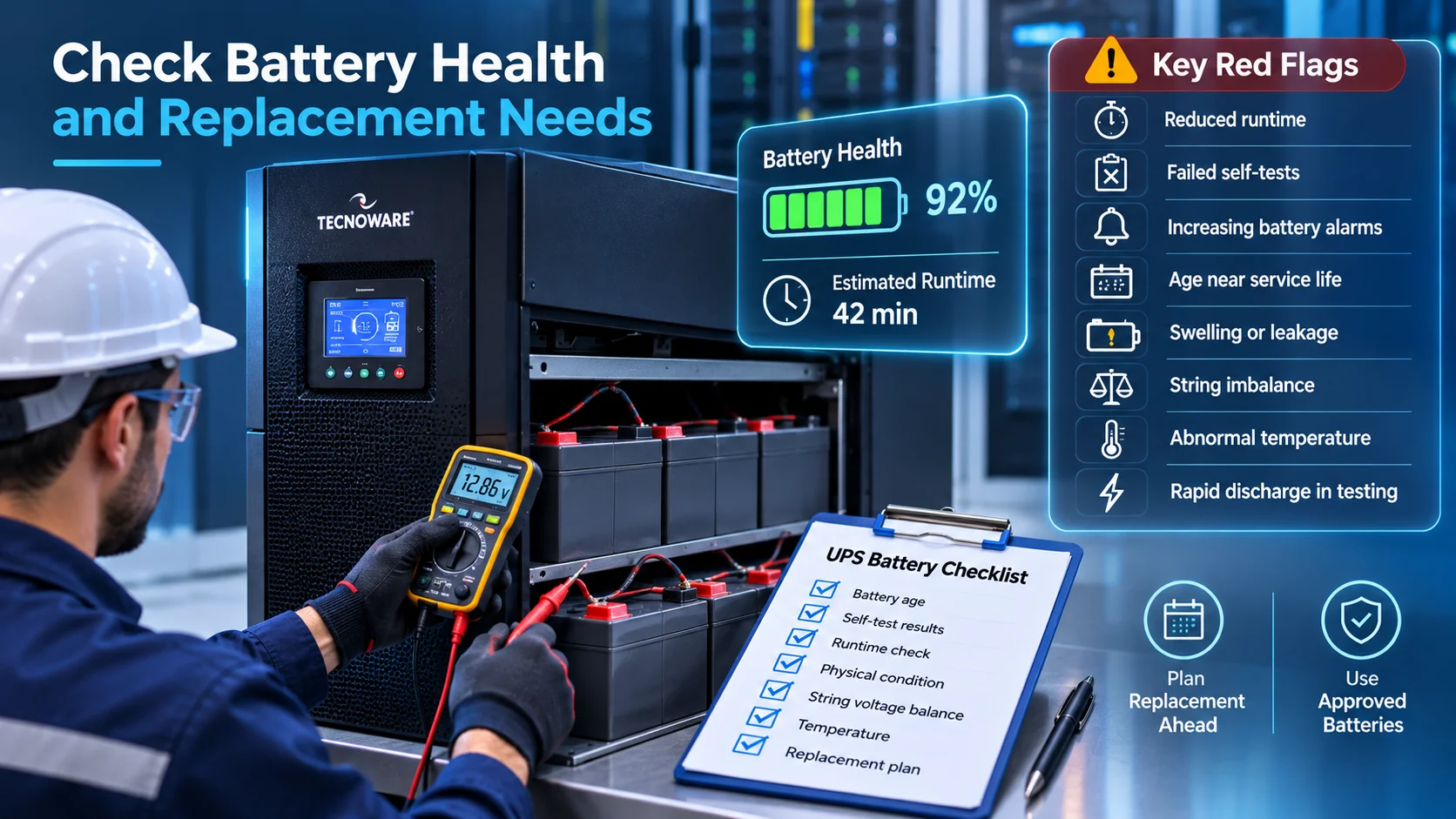
For smaller, standard UPS units, manufacturers often use age as a major heads-up. Eaton, for example, suggests planning for a swap as smaller batteries approach the four-year mark, while also weighing test results and physical condition. That said, don’t treat four years as a hard-and-fast rule everywhere. Factors like battery chemistry, room temperature, discharge cycles, charging patterns, and overall unit design all play a massive role in actual lifespan.
Instead, look for a combination of red flags like these:
- Reduced estimated runtime
- Failed self-tests
- Increasing battery alarms
- Age approaching the expected service life
- Swelling or leakage
- Significant imbalance within a battery string
- Abnormal temperature
- Unexpectedly rapid discharge during controlled testing
And always make sure you’re using the right replacement battery.
Tecnoware explicitly highlights in its modular documentation that any replacement modules must match the original battery type. Their safety guidelines also state that only authorized technicians should handle battery swaps, given the serious risks of electric shock and high short-circuit currents. At the end of the day, replacing batteries isn’t a task to toss over to the general IT helpdesk.
Schedule Controlled Tests and Service Windows
Testing a UPS shouldn’t mean pulling the main breaker and hoping for the best. You want a carefully planned routine instead. The UPS maintenance checklist should specify which tests are scheduled, who is authorized to perform them and how the site will respond if something goes wrong. Before kicking off any test on essential gear, your team needs to review the current load, double-check bypass and generator setups, estimate runtime and run through the shutdown procedure.
Depending on the installation, tests may include:
- UPS self-test
- Alarm verification
- Battery discharge test
- Bypass operation
- Generator-to-UPS transition
- Redundancy or module-failure simulation
- Monitoring and alert delivery
- Controlled application shutdown
The exact procedure should come from the UPS manufacturer and qualified service personnel. For a critical site, schedule a service window even when the architecture is designed to remain online. Redundancy reduces risk; it does not eliminate the need for operational control.
Systems like Tecnoware’s modular range make this easier by building in hot-swappable components, modular battery options, and maintenance bypass functions. Beyond hardware, testing is also about making sure your operational workflows actually work when needed.
If the generator fails to start and only 15 minutes of battery remains, who receives the alert?
- Which systems shut down first?
- Who decides whether a controlled shutdown begins?
- Does the Riyadh warehouse operations team know who to call outside normal office hours?
Those questions matter just as much as whether the UPS itself passes its test.
Keep a Maintenance and Escalation Log
Every time you perform an inspection, make sure to write it down. Pairing your UPS maintenance checklist with a straightforward UPS maintenance schedule and tracking log helps keep everyone on the same page.
Here is a quick example of what that can look like:
| Field | Example |
|---|---|
| Site | Riyadh Logistics Centre |
| UPS | Tecnoware EVO DSP PLUS |
| Serial number | Recorded asset ID |
| Inspection date | 6 October |
| Load | 54% |
| Operating mode | Online |
| Active alarms | None |
| Room temperature | 23°C |
| Battery age | 3 years |
| Visible condition | Normal |
| Latest self-test | Passed |
| Engineer action | None |
| Next preventive service | January |
| Escalation owner | Facilities Manager |
You should keep your UPS alarm log right alongside these maintenance records. It’s best not to wipe the history clean as soon as a quick fix is applied. If an alert pops back up six months later, having that past context makes it much easier for an engineer to spot a recurring or deeper problem. It also helps to figure out your escalation steps ahead of time so nobody is left guessing during a crisis.
For example, immediate technical escalation might be required for:
- Battery swelling or leakage
- Repeated battery-test failure
- Persistent bypass operation
- Overload
- Internal overtemperature
- Fan failure
- Burning smell
- Unexpected shutdown
- Rapid runtime loss
- Water near UPS or batteries
On the other hand, day-to-day planning can comfortably focus on things like battery age, rising power loads, shorter backup runtimes, and upcoming service checkups. Using a consistent UPS maintenance checklist across locations makes it easier to compare findings and escalate issues. Having this kind of clear process in place makes a huge difference, especially if you’re managing multiple sites across the GCC.
D3 focuses heavily on helping regional businesses and partners across Dubai, Riyadh build reliable power continuity plans. Our Tecnoware offering links quality hardware directly with local technical support and preventive maintenance, while their expansion in Saudi Arabia ensures on-the-ground help is always close to key projects. That local support is a big advantage with logistics manners in KSA.
A busy distribution center relies on network switches, Wi-Fi, CCTV, access control, servers and warehouse management software staying online non-stop. Keeping up with UPS maintenance isn’t just about preserving an electrical box, it’s about making sure the whole facility can keep receiving shipments, scanning inventory, and operating smoothly. That’s really where D3 adds value: connecting Tecnoware hardware with complete operational support, from initial sizing and battery checks to ongoing monitoring and regional maintenance.
You install a UPS so you’re covered when the main power fails. Consistent maintenance is what guarantees the UPS itself doesn’t fail you first.