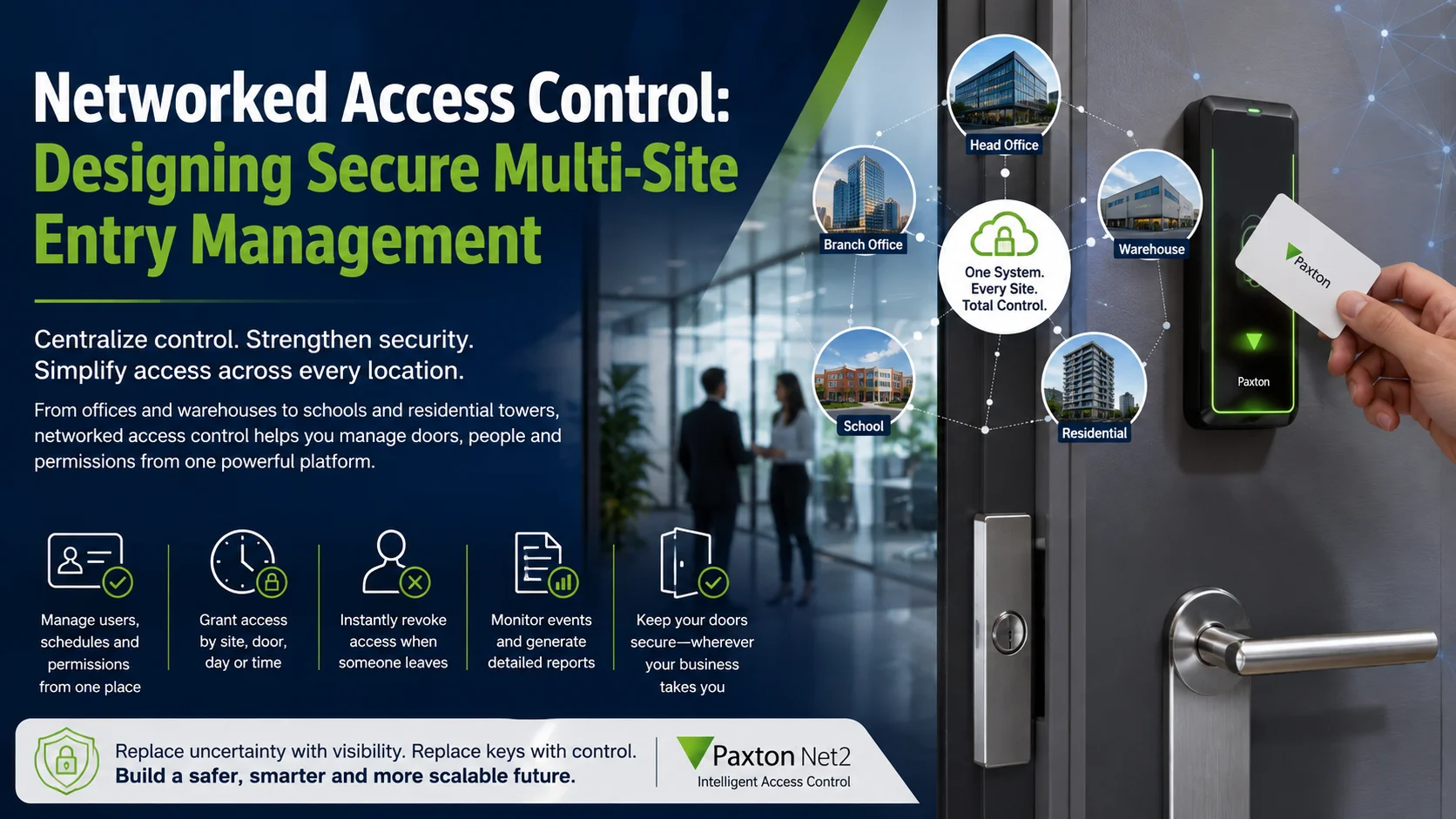
Think of a networked system as your central command center for everything related to your doors. You can manage users, schedules and credentials all from one place. Need an employee to have access to the Dubai office but not the warehouse? No problem. Has a contractor come in for just three days? Easy. And if someone leaves the company, you can deactivate their access instantly without ever having to touch a physical lock.
For organizations in the GCC whether they’re managing schools, logistics hubs or residential towers the goal isn’t just to open doors with a button. The real trick is building a system that stays easy to manage even as your business adds more locations and more people.
Getting this right takes more than just picking out a card reader. It’s about making sure your controllers, locks, networks and even your emergency plans all talk to each other as one seamless setup.
Why Keys Are Not Enough for Modern Facilities
Mechanical keys are still useful in some situations, but they give you very little visibility into what’s happening in your facility.
A key can confirm that someone possesses it. It cannot confirm who is using it, when it was copied or whether the person still has permission to enter.
When a key goes missing, you’re usually stuck with two bad options: either accept the security risk or go through the hassle of changing the locks and issuing new keys to everyone. That becomes a logistical nightmare if one key opens multiple doors or if you have hundreds of employees, tenants and contractors to manage.
Traditional keys also struggle with temporary access. Think about a cleaner who only works evenings, a maintenance contractor who needs entry to one room for a specific project or a visiting employee who’s only there for a week.
With physical keys, you’re essentially relying on trust and policy. But with an access control system, you can set specific permissions and time profiles that do the work for you.
Paxton Net2 is designed as a networked access control system that can be administered from one or more computers and monitored from a central location. Its ecosystem includes door controllers, readers, wireless door handles and video entry components.
This creates several practical benefits:
- Lost cards or mobile credentials can be disabled.
- Access can be limited by site, door, day or time.
- Events can show whether access was granted or denied.
- Permissions can be updated without visiting every door.
- Reports can support investigations and operational reviews.
The difference really stands out during employee offboarding.
In a building with physical keys, you have to chase people down to get their keys back and you can never be 100% sure they haven’t made copies. With a networked system, you can just remove their access from the software as part of their departure. It’s immediate and certain.
That does not make access control automatic security. Poor permissions can still expose sensitive areas. Shared cards can still weaken accountability. Doors can still be left open.
The value comes from replacing informal control with a process that can be managed, reviewed and improved.
Controllers, Readers, Credentials and Doors
A secure door is not created by one device. It is the result of several components working together.
The reader is the part users normally see. It receives a card, token, mobile credential or PIN and passes that information to the system.
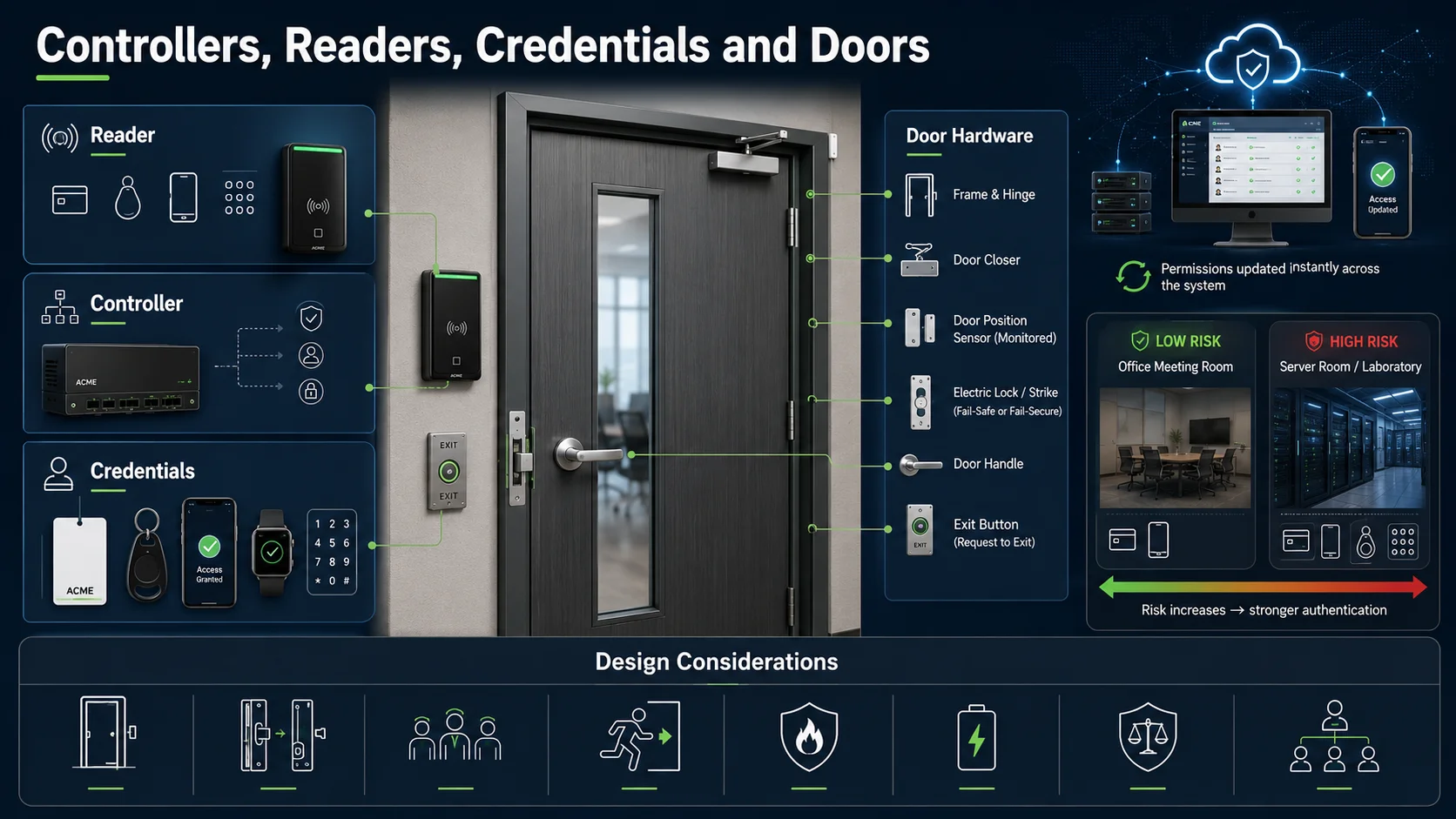
The controller makes the access decision. It checks the credential against the permissions stored for that door. When access is approved, it activates the locking hardware for the configured period.
Paxton describes the controller as the component that manages the reader, keypad, electric lock, exit button and other devices connected at the door. Within a networked system, changes made through the software can be applied to the controller immediately. This architecture is explained in the official Net2 system overview.
The credential represents the user’s identity within the access system. It may be a card, key fob, smartphone, smartwatch or PIN.
Credentials should be selected according to the risk and operating environment. A low-risk office meeting room does not necessarily require the same authentication method as a server room, laboratory or cash-handling area.
The door hardware is equally important. Electronic access control does not correct a weak frame, unsuitable lock or badly aligned door. The design must consider:
- Door and frame construction
- Internal or external location
- Traffic volume
- Lock type
- Emergency exit requirements
- Fire and life-safety obligations
- Door closer operation
- Request-to-exit devices
- Door position monitoring
- Backup power
Fail-safe and fail-secure behavior must also be decided intentionally. One lock type releases when power is removed; another remains locked. The correct choice depends on the door’s purpose, evacuation requirements and local regulations.
The design team should therefore survey every door rather than selecting one standard bill of materials for the entire building.
Credentials require the same level of planning. Businesses should define who issues them, how identity is verified, what happens when they are lost and how quickly they are disabled when someone leaves.
For higher-risk facilities, the organization may also consider stronger credential technologies and multi-factor methods. NIST guidance for physical access control systems recommends selecting authentication methods according to risk rather than treating every access point equally.
A well-designed system begins with zones and user groups, not products. Public entrances, offices, stores, server rooms, loading areas and executive floors should each have permissions that reflect their actual purpose.
Centralized Monitoring and Remote Management
Multi-site systems really prove their worth when you can manage every door without ending up with a dozen different, disconnected admin setups.
Imagine a company with a main office, a couple of warehouses and several branches. Without a central way to handle things, every site might create users differently, follow its own random schedule, and rely on different staff to cancel old cards.
Before long, the business starts losing track of exactly who has access to what, which is a major security risk.
Centralized monitoring creates one operating model. Security or facilities teams can manage users, review events and apply policies across locations while still giving local administrators limited responsibility for their own sites.
Paxton10 is built for this, using a cloud gateway to link up to 100 different sites to a single server. It is incredibly scalable, handling anything from a single door up to 1,000 doors and cameras.
Just because it’s centralized doesn’t mean everyone should have the keys to the kingdom, though.
It’s all about setting up clear roles. A receptionist might only need to add visitors, while a branch manager handles their local team. You’d keep system-wide changes restricted to just a handful of trusted administrators.
Managing things remotely also saves a ton of time. With the Paxton Connect app, you can update users, check logs, or even pop a door open from your phone. It even helps with emergencies by providing instant roll-call reports.
Of course, remote access is a powerful tool, so it needs to be protected. Every admin should have their own login, permissions should match their actual job, and you should review who has access on a regular basis.
The technical side matters too. You shouldn’t just plug your controllers or servers into any old network. Proper firewalls, secure connections, and regular backups are essential parts of a solid design.
Multi-site systems must also account for different time zones, working weeks and public holidays. A schedule designed for one country may not suit another. Local teams may need flexibility, but that flexibility should remain inside a consistent group policy.
A good centralized platform creates visibility without removing local context.
Wireless Locks and Video Intercom Integration
Not every door is easy or economical to cable.
Existing offices, hotels, schools and multi-tenant buildings may contain internal doors where installing network and power cabling would create unnecessary disruption. Wireless electronic locksets can bring those doors into the access control environment without rebuilding the surrounding area.
The Pax Lock Pro wireless door handle can operate standalone or as part of Net2 or Paxton10. Paxton lists compatibility with DIN-standard locks, several token technologies and Bluetooth smart credentials when used with Paxton10.
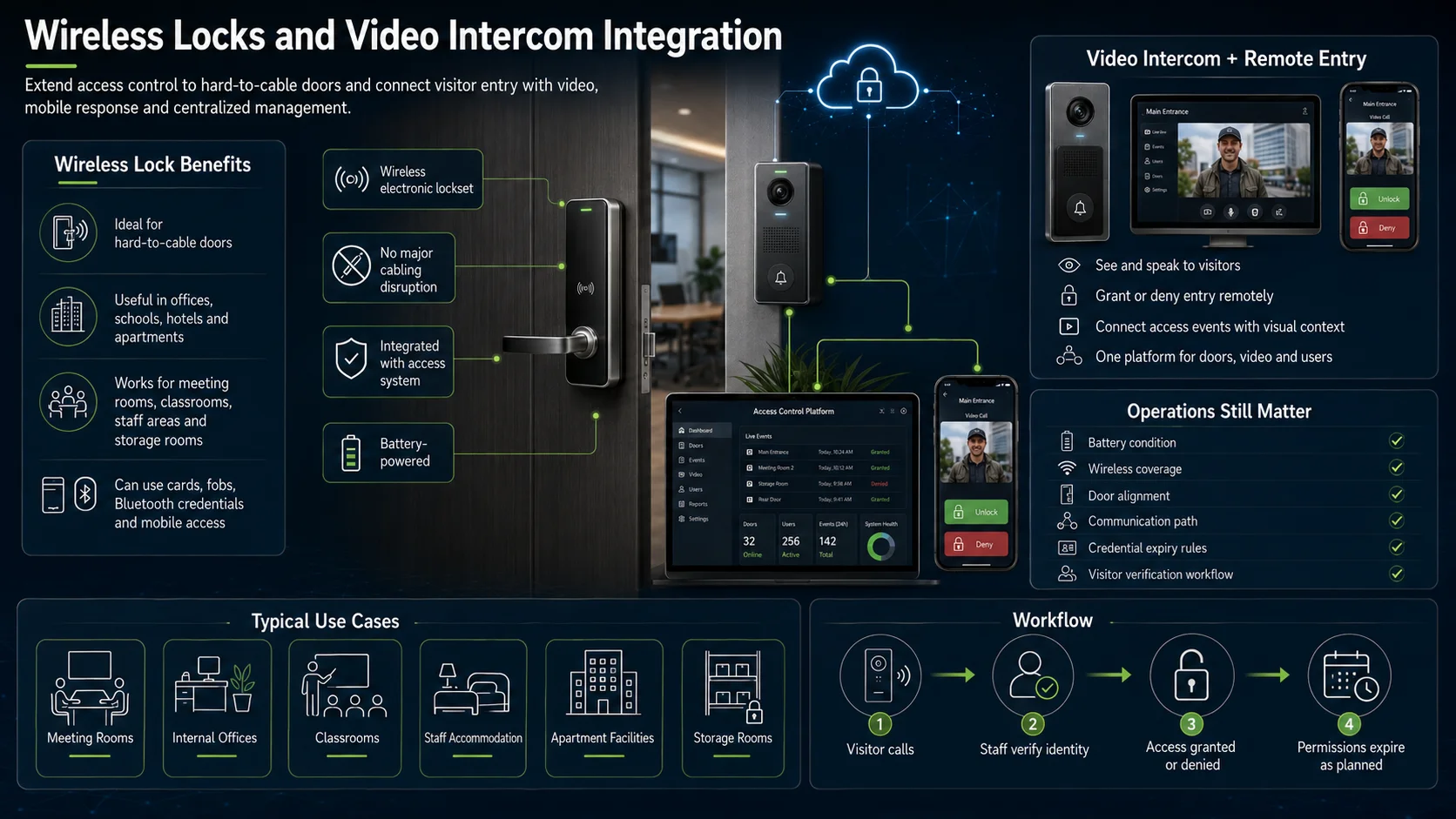
This can be useful for:
- Meeting and training rooms
- Internal office areas
- Staff accommodation
- Classrooms
- Apartment facilities
- Storage rooms
- Doors where new cabling is difficult
Wireless does not mean maintenance-free. Battery condition, wireless coverage, door alignment and communication paths still need to be checked. The operating team must know how battery alerts are handled and what happens if communication is temporarily unavailable.
Visitor access introduces a different requirement. Before opening a main entrance, reception or security staff may need to see and speak to the person requesting entry.
Paxton Entry combines an external panel, door control unit and internal monitor. It can operate independently or integrate with Net2 and Paxton10. Its mobile application can also allow authorized users to answer calls and grant or deny entry remotely.
When video intercom and access events are connected, operators receive more context. A denied credential, forced door or visitor call can be reviewed with relevant visual information rather than appearing as an isolated line in a report.
Paxton10 also combines access control and video management in one platform. In a multi-academy deployment, multiple sites were managed through one system, with wired readers, Pax Lock Pro handles, cameras and video entry used across 66 doors.
Integration should still follow a defined workflow. Technology can display a visitor, but the organization must decide who verifies identity, which areas visitors may enter and when their permissions expire.
Common Design Mistakes
The costliest mistakes in access control usually happen long before anyone picks up a drill.
A big one is trying to design everything from a floor plan without actually walking the site. A drawing won’t tell you if a door frame is warped, what kind of locks are already there, or if running cables through that specific wall is going to be a nightmare.
It’s also easy to get hung up on the number of doors and forget about the people using them. Managing a handful of doors for thousands of rotating contractors can actually be way more complicated than running a hundred doors for a steady, long-term team.
Then there’s offboarding, which often gets overlooked. If removing access is just seen as an occasional “to-do” rather than a standard part of the HR process, you end up with old credentials staying active way longer than they should.
Other frequent mistakes include:
Giving too much access: Permissions are copied from one employee to another without checking whether they are still appropriate.
Using shared credentials: Shared cards remove accountability because several people appear as one user.
Ignoring visitors and contractors: Permanent employees are managed carefully, while temporary users receive informal access that is never reviewed.
No resilience planning: The project does not define what happens during power, server, network or controller failure.
Weak network security: Access devices are installed on flat networks without controlled remote administration or update procedures.
Choosing credentials before assessing risk: Every door receives the same card technology regardless of the area being protected.
No room to grow: The setup might work fine today, but if the architecture isn’t scalable, adding a new branch later could mean starting again from scratch.
Skipping user acceptance testing: The system is technically online, but reception, security and facilities teams have not tested real scenarios.
These scenarios should include lost credentials, denied access, forced doors, visitor entry, emergency lockdown, power interruption and the removal of a former employee.
A good example of scale is Paxton’s Dubai residential case study, where Paxton10 was deployed across more than 450 doors for over 20,000 users. Centralized administration, bulk user upload and smartphone credentials were used to reduce the administrative burden and support future expansion.
The takeaway isn’t that you need the biggest system possible. It’s that you should build your setup for where your business is heading, not just where it is right now.
Access Control Project Checklist
Before you dive into a multi-site access control project, it’s worth sitting down with your team and your security partner to walk through these 15 points. It’s the best way to make sure everyone is on the same page from day one.
Where are you headed?
Think about how many doors and people you need to manage today, but also what your business might look like in three to five years. You don’t want to outgrow your system too quickly.
Know your doors
Has someone actually walked the site to check the door frames, locks, and power availability? Paper plans rarely tell the whole story.
Mapping out your zones
Which spots are open to everyone and which are top-secret? Make sure your permissions match the actual risk level of each area.
Categorizing your users
Think through how you’ll handle different groups, from your full-time staff and long-term tenants to short-term contractors and visitors.
Choosing your keys
What feels right for your team—cards, fobs, or just using their phones? Also, have a clear plan for what happens the moment someone loses their “key.”
Setting the clock
Who needs access 24/7, and who should only be able to get in during office hours or for a specific temporary window?
Deciding who’s in charge
Who gets to add new users, change settings, or open a door remotely? It’s best to keep the “master” permissions to just a few people.
Keeping things consistent
If you have multiple sites, will they all follow the same rules, or do local managers need some flexibility to run their own show?
Welcoming visitors
How will you verify who people are when they arrive, and how do you make sure their access is automatically turned off when they leave?
Connecting the dots
Do you need your doors to talk to your cameras, alarms, or elevators? It’s much easier to plan these integrations now than later.
Staying safe online
Is your network setup secure? Make sure you have a solid routine for backups and software updates to keep the system running smoothly.
Planning for “What if?”
Think about the worst-case scenarios. What happens if the power goes out or the internet drops? You need to know how your doors will behave.
Keeping a record
Which events do you actually need to log, who’s going to look at them, and how long do you need to keep that data on file?
Training the team
Don’t just hand over the manual. Make sure your reception and security teams have practiced real-life situations, like dealing with a lost card or an emergency.
Ongoing support
Who handles future doors, replacement credentials, system updates and technical issues?
D3 supports partners and businesses with Paxton access control solutions across Dubai and the UAE, including Net2, Paxton10, readers, controllers, wireless locksets, smart credentials and video entry technologies. Its role extends beyond supplying hardware to regional consultation, product selection, deployment planning and technical support.
The strongest access control system is not necessarily the one with the most advanced reader or the longest feature list.
It is the one that gives the right person access to the right door at the right time and gives the organization a clear way to manage what happens next.