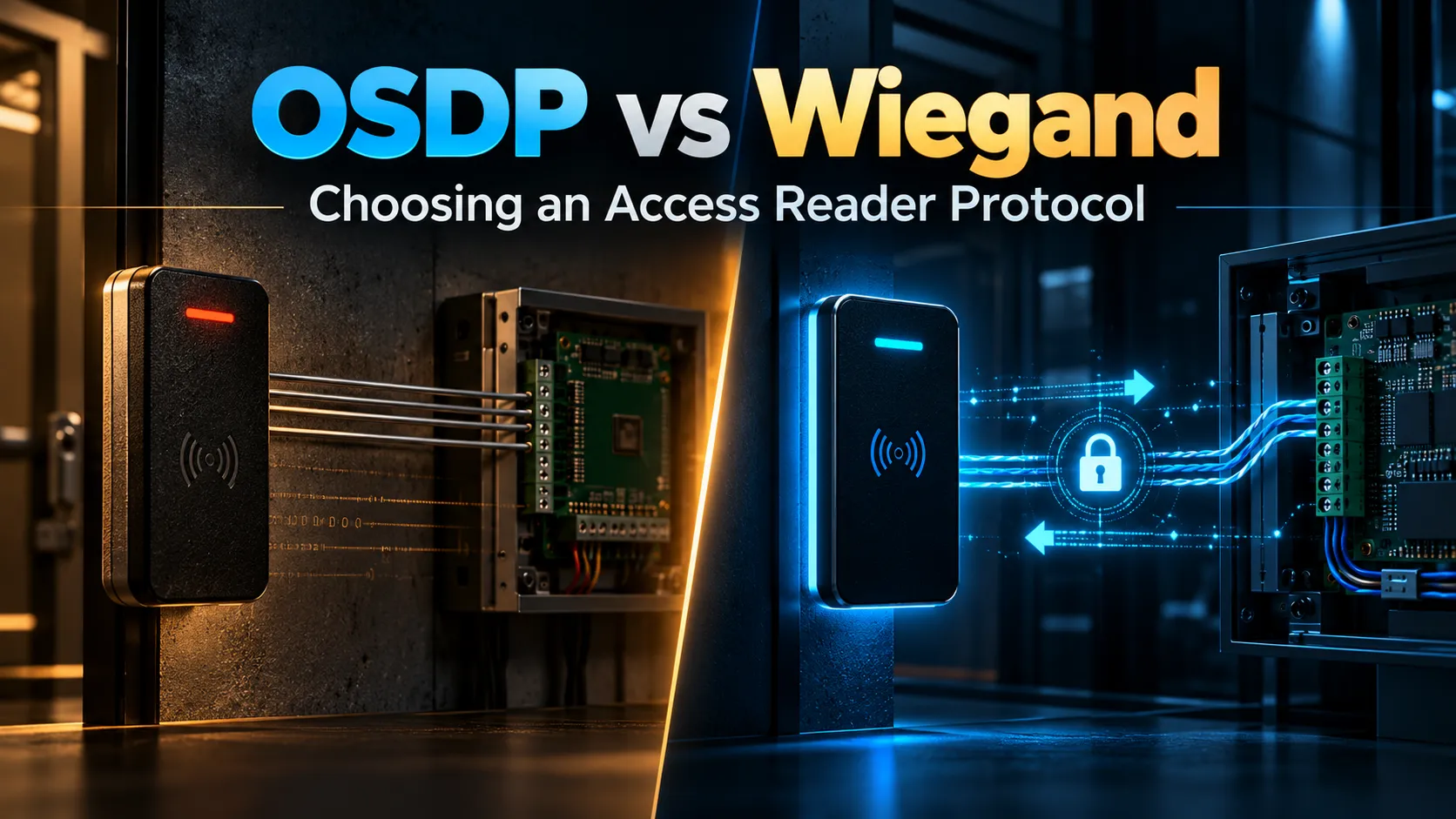
You can set up top notch smart credentials, place state of the art readers at every door and run an incredible access control system and still leave a massive blind spot. That vulnerability sits right in the cable connecting the reader on the wall to the controller tucked away inside.
That’s exactly why OSDP vs Wiegand is such an important comparison today.
Wiegand has been around for decades. It’s simple, reliable and built into countless existing systems, which is why so many people stick with it. But it was designed for a totally different era of security. Card data travels over Wiegand completely unencrypted and the system has no way of checking whether a reader is constantly connected or being tampered with.
OSDP, short for Open Supervised Device Protocol, was built from the ground up to fix those weaknesses. Maintained as a standard by the Security Industry Association (and internationally recognized as IEC 60839-11-5), OSDP enables full two-way communication between readers and controllers, continuous device supervision and robust AES-128 encryption over its Secure Channel.
This upgrade is especially crucial for businesses across the GCC that are modernizing commercial offices, data centers and facilities where access points protect truly vital assets.
The point isn’t to tear out Wiegand everywhere overnight just because something newer exists. It’s about recognizing where legacy wiring puts your site at risk, understanding what OSDP actually brings to the table and knowing what hardware or cabling changes you’ll need to make the switch successfully.
How Wiegand and OSDP Communicate
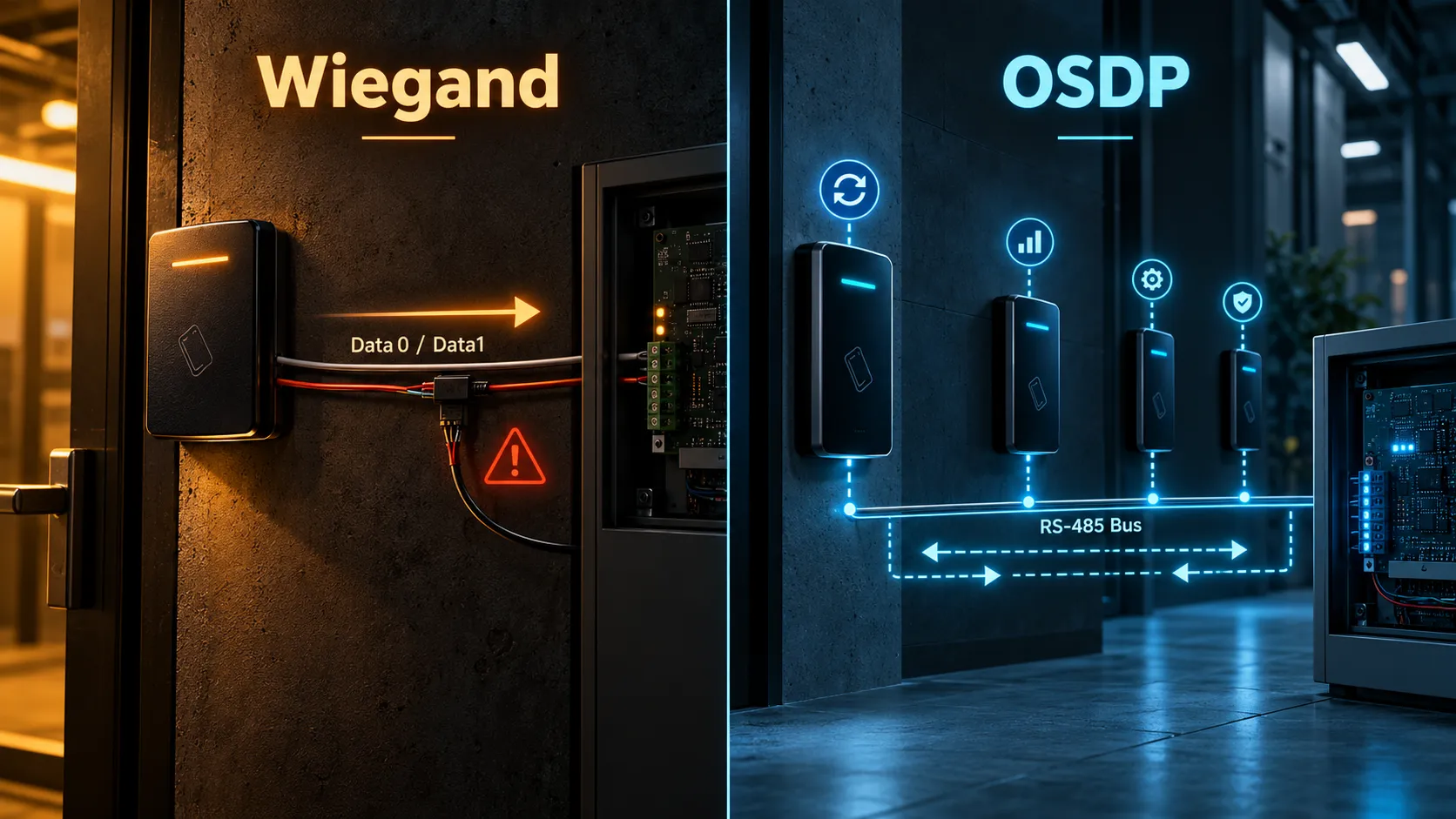
The first key difference in OSDP vs Wiegand is how information moves between a reader and its controller. Wiegand is fundamentally a one-way interface. When somebody presents a card or other credential, the reader converts the credential data into a stream transmitted toward the access controller. Traditional Wiegand uses Data 0 and Data 1 lines to represent the binary credential information. The controller catches that transmission and decides on the spot whether to unlock the door.
The real issue? There is no back-and-forth dialogue.
Unlike modern networked equipment, the controller doesn’t maintain an active dial with the reader over Wiegand. The whole setup was designed simply to pass badge numbers, not to manage devices or verify line integrity.
As the SIA points out, Wiegand streams badge data across Data0 and Data1 completely unencrypted, working exclusively in one direction from reader to controller. If an attacker taps into that wire, the access system usually has zero built-in protocol safeguards to flag the breach.
OSDP takes a completely different approach. Running over an RS-485 bus, it enables bidirectional communication between the main control panel and field units like wall readers. This allows the controller to continuously check in on the reader, gather health diagnostics and push updates back down the line.
That continuous connection unlocks a whole new set of capabilities.
The controller immediately knows if a reader stays online or goes missing. Depending on your hardware, you can remotely drive reader LEDs and sounders, push fresh configurations, handle advanced smart card workflows and manage devices straight from the software platform.
OSDP also supports multidrop architecture, allowing multiple properly addressed peripheral devices to share an RS-485 communication bus where the controller and product design support it. SIA notes that OSDP’s two-wire data architecture can reduce cabling compared with traditional reader interfaces and enable supervised, scalable deployments.
In practical terms, OSDP vs Wiegand is about far more than changing one connector.
Wiegand basically just shouts:
“Here’s the card code I just picked up!”
OSDP, on the other hand, keeps an active, ongoing conversation alive between reader and controller.
Encryption and OSDP Secure Channel
Security is the biggest differentiator in OSDP vs Wiegand. But there’s one critical detail you shouldn’t overlook:
Just using OSDP doesn’t automatically mean your connection is encrypted.
If you want encrypted data transfers, you have to run it in OSDP Secure Channel mode.
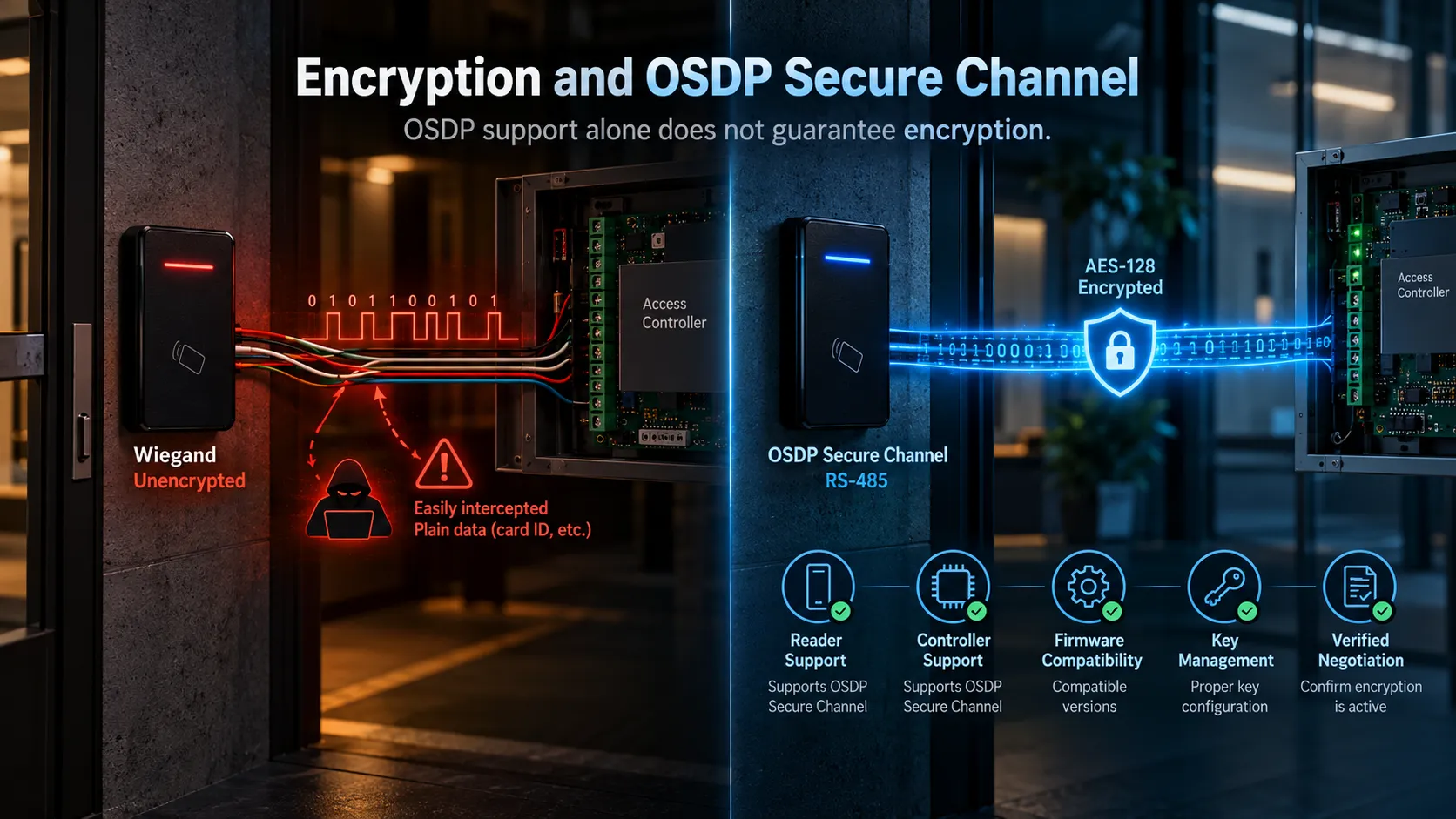
SIA guidelines specify AES-128 encryption for Secure Channel links between controllers and readers. In fact, current implementation guidelines warn that leaving OSDP unencrypted after setup defeats the main reason for moving away from Wiegand in the first place—so turning on and verifying Secure Channel is essential.
Keep this distinction in mind when weighing OSDP vs Wiegand during procurement.
Just because a spec sheet claims “OSDP supported” doesn’t guarantee that Secure Channel is actually supported, switched on, or properly set up across your combination of readers and controllers.
Before moving forward, double-check that you have:
- Secure Channel support on the reader side
- Secure Channel support on the controller side
- Compatible firmware across all devices
- A clear key management and initialization strategy
- Verified encrypted-channel negotiation during setup
The SIA’s 2026 corporate credential guide reinforces this, recommending OSDP v2 Secure Channel with AES-128 as the baseline standard for reader-to-panel links whenever possible. It also cautions that Secure Channel rarely turns on by default; installers need to explicitly configure it. Paying attention to this step is especially crucial if you’ve already invested in high-security credentials. You can issue advanced smart cards with top-tier cryptographic protections, but if your reader translates that data into unencrypted Wiegand as it sends it to the controller, that cable line remains a major weak link.
Ultimately, secure credentials and Secure Channel protect two different parts of the system. To keep your site fully protected, you need both.
Supervision and Two-Way Communication
Reader supervision is another important part of OSDP vs Wiegand. The “S” in OSDP stands for Supervised, and that’s not just a fancy label.
It represents one of the most practical upgrades the protocol brings to day-to-day operations. Instead of just sitting back and waiting for data pulses to arrive, the controller actively maintains a continuous dialogue with the reader.
If that line of communication ever drops out, the system catches it immediately and flags that the reader is no longer responding. That makes a huge difference when you need to tell whether a door is simply quiet or if someone has unhooked a reader or caused a system fault.
Having that bidirectional line open also gives installers and system designers a ton of extra flexibility.
SIA highlights that suitable OSDP setups can handle remote management and file transfers, letting you push settings or firmware updates without walking up to every single reader. That convenience really adds up when you’re managing large, multi-building sites.
Think about managing a site with 150 doors. With a traditional legacy reader architecture, updating reader behaviour may require technicians to visit individual locations depending on the products involved.
An OSDP setup built for remote management takes away a massive chunk of that maintenance headache. That two-way street also allows for much richer feedback at the door letting the controller send direct commands for LED sequences, sounder alerts and other supported reader functions rather than just basic default responses.
Even so, you should always put supervision through its paces during commissioning. Unplug a reader. Cut the communication line. See what the access software actually flags on screen. At the end of the day, a feature listed on a spec sheet is only useful if your operators actually get alerted when something happens.
Wiring and Migration Requirements
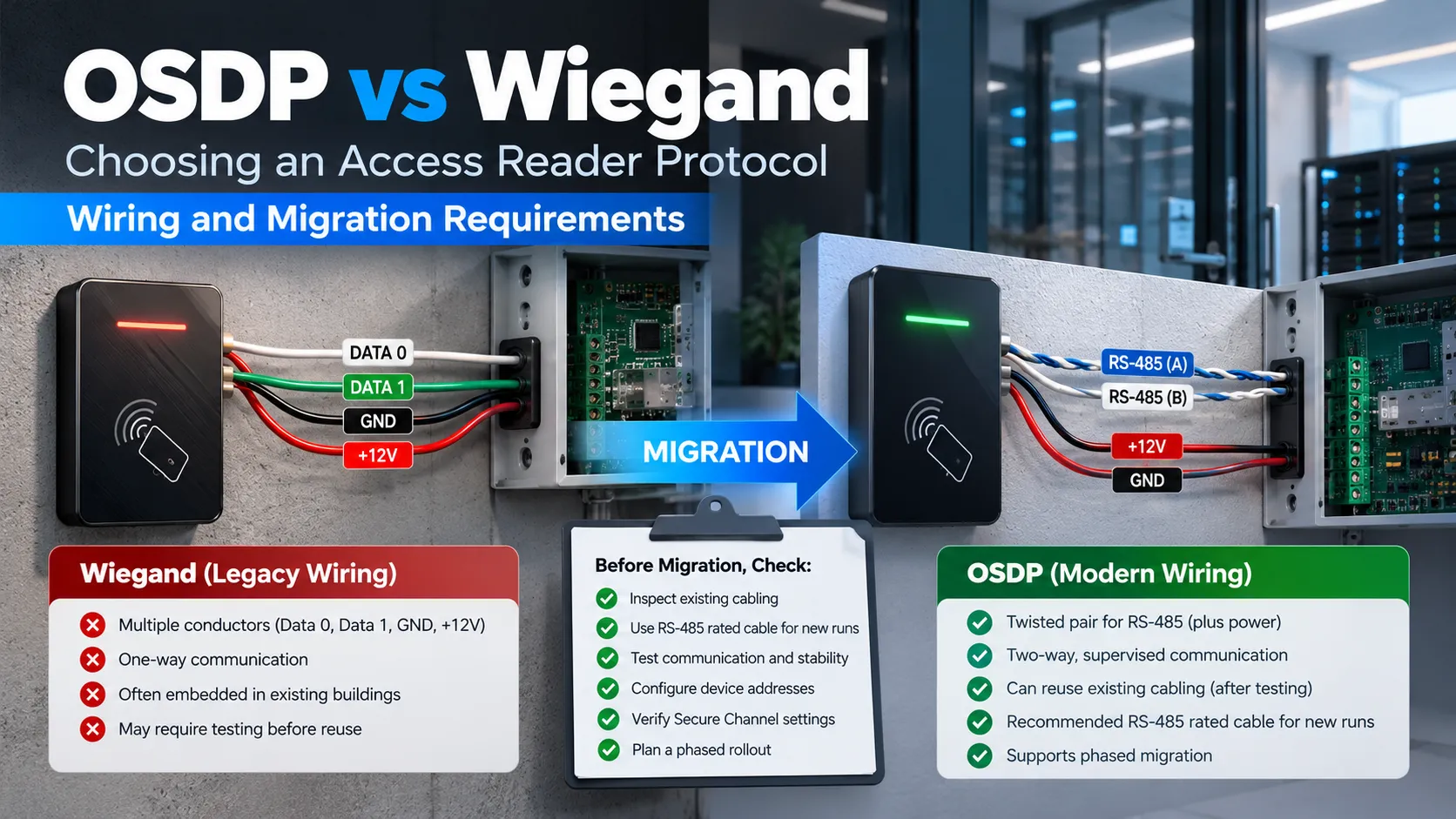
An important practical point in OSDP vs Wiegand migration is that moving to OSDP doesn’t always force you to rip out and replace every cable in the building. That said, you’ll still want to inspect your existing cabling thoroughly before reusing it.
A standard OSDP setup needs power along with a twisted pair for RS-485 communication. SIA outlines this as a four-conductor configuration: two wires for power and two for the communication pair. For brand new OSDP installations, always stick with cabling specifically designed for RS-485.
While legacy Wiegand wiring can work in certain scenarios, don’t assume it’s good to go just because you have enough spare conductors. In fact, SIA’s latest implementation checklist recommends thoroughly testing any existing wiring prior to reuse and insisting on two-wire RS-485 rated cable for new runs.
There are a few other adjustments to plan for as well.
Every OSDP peripheral requires its own device address and both the reader and controller must agree on communication settings. SIA advises keeping detailed documentation of addresses, settings, firmware releases, baud rates, physical locations and Secure Channel configurations right from installation day. This is precisely why bench testing pays off. Rather than mounting 80 readers across a facility right away, set up a test rig on your workbench first.
Take the time to test:
- Credential reads
- LED and buzzer commands
- Secure Channel negotiation
- Reader addressing
- Communication stability
- Expected controller events
A staged migration can then begin with the doors where exposure matters most, server rooms, financial areas, executive spaces or critical infrastructure rather than requiring one building wide replacement weekend. SIA explicitly identifies phased migration and converter solutions as practical approaches when an organisation cannot replace every legacy controller immediately.
Check Readers, Controllers and Converters
A complete OSDP vs Wiegand assessment must account for two main hardware pieces: the reader at the door and the controller behind it. For everything to work smoothly, both units need to support the features your project relies on.
Simply buying an “OSDP-compatible” reader won’t get you far if your existing access controller only accepts legacy Wiegand inputs. To clear up confusion, SIA runs an OSDP Verified Product programme that evaluates hardware against the standard.
There’s a big difference between a manufacturer claiming compatibility and a device that has passed independent verification. Firmware compatibility is another key detail to keep in mind.
A controller might require a specific software update to support OSDP. Another might handle basic reader signals fine but lack remote management tools, or cap the number of devices you can daisy-chain together. That’s why project specifications should spell out exact hardware models and firmware requirements instead of using generic tags like “OSDP required.”
Existing Paxton Net2 environments provide a useful example of migration rather than immediate replacement.
Paxton documents an integration in which an OSDP-compatible third-party reader communicates through AES-128 encrypted RS-485 to a Cypress OSMIUM interface module. That module then passes the credential information onward to a Net2 Plus controller through its Wiegand reader input. That allows an organisation to strengthen the exposed reader cable while retaining the existing controller. It is a useful migration strategy. It is not the same thing as converting the entire path into native OSDP.
For integrators sourcing access control equipment in the UAE, KSA and wider GCC, D3 is a Paxton Distributor offering Net2, Paxton10, readers, controllers and video entry solutions.
What a Converter Does Not Protect
A converter adds an important qualification to OSDP vs Wiegand: it solves a compatibility gap, but it doesn’t automatically fix every security vulnerability. Looking at the Paxton setup, data travels securely over OSDP Secure Channel between the reader and the converter, but the converter then outputs raw Wiegand data to the Net2 controller.
This means encryption stops at the converter itself, leaving an unencrypted Wiegand segment behind it. Because of this, physical placement of the converter is critical.
If you mount the converter safely inside the controller enclosure, that unencrypted Wiegand run is just a tiny internal link behind a locked door. That is far safer than running unencrypted Wiegand all the way from an exposed outdoor reader across the building. Still, using a converter doesn’t magically turn a legacy unit into a true OSDP controller and it can’t provide end-to-end Secure Channel encryption over a Wiegand interface. That’s why any migration plan should clearly map out the security boundaries:
Reader → encrypted OSDP → converter → Wiegand → legacy controller
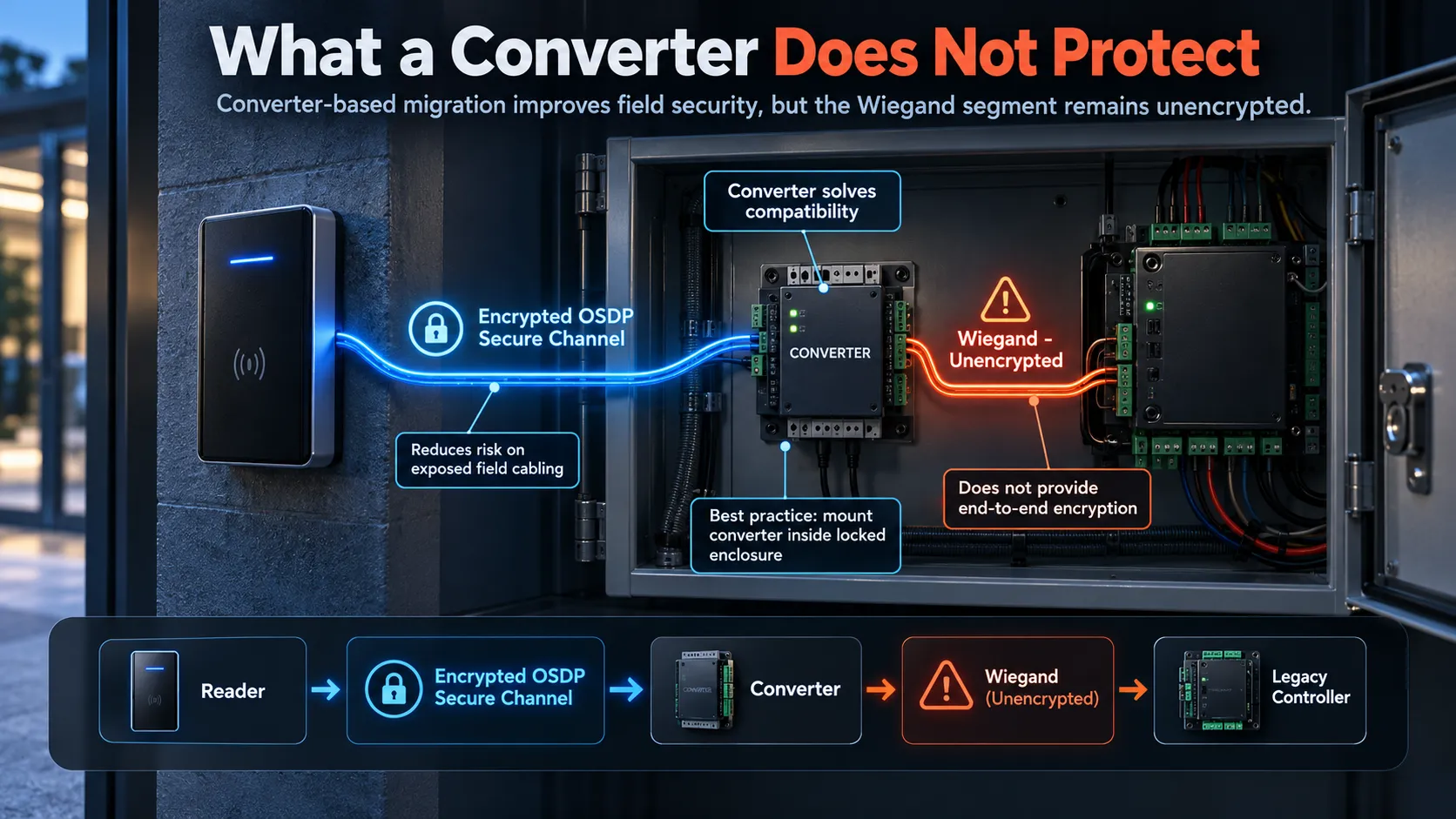
This setup significantly reduces risk on vulnerable field cables while letting you keep existing controller hardware. Down the line, when it’s time to upgrade panels, you can transition smoothly to a fully native OSDP reader-to-controller path. For most organizations, a phased rollout like this makes much more operational and financial sense than ripping out an entire system just to replace a single protocol.
A Reader Upgrade Decision Table
Here is an OSDP vs Wiegand comparison of key security features, wiring needs and upgrade paths across Wiegand, native OSDP and converter-based setups.
| Requirement | Wiegand | Native OSDP Secure Channel | OSDP Reader + Converter |
|---|---|---|---|
| Basic credential transmission | Yes | Yes | Yes |
| Encrypted reader communication | No | Yes, when Secure Channel is enabled | Yes between reader and converter |
| Two-way communication | No | Yes | Only on the OSDP side |
| Reader supervision | Limited/no protocol supervision | Yes | Reader-to-converter portion |
| RS-485 cabling | No | Yes | Reader-to-converter portion |
| Existing Wiegand controller reuse | Yes | Only if controller supports OSDP too | Yes |
| Best fit | Legacy or low-risk existing systems | New and high-security installations | Phased migration |
| Long-term upgrade path | Limited | Strong | Transitional |
If you are starting completely fresh with a new access control system, going with native OSDP hardware that supports Secure Channel is easily your best bet. However, if you are upgrading an existing facility, your best approach might look a bit different.
Start by taking a clear inventory of what you already have. Check which doors are using Wiegand readers, see what controllers are behind them and inspect your existing wiring runs. Most importantly, figure out which locations pose the biggest risk if a reader line is intercepted or tampered with.
From there, decide what makes sense to tackle right away. A phased rollout often works best: start by swapping out exposed external readers, use OSDP-to-Wiegand converters at your current control panels and then update the controllers themselves down the road during your next major infrastructure refresh.
For any system integrator, the key isn’t just picking a reader; it’s understanding how the readers, credentials, protocols, controllers and wiring all work together before cutting a single wire.
The final OSDP vs Wiegand decision should account for risk, existing hardware and long-term maintenance. Wiegand is familiar, widely deployed and still functional. But modern security isn’t just about whether your keycards are hard to clone. The communication cable connecting your hardware matters just as much.
Even the most secure credential loses its value if its data is sent down the wire completely unencrypted.