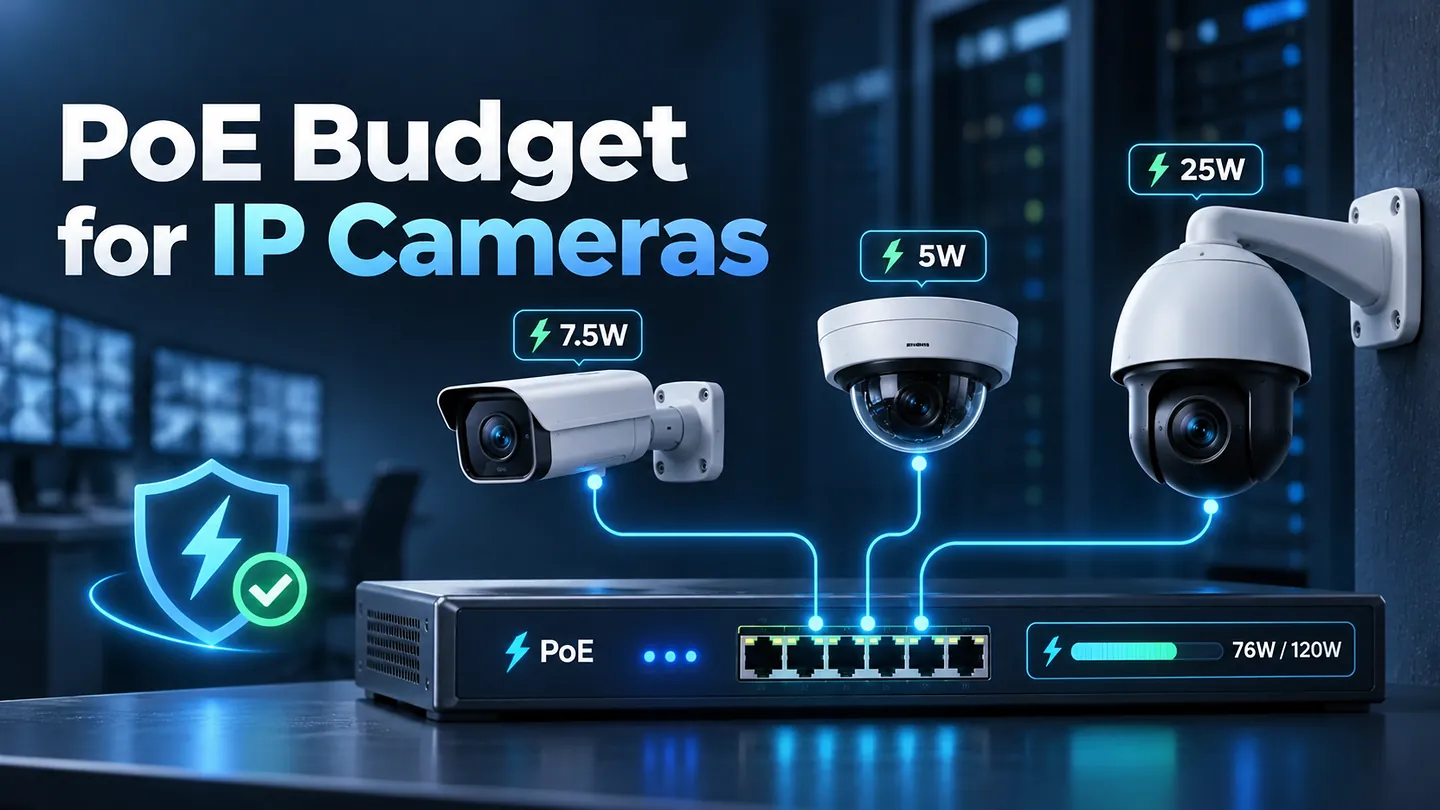
An IP camera might show up fine on your network and work with your NVR, but still not get enough power. And you might not even notice right away.
Everything runs smoothly during the day, but as soon as night falls and the IR LEDs kick in, the camera reboots. A PTZ camera might work fine until you try moving the lens, turning on infrared and zooming in all at once. Or maybe you add four new cameras to an existing PoE switch, only to end up with random dropouts across the setup.
In PoE Budget for IP Cameras troubleshooting, these problems are often blamed on the camera or network. Often, though, it comes down to something much simpler: you’ve pushed past your PoE power budget.
Power over Ethernet makes installations a breeze since a single Ethernet cable handles both data and power. However, every PoE switch, NVR and injector has its limits. Just because a switch has 16 ports doesn’t mean it can deliver full power to all 16 at the same time. That distinction really matters as systems evolve beyond basic fixed cameras to feature high-res video, long-range IR, heaters, PTZ motors and edge processing.
For D3 customers and system integrators across Dubai or even Riyadh and the wider GCC, PoE Budget for IP Cameras planning should therefore happen alongside camera selection, bandwidth and storage planning not after installation.
A solid surveillance setup needs more than just enough network bandwidth. It also needs enough power delivered to every single camera, even under heavy peak demand.
What a PoE Budget Means
Simply put, a PoE Budget for IP Cameras is the total amount of electrical power a switch or NVR can dish out across all connected devices. Take an eight-port PoE NVR, for instance. Even if each individual port is rated for up to 30W, that doesn’t guarantee the recorder can handle:
8 × 30W = 240W
all at the same time. In reality, the unit might cap out at a total power budget of 70W, 120W or somewhere in between.
This is visible in real surveillance equipment. One Tiandy eight-port PoE NVR provides up to 30W per port while having a total PoE budget of 70W. Another Tiandy eight-port model provides the same 30W maximum per port but a larger 120W total budget. The difference is critical.
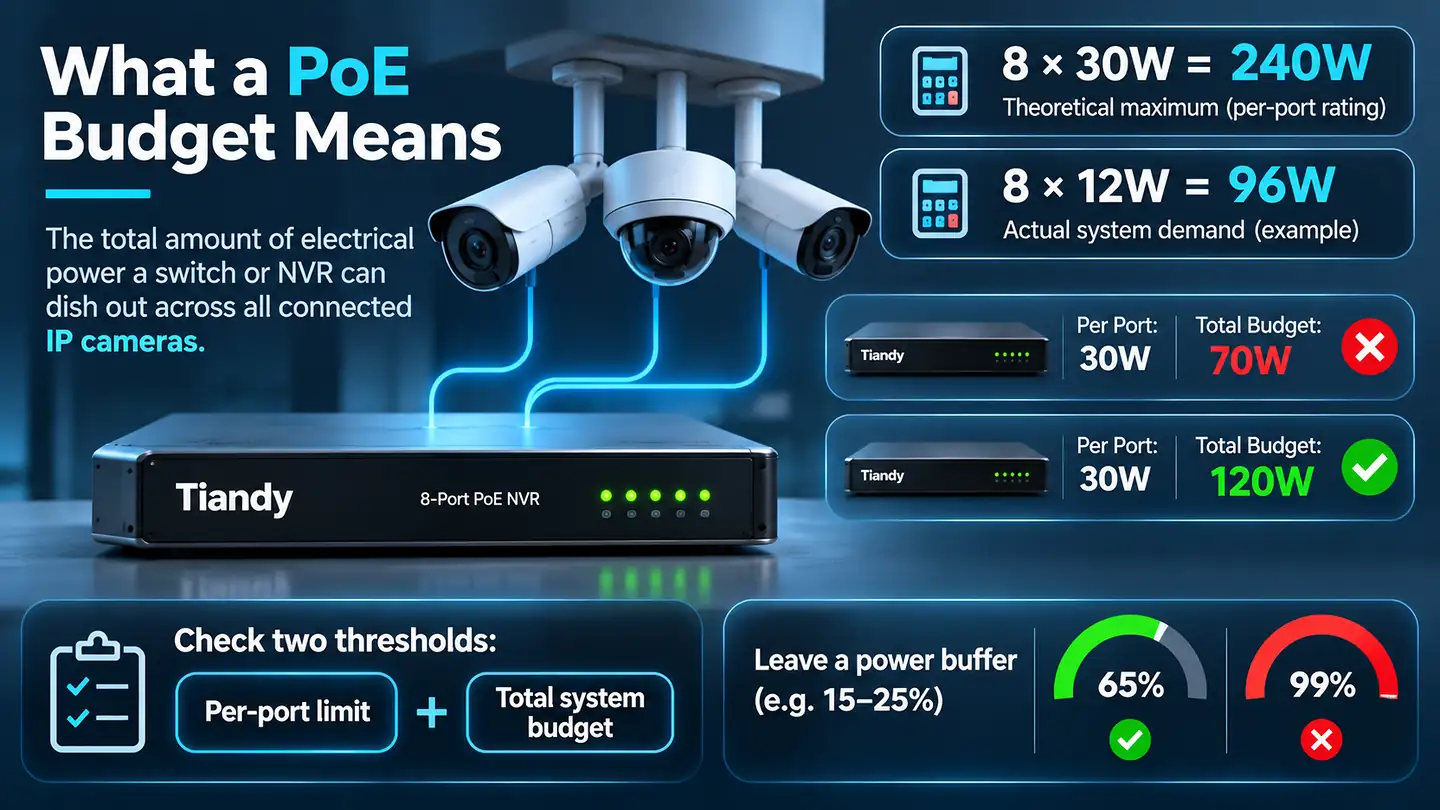
Say you hook up eight cameras that hit 12W each at peak operation. On paper, your system needs:
8 × 12W = 96W
The 120W NVR will handle this without breaking a sweat. The 70W model, on the other hand, will fall short even though no single camera exceeds the 30W port rating. That’s why every PoE setup requires checking two separate thresholds:
Per-port limit
and
Total system budget
You need to pass both.
The available PoE Budget for IP Cameras should also not automatically be treated as capacity that should be consumed to 100%. A good design leaves a comfortable buffer for power spikes, cold starts, night-time IR, firmware updates and future equipment additions. A switch running comfortably at 65% of its available PoE power is a different design from one operating continuously at 99%.
Camera Power Needs: IR, Heaters and PTZ
When calculating a PoE Budget for IP Cameras, remember that a camera’s power draw isn’t set in stone. A standard fixed camera might sip minimal power during bright daylight hours. When night falls, its infrared LEDs kick on. And power consumption shoots up right away. Motorized varifocal lenses pull extra juice whenever they adjust zoom or focus. PTZ cameras rely on motors to drive pan, tilt and optical zoom movements.
High-end PTZ models often come packed with extra features like:
- High-power IR illuminators
- Laser illumination
- Built-in heaters
- Defogging functions
- Wipers
- Speakers
- Advanced processors
This can create a large difference between typical power and maximum power.
For example, a high-performance Tiandy PTZ model advertises a typical draw around 45W, but it can peak at 76W requiring IEEE 802.3bt PoE++ support. Another panoramic PTZ model drops to around 29W with IR off, but climbs to 55W with IR enabled. That’s exactly why testing system draw solely during daytime setup can bite you later.
Imagine installing ten cameras that each appear to consume 6W during daylight. An installer might quickly tally up:
10 × 6W = 60W
and install a standard 70W PoE system.
When the sun sets, each camera fires up its IR emitters and jumps to 9W. Now the real demand hits:
10 × 9W = 90W
And suddenly the entire system is starved of power.
For outdoor installations, heaters can create the same issue. A camera may normally operate comfortably until colder conditions activate its heating system. To play it safe, always base your PoE calculations on the camera’s maximum rated power, rather than whatever reading you get on day one.
PoE Standards and Power at the Device
Here’s the thing: when evaluating a PoE Budget for IP Cameras, not all PoE ports give you the same amount of actual, usable power. When it comes to modern Ethernet power, three main standards run the show:
IEEE 802.3af — PoE
IEEE 802.3at — PoE+
IEEE 802.3bt — PoE++
The difference is not simply naming. They directly dictate how much juice your power source can push out and how much your camera can actually draw.
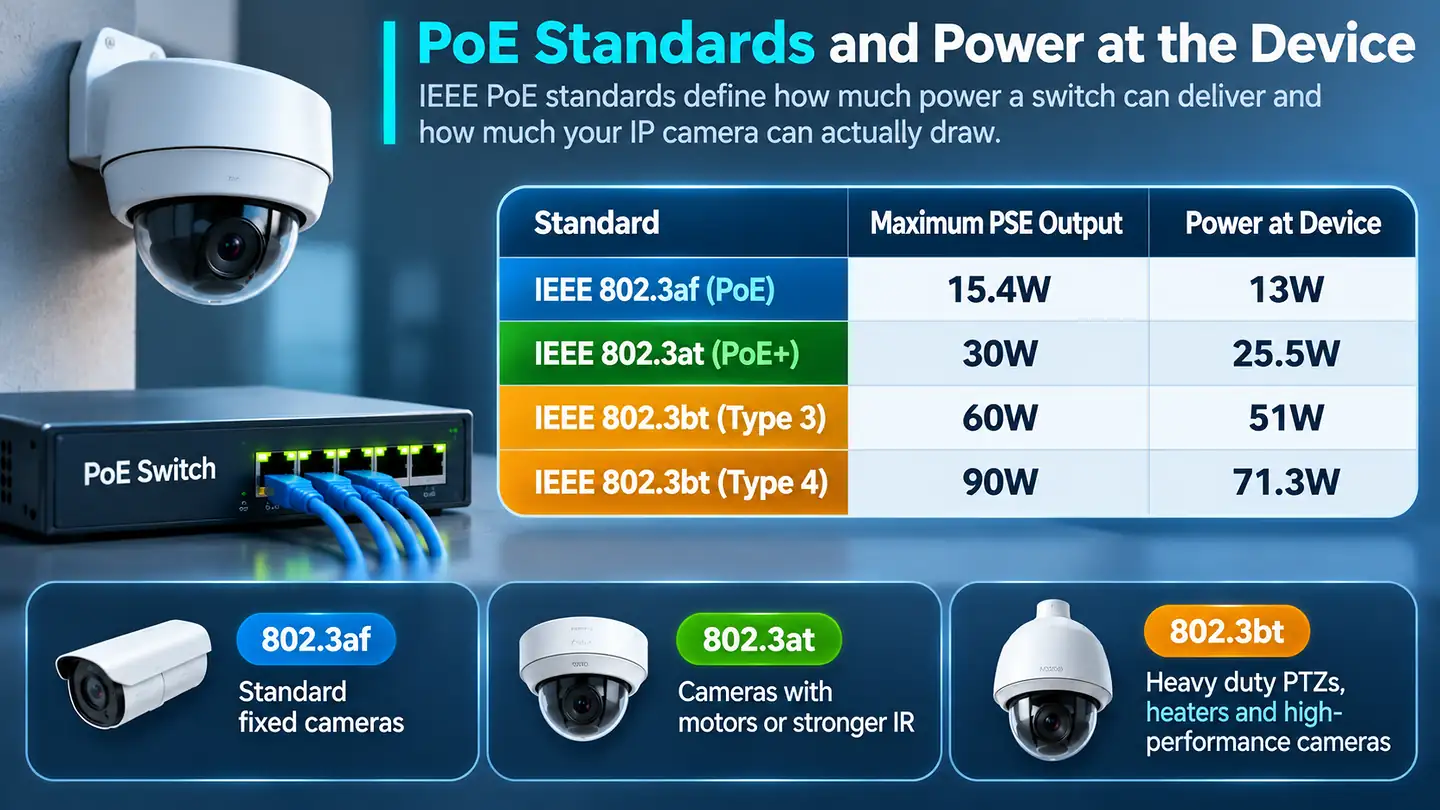
According to the Ethernet Alliance’s overview of IEEE PoE standards, the major classes provide approximately:
| Standard | Maximum PSE Output | Power Available at Device |
|---|---|---|
| IEEE 802.3af / Type 1 | 15.4W | 13W |
| IEEE 802.3at / Type 2 | 30W | 25.5W |
| IEEE 802.3bt / Type 3 | 60W | 51W |
| IEEE 802.3bt / Type 4 | 90W | 71.3W |
So why does the camera end up with less power than the switch outputs? Simply put, some energy gets lost as heat while traveling down the Ethernet cable.
That distinction is important. If a camera demands 25W at the device end, picking a switch rated for 25W per port won’t cut it. You have to pick a PoE class that accounts for cable loss along the way.
IEEE 802.3bt boosted power capacity by using all four twisted pairs in the cable. As the Ethernet Alliance highlights, Type 4 can supply up to 90W from the source, delivering roughly 71.3W right at the camera.
In practical surveillance terms, here’s how it plays out:
- Standard fixed cameras usually get by fine on basic 802.3af.
- Cameras with motors, stronger IR lights or extra feature sets generally need 802.3at.
- Heavy duty PTZs, built-in heaters and high-performance hardware will likely demand 802.3bt.
Always double-check the exact camera model specs rather than relying on the general product line.
How to Calculate a Switch Power Budget
Calculating a PoE Budget for IP Cameras is straightforward:
Required PoE Budget = Sum of Maximum Camera Power Requirements
Let’s say your site setup includes:
- 8 fixed cameras at 8W maximum each
- 4 motorized cameras at 14W each
- 2 PTZ cameras at 25W each
Here’s how the math breaks down:
8 × 8W = 64W
4 × 14W = 56W
2 × 25W = 50W
Total:
170W
For this PoE Budget for IP Cameras example, that tells you a 150W PoE switch won’t cut it. Now, a 200W switch can handle the load on paper, but it only leaves you with 30W of breathing room.
Whether that’s sufficient really depends on your overall design plan and if you expect to add more gear later. You’ll also want to double-check the limits on each individual port.
If the switch supports 30W per port but one PTZ requires 55W, a large overall switch budget does not solve the problem. That camera is still going to need a high-power PoE++ port or a dedicated power supply to run properly.
To keep things clear during design, it helps to map everything out in a simple cheat sheet:
| Camera | Quantity | Max Power | Total |
|---|---|---|---|
| Fixed camera | 8 | 8W | 64W |
| Motorized camera | 4 | 14W | 56W |
| PTZ | 2 | 25W | 50W |
| Total | 14 | 170W |
Once you have your numbers, compare the:
170W required
against
available PoE budget
and make sure the port specs align with any high-draw cameras in your system.
Running through this quick check will save you from a lot of headaches down the road.
Allowing for Startup Peaks and Growth
When setting a PoE Budget for IP Cameras, planning strictly around today’s peak power numbers won’t leave you any wiggle room later on.
Imagine your switch delivers 200W and your current setup needs 192W right out of the box. It works. But you’re pretty much trapped if you ever need to handle things like:
- Startup variation
- Additional IR load
- Device replacement
- Higher-powered cameras
- Expansion
- New peripherals
A far more reliable strategy is to build in a comfortable buffer from day one.
While exact needs vary across projects, keeping a 15–25% power reserve is a solid rule of thumb so you aren’t maxing out your hardware straight away. So if your calculated load comes out to 170W, adding a 20% safety margin brings your target to:
170W × 1.20 = 204W
That immediately tells the designer that a 200W switch is still slightly tight. Stepping up to a 240W or larger unit gives your system much healthier breathing room. It’s also worth thinking ahead about future upgrades. If you buy a 24-port switch but only plug in 16 cameras at first, ask yourself:
What happens when the remaining eight cameras are installed?
People fall into this trap all the time. It’s easy to save open ports, but completely forget to reserve the wattage needed to power them. Having eight unused ports won’t help much if your power budget is already completely tapped out. Always plan for extra ports and extra watts together.
Warning Signs of Underpowered Cameras
Problems with a PoE Budget for IP Cameras aren’t always glaringly obvious right off the bat. It’s not as simple as a camera just failing to turn on altogether.
Instead, you’ll usually run into warning signs like these:
The camera keeps restarting at night.
When night falls and the IR lights switch on, the power draw spikes past what the system can actually supply.
PTZ cameras act glitchy when moving.
Panning, tilting, zooming or firing up extra lighting creates a sudden jump in power demand.
Cameras drop connections over and over.
Infrared night vision looks weak or refuses to turn on.
Cameras work fine on their own, but start failing once everything is plugged in.
PoE overload warnings start popping up on your switch or recorder.
Certain Tiandy PoE recorders, for example, will flag PoE overload and voltage alerts right in their system logs, making it much easier to spot these issues. Another red flag is when a system suddenly misbehaves after an expansion. Everything worked for months. Then you add four more cameras to the setup. Suddenly several older cameras became unreliable.
The new hardware might be completely fine; the switch has just tipped over its maximum power budget. When troubleshooting, run through this list first:
- Port PoE status
- Device class
- Current power draw
- Maximum rated consumption
- Total switch allocation
- Night-time behaviour
- Cable length
- Connector quality
Don’t rush to replace the camera right away. Double-check that it’s actually getting the power it needs to run reliably.
PoE Budget Example for a Camera Site
Let’s walk through a real-world PoE Budget for IP Cameras example: a commercial surveillance setup with 20 cameras.
Here is the breakdown of what the system includes:
12 fixed cameras
Maximum 7W each
4 motorized varifocal cameras
Maximum 13W each
2 IR bullet cameras
Maximum 16W each
2 PTZ cameras
Maximum 25W each
Now, let’s tally up the power needed for each group:
Fixed:
12 × 7W = 84W
Motorized:
4 × 13W = 52W
IR bullet:
2 × 16W = 32W
PTZ:
2 × 25W = 50W
Total maximum demand:
84 + 52 + 32 + 50 = 218W
Next, factor in a 20% safety cushion:
218 × 1.20 = 261.6W
That puts our practical power target right around:
262W or more
A 24-port switch with a 250W budget would be technically close but below the design target. Opting for a switch that delivers around 300W gives the system plenty of headroom to breathe. From there, take a close look at the individual switch ports. If no single camera draws more than 25.5W at the device end, standard IEEE 802.3at ports will do the job.
However, if you plan to upgrade to a heavier PTZ that pulls 55W down the line, you’ll need at least one 802.3bt-capable port available. This shows exactly why simply stating:
“We need a 24-port PoE switch”
doesn’t tell the whole story. What you really need to specify is:
24 ports + the right PoE standard + sufficient overall wattage.
Installation Checklist
Before setting up your IP cameras over PoE, use this PoE Budget for IP Cameras checklist:
1. Record maximum camera power.
Always rely on the datasheet’s maximum power figure instead of typical daytime consumption.
2. Identify the required PoE standard.
Determine whether your camera needs 802.3af, 802.3at or 802.3bt.
3. Check each switch port.
Ensure that the specific port can deliver the wattage your camera requires.
4. Calculate total camera consumption.
Add all connected devices at maximum rated power.
5. Compare against the switch budget.
Do not confuse total PoE budget with per-port rating.
6. Leave headroom.
Avoid operating continuously at the maximum available wattage.
7. Plan future cameras.
Set aside enough power capacity along with your available physical ports.
8. Consider IR and heaters.
Keep in mind that night operations and cold weather will increase power draw.
9. Check PTZ requirements carefully.
Large PTZs may require PoE++.
10. Review cable distance.
Standard IEEE PoE accounts for power loss over standard network runs up to roughly 100 meters.
11. Use quality cabling.
Conductor resistance affects voltage drop and heating.
12. Test nighttime operation.
Make sure IR-heavy conditions do not create overloads.
13. Move PTZ cameras during testing.
Test pan, tilt, zoom and illumination together.
14. Monitor PoE statistics.
Check real-time operating data from your managed switches or PoE NVRs.
15. Document the final allocation.
Keep a record of power usage so future technicians know what’s available and consumed.
D3’s Tiandy surveillance portfolio supports smart camera and video surveillance projects throughout the GCC. D3, also a Paxton Distributor, works closely with partners to ensure every detail of the setup from cameras and NVRs to switching, power, network layout and storage is built for complete reliability. Proper PoE Budget for IP Cameras planning might seem like a small detail in the big picture. Until it is wrong. When it does, it can compromise every single camera drawing power from that source.
At the end of the day, the core takeaway is straightforward:
Count watts, not just ports.
For a reliable PoE Budget for IP Cameras, having enough physical ports on a PoE switch is only half the battle it needs to deliver enough raw power to keep every connected camera running smoothly, even during peak operational demand.